<?xml version="1.0" encoding="utf-8"?><feed xmlns="http://www.w3.org/2005/Atom" ><generator uri="https://jekyllrb.com/" version="4.4.1">Jekyll</generator><link href="https://sherlockliu.co.uk/feed.xml" rel="self" type="application/atom+xml" /><link href="https://sherlockliu.co.uk/" rel="alternate" type="text/html" /><updated>2026-05-04T20:19:06+01:00</updated><id>https://sherlockliu.co.uk/feed.xml</id><title type="html">SherlockLiu</title><subtitle>Notes on engineering, management, and life from a minimal perspective.</subtitle><author><name>SherlockLiu</name></author><entry><title type="html">Build Your Own Agent Harness: The Practical Blueprint (Part 12)</title><link href="https://sherlockliu.co.uk/engineering/architecture/2026/04/25/build-your-own-agent-harness-blueprint-part-12.html" rel="alternate" type="text/html" title="Build Your Own Agent Harness: The Practical Blueprint (Part 12)" /><published>2026-04-25T00:00:00+01:00</published><updated>2026-04-25T00:00:00+01:00</updated><id>https://sherlockliu.co.uk/engineering/architecture/2026/04/25/build-your-own-agent-harness-blueprint-part-12</id><content type="html" xml:base="https://sherlockliu.co.uk/engineering/architecture/2026/04/25/build-your-own-agent-harness-blueprint-part-12.html"><![CDATA[<p><em>Series: The Agent Harness — Part 12 of 12</em></p>

<hr />

<p>Eleven posts. Eleven components. Hundreds of design decisions, naming patterns, anti-patterns, and checklists.</p>

<p>This final post is not a recap. It’s a synthesis — the kind you can actually use to make a decision and start building. We’ll answer three questions in order:</p>

<ol>
  <li>Do you actually need an agent harness?</li>
  <li>Should you build one, or use a platform?</li>
  <li>If you build, what are the principles worth stealing from Claude Code?</li>
</ol>

<p>Then we’ll point you at a practical kit to start right.</p>

<hr />

<h2 id="question-1-do-you-actually-need-a-harness">Question 1: Do You Actually Need a Harness?</h2>

<p>Most LLM use cases don’t need one. The wrong answer here costs months.</p>

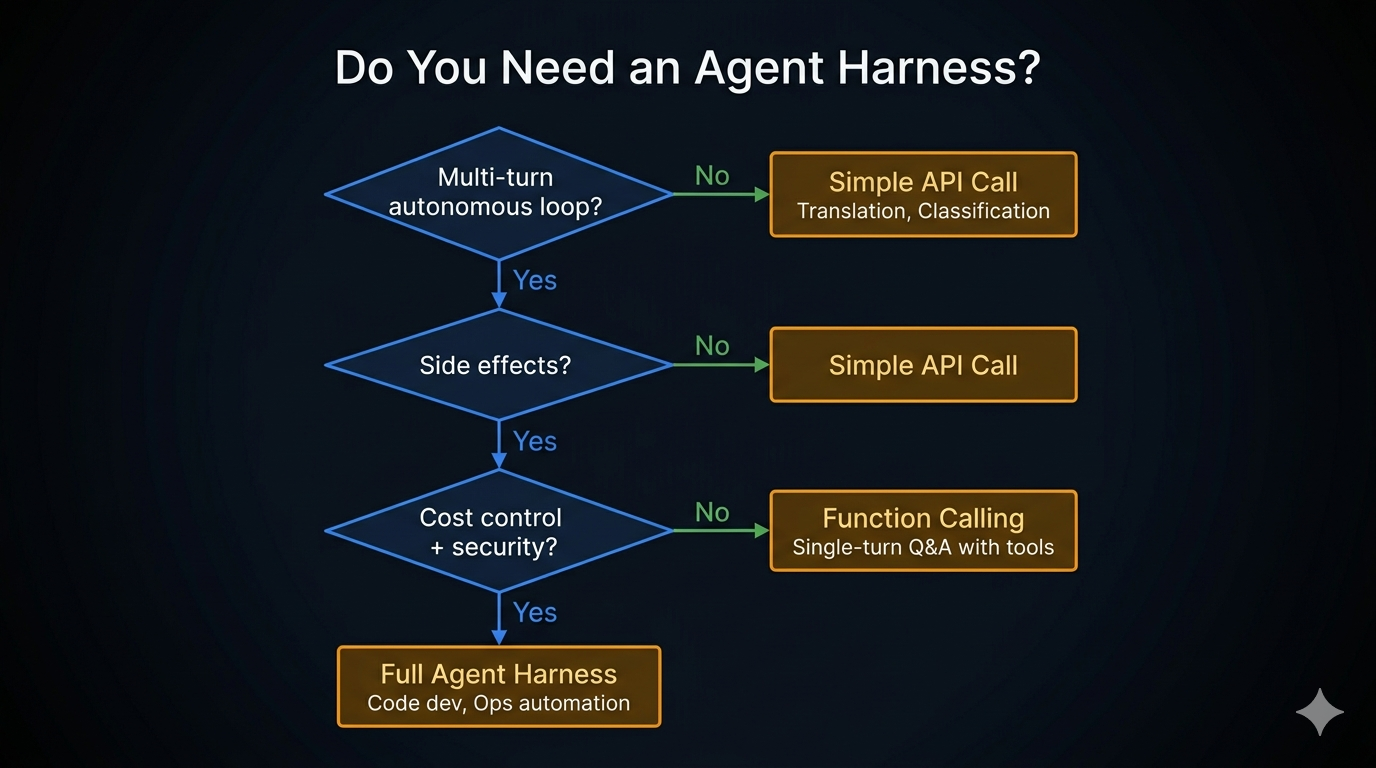
<p>The decision lives in three questions, applied in order:</p>

<div class="language-plaintext highlighter-rouge"><div class="highlight"><pre class="highlight"><code>Does the agent need to act on intermediate results?
  No  → Simple API call. Stop here.
  Yes ↓

Does it involve side effects (files, commands, network)?
  No  → Simple API call. Stop here.
  Yes ↓

Does it need cost control, security, or multi-turn state?
  No  → Function Calling (single-turn tool use)
  Yes → Agent Harness
</code></pre></div></div>

<p>The rule of thumb: if your system needs the LLM to perform “observe → think → act → observe again,” you need a harness. If it’s “input → output,” you don’t.</p>

<p><img src="/assets/images/posts/2026-04-25-build-your-own-agent-harness-blueprint-part-12/Decision Flowchart.jpeg" alt="Decision Flowchart" /></p>

<table>
  <thead>
    <tr>
      <th>Use case</th>
      <th>Right choice</th>
    </tr>
  </thead>
  <tbody>
    <tr>
      <td>Translation, summarization, classification</td>
      <td>Simple API call</td>
    </tr>
    <tr>
      <td>Single-turn Q&amp;A with one or two tool calls</td>
      <td>Function Calling</td>
    </tr>
    <tr>
      <td>Code editing, ops automation, research loops</td>
      <td>Agent Harness</td>
    </tr>
  </tbody>
</table>

<p>If you are building a harness when a simple API call would do, you are not being more sophisticated — you are creating maintenance overhead for no benefit.</p>

<hr />

<h2 id="question-2-build-your-own-or-use-a-platform">Question 2: Build Your Own or Use a Platform?</h2>

<p>Assuming you need a harness, the next honest question is whether to build one or adopt a framework like LangGraph, CrewAI, AutoGen, or a hosted platform like Vertex AI Agents or Bedrock Agents.</p>

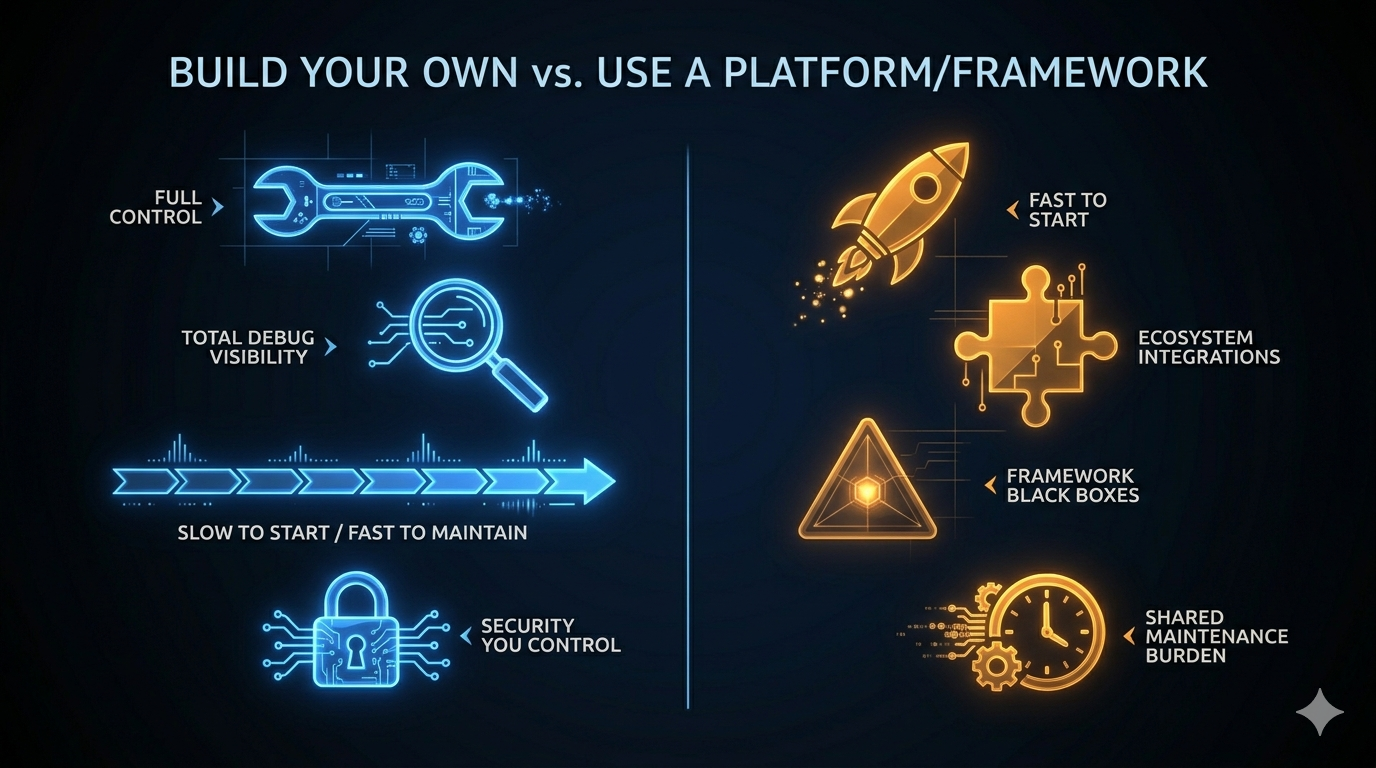
<p>The common framing is “build vs. buy.” The more useful framing is: <strong>at what point does custom beat framework?</strong></p>

<p><img src="/assets/images/posts/2026-04-25-build-your-own-agent-harness-blueprint-part-12/Build vs Platform Trade-offs.jpeg" alt="Build vs Platform Trade-offs" /></p>

<table>
  <thead>
    <tr>
      <th>Dimension</th>
      <th>Build Your Own</th>
      <th>Platform / Framework</th>
    </tr>
  </thead>
  <tbody>
    <tr>
      <td>Initial velocity</td>
      <td>Slow (you build everything)</td>
      <td>Fast (components exist)</td>
    </tr>
    <tr>
      <td>Customization ceiling</td>
      <td>None</td>
      <td>Framework abstractions</td>
    </tr>
    <tr>
      <td>Debug visibility</td>
      <td>Total (you wrote it)</td>
      <td>Partial (black boxes)</td>
    </tr>
    <tr>
      <td>Maintenance burden</td>
      <td>Yours alone</td>
      <td>Shared with community</td>
    </tr>
    <tr>
      <td>Architecture fit</td>
      <td>Exact</td>
      <td>Approximate</td>
    </tr>
    <tr>
      <td>Security control</td>
      <td>Full</td>
      <td>Depends on the framework</td>
    </tr>
    <tr>
      <td>Upgrade path</td>
      <td>You decide when to change</td>
      <td>Framework release schedule</td>
    </tr>
  </tbody>
</table>

<p>The honest answer most teams don’t want to hear: <strong>frameworks win at the start; custom wins at scale.</strong></p>

<p>Use a framework for:</p>
<ul>
  <li>Proof of concept and early validation</li>
  <li>Teams without dedicated infrastructure engineers</li>
  <li>Domains where the framework’s built-in tool integrations cover most of your needs</li>
</ul>

<p>Build your own for:</p>
<ul>
  <li>Production systems where you need full visibility into every permission check</li>
  <li>Use cases where the framework’s abstraction layer creates problems faster than it solves them</li>
  <li>Teams that have hit the ceiling of a framework and are spending more time working around it than using it</li>
</ul>

<p>Claude Code is a useful data point here. Anthropic chose to build everything from scratch — no framework dependency, no abstraction tax, no upgrade path to manage. The result is a system where every component is designed exactly for the problem it solves. The tradeoff is that they own every bug and every maintenance burden.</p>

<p>For most teams, the right path is: <strong>start with a framework, migrate custom components as you hit the ceiling.</strong> The ceiling usually shows up in permission control, context management, or debugging production failures.</p>

<hr />

<h2 id="question-3-what-to-steal-from-claude-code">Question 3: What to Steal from Claude Code</h2>

<p>If you’ve read this series, you’ve spent eleven posts inside Claude Code’s architecture. The most valuable output isn’t the code — it’s the design decisions that kept recurring across unrelated components.</p>

<p>These aren’t Claude Code-specific. They’re the engineering discipline that makes any autonomous agent production-ready.</p>

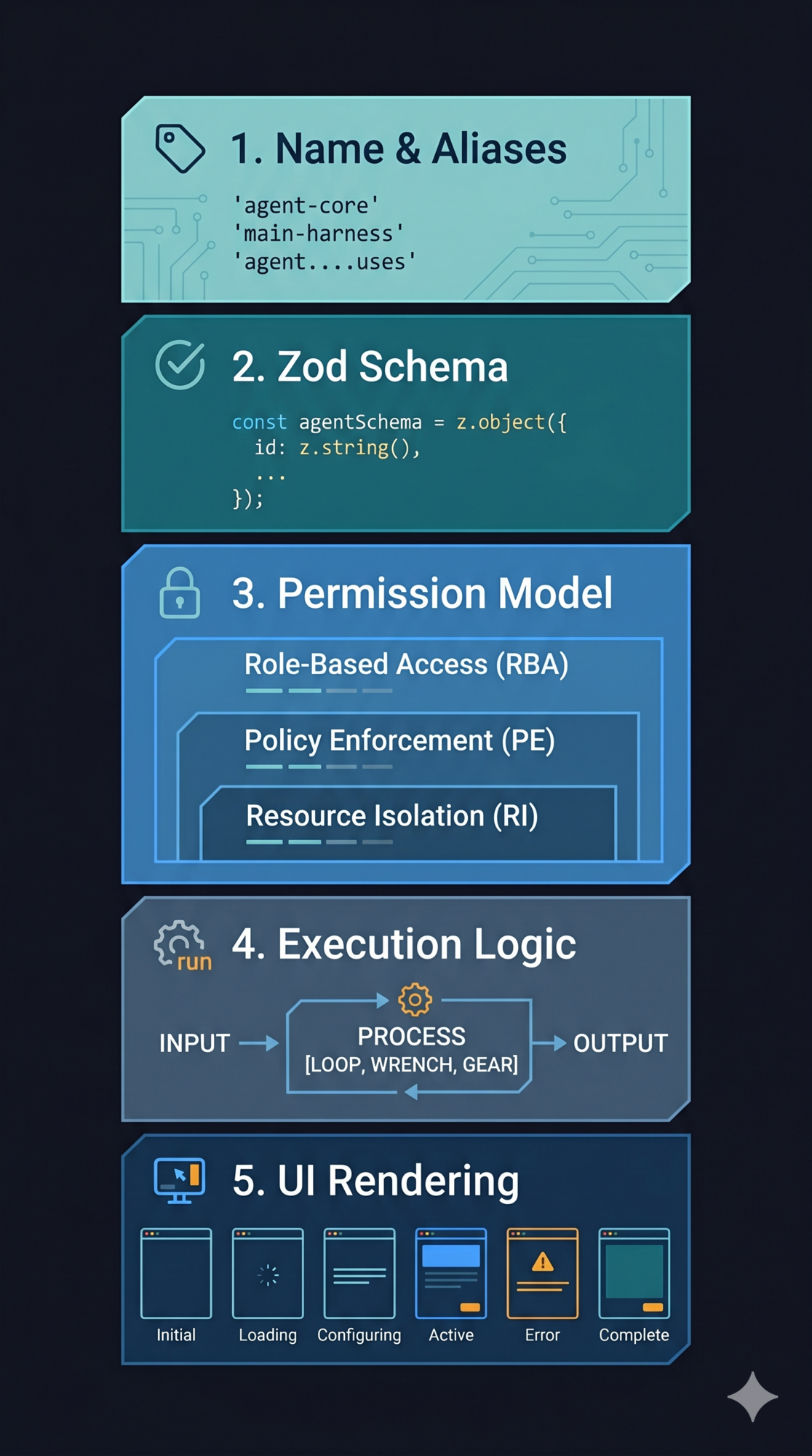
<p><img src="/assets/images/posts/2026-04-25-build-your-own-agent-harness-blueprint-part-12/Twelve Lessons Visual.jpeg" alt="Twelve Lessons Visual" /></p>

<h3 id="1-loops-over-recursion">1. Loops over recursion</h3>

<p>Every component in Claude Code that could have been recursive is iterative. The agent’s core is <code class="language-plaintext highlighter-rouge">while(true)</code>, not a call stack.</p>

<p>Why it matters: you cannot abort a recursive turn mid-flight. State recovery requires unwinding a stack. In-flight inspection becomes frame tracing. The loop gives you a natural checkpoint every iteration — a place to read state, apply compression, check abort signals, and write new state atomically.</p>

<p><em>Covered in <a href="/engineering/architecture/2026/04/05/the-dialog-loop-agent-heartbeat-part-2.html">Part 2</a>.</em></p>

<h3 id="2-schema-driven-not-hard-coded">2. Schema-driven, not hard-coded</h3>

<p>Validation logic, permission checking, and model documentation all derive from the same Zod schema. One definition — no drift.</p>

<p>The discipline: never maintain separate schemas for validation and documentation. They will diverge. When they do, the model starts hallucinating input formats. The schema is the single source of truth or it’s not the source of truth at all.</p>

<p><em>Covered in <a href="/engineering/architecture/2026/04/07/the-tool-system-how-agents-act-part-3.html">Part 3</a>.</em></p>

<h3 id="3-progressive-permissions-with-a-clear-winner">3. Progressive permissions with a clear winner</h3>

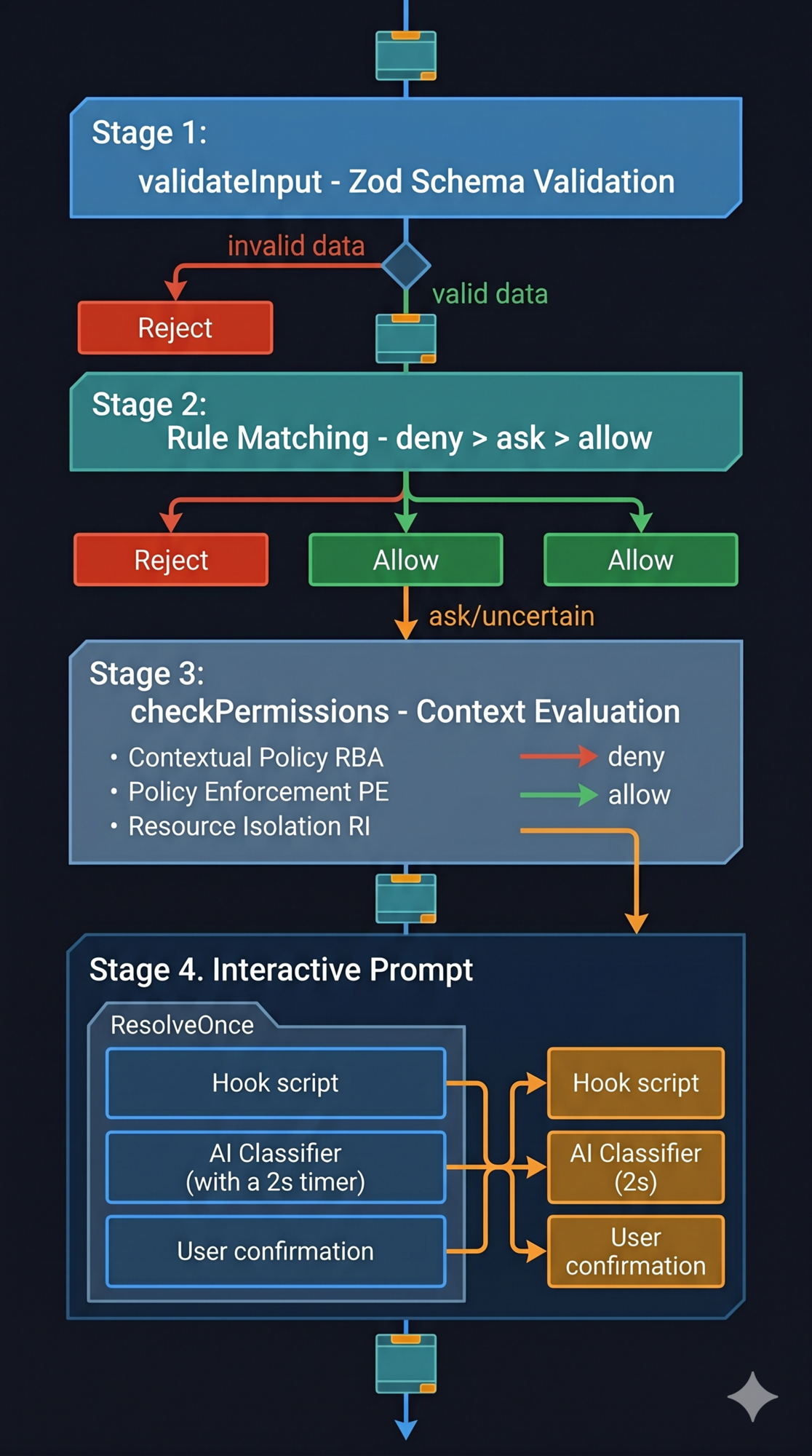
<p>Four stages, in order. Each stage can short-circuit. And the rule that never bends: <strong>deny always wins over allow, regardless of source or order.</strong></p>

<p>Fail-safe, not fail-stop: invalid input routes to “ask the user,” not a crash. The system stays safe even when something unexpected happens.</p>

<p><em>Covered in <a href="/engineering/architecture/2026/04/09/the-permission-pipeline-agent-safety-part-4.html">Part 4</a>.</em></p>

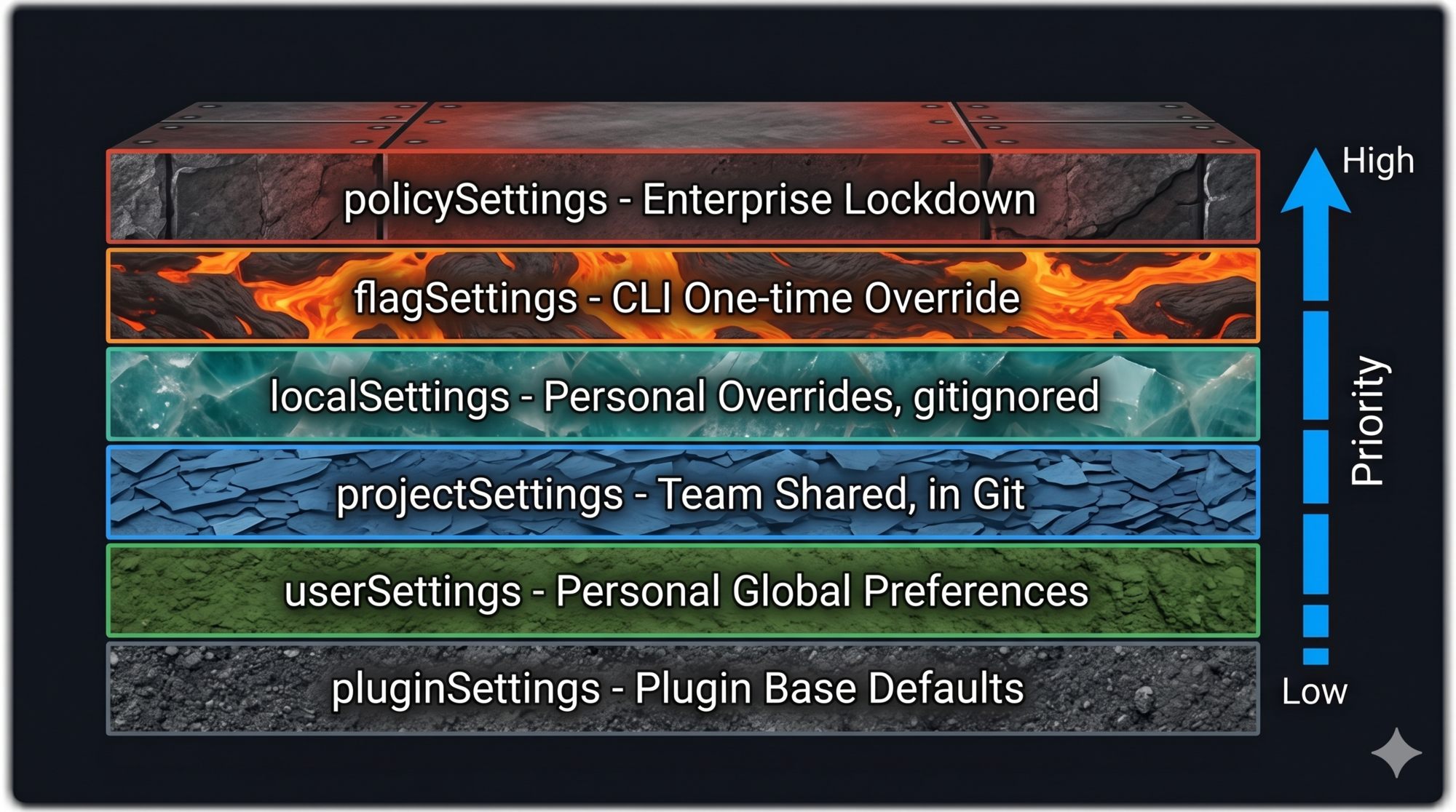
<h3 id="4-layered-config-with-defined-merge-semantics">4. Layered config with defined merge semantics</h3>

<p>Six layers, ascending priority. The nuance that makes it work: <strong>arrays concatenate and deduplicate across layers</strong> (allow-lists, hook lists, permissions); <strong>scalars shadow</strong> (model, temperature, timeout).</p>

<p>The failure mode when you skip this: team settings stomp user preferences, or personal machine paths leak into shared config. Both erode trust fast.</p>

<p><em>Covered in <a href="/engineering/architecture/2026/04/11/configuration-as-architecture-settings-part-5.html">Part 5</a>.</em></p>

<h3 id="5-memory-is-a-clue-not-a-conclusion">5. Memory is a clue, not a conclusion</h3>

<p>Store only what cannot be derived from current project state at runtime. Treat stored memories as signals that warrant verification — not as ground truth.</p>

<p>Trust “why” memories directly (they record decisions). Verify “what” memories against current state (file paths go stale; configurations change). The failure mode of treating memory as fact is an agent that confidently acts on outdated information.</p>

<p><em>Covered in <a href="/engineering/architecture/2026/04/13/the-memory-system-how-agents-remember-part-6.html">Part 6</a>.</em></p>

<h3 id="6-compress-proactively-not-reactively">6. Compress proactively, not reactively</h3>

<p>Context management done wrong waits until overflow, then panics. Done right, it compresses at natural milestones — task boundaries, before a new major phase — while there’s still enough working memory to make intelligent compression decisions.</p>

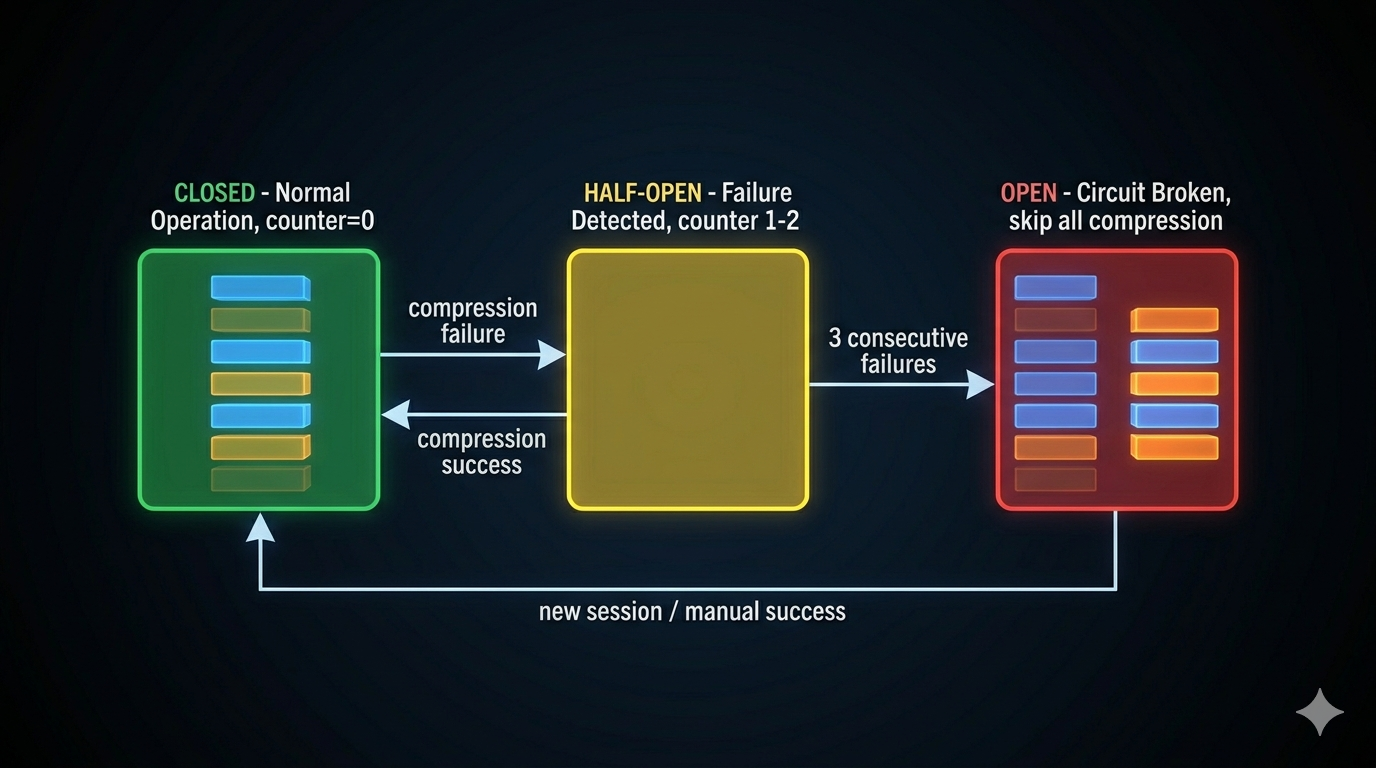
<p>The circuit breaker is non-optional: three consecutive compression failures stop further attempts. Without it, a broken API state generates thousands of wasted calls before the session terminates.</p>

<p><em>Covered in <a href="/engineering/architecture/2026/04/15/context-management-compression-problem-part-7.html">Part 7</a>.</em></p>

<h3 id="7-extension-without-forking">7. Extension without forking</h3>

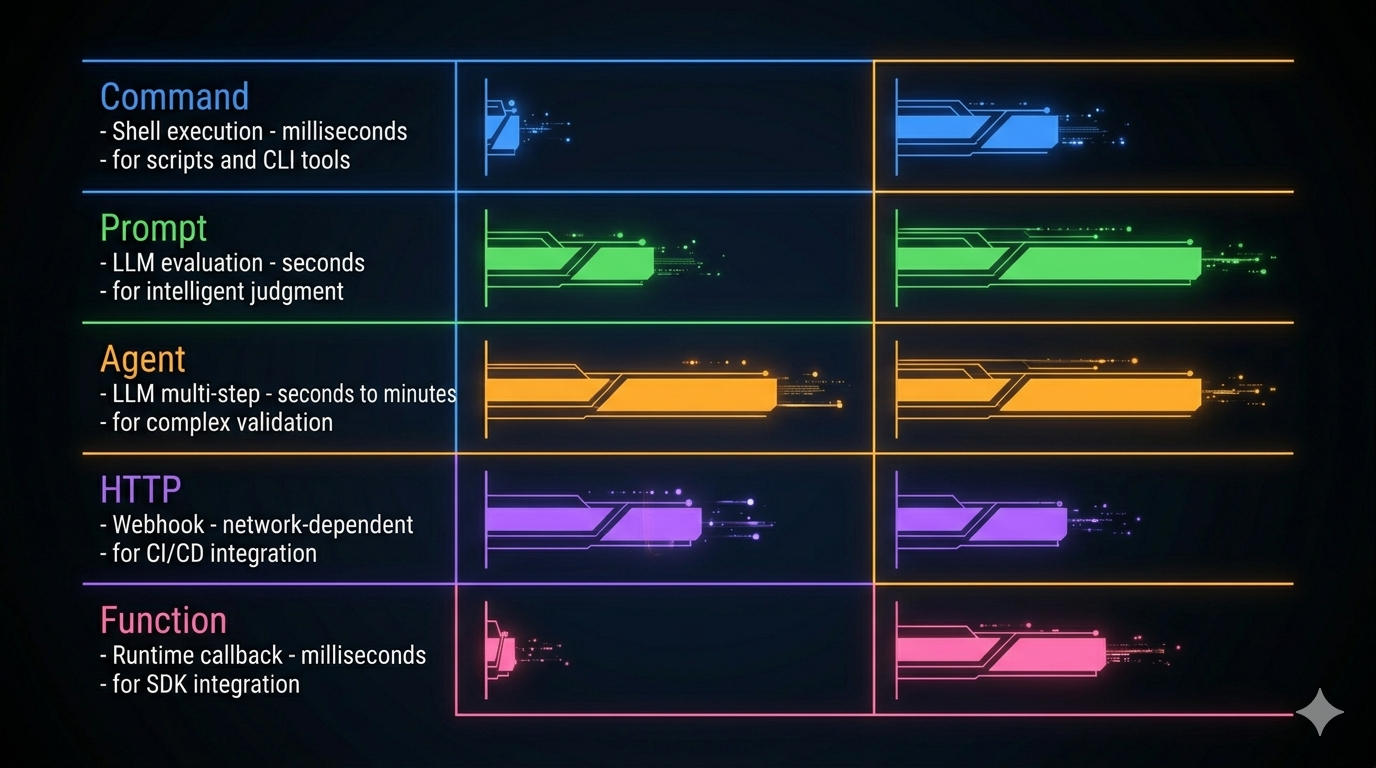
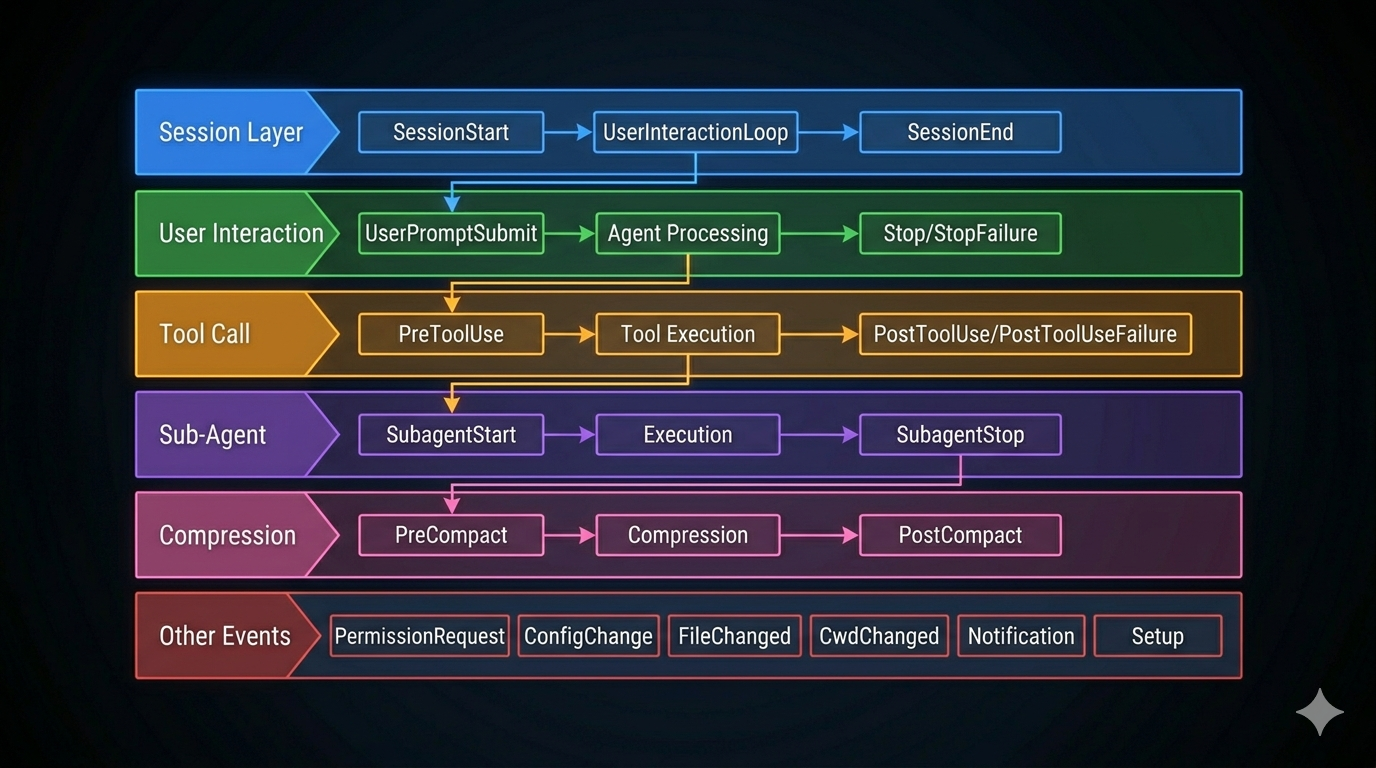
<p>The hook system is how Claude Code lets operators customize behavior across 26+ lifecycle events without modifying core code. The architecture: events fire at known points; hooks subscribe; hooks output structured JSON; both the JSON and the exit code are read.</p>

<p>Start with Command hooks (shell scripts). Reach for Prompt hooks only when script logic is genuinely insufficient. Never use Prompt hooks for decisions a <code class="language-plaintext highlighter-rouge">grep</code> can make.</p>

<p><em>Covered in <a href="/engineering/architecture/2026/04/17/the-hook-system-extension-points-part-8.html">Part 8</a>.</em></p>

<h3 id="8-minimum-necessary-context-and-tools-for-sub-agents">8. Minimum necessary context and tools for sub-agents</h3>

<p>Every sub-agent gets the minimum context and minimum tool set needed for its task. No sub-agent sees the full conversation history. No sub-agent gets write tools if it only needs to read.</p>

<p>The depth limit (≤3 levels) is enforced in code, not by convention. Depth limits enforced by convention are not enforced.</p>

<p><em>Covered in <a href="/engineering/architecture/2026/04/19/subagents-coordinators-skills-multi-agent-part-9.html">Part 9</a>.</em></p>

<h3 id="9-streaming-first-everywhere">9. Streaming first, everywhere</h3>

<p><code class="language-plaintext highlighter-rouge">AsyncGenerator&lt;StreamEvent&gt;</code> from the loop all the way to the UI. Every component is incremental and cancellable.</p>

<p>The failure mode of batching: users see a blank screen for ten seconds, then everything at once. Streaming makes agents feel fast even when they’re doing real work. It also makes them cancellable at any point — which is critical for cost control in production.</p>

<p><em>Covered in <a href="/engineering/architecture/2026/04/21/streaming-architecture-agent-performance-part-10.html">Part 10</a>.</em></p>

<h3 id="10-read-before-you-write">10. Read before you write</h3>

<p>Plan Mode is not a UX suggestion. It’s an enforcement mechanism: write tools are denied at the permission pipeline level during the planning phase. The agent literally cannot act until you approve.</p>

<p>The principle extends to anything with significant blast radius. The cost of exploration is nearly zero. The cost of a wrong first move in a multi-file refactor can be hours of recovery work.</p>

<p><em>Covered in <a href="/engineering/architecture/2026/04/23/plan-mode-think-before-act-part-11.html">Part 11</a>.</em></p>

<hr />

<h2 id="the-smart-way-to-start-the-agent-harness-kit">The Smart Way to Start: The Agent Harness Kit</h2>

<p>Knowing the principles is one thing. Starting a new project from a blank file and applying them correctly is another.</p>

<p>The agent-harness-kit is a portable spec and skill set built directly from this series. It contains:</p>

<ul>
  <li><strong><code class="language-plaintext highlighter-rouge">SPEC.md</code></strong> — Design rules, anti-patterns, and per-component checklists for all 10 components. Load it into any AI coding assistant before designing or building agent infrastructure.</li>
  <li><strong>Skills for Claude Code, Gemini, and Codex</strong> — Pre-configured project instructions that load the spec automatically when you describe an agent design problem.</li>
</ul>

<div class="language-plaintext highlighter-rouge"><div class="highlight"><pre class="highlight"><code>agent-harness-kit/
├── SPEC.md                        Design rules + checklists for 10 components
└── skills/
    ├── claude/
    │   ├── SKILL.md               Claude Code skill (/build-agent)
    │   └── CLAUDE.md              Add to your project's CLAUDE.md
    ├── gemini/
    │   └── GEMINI.md              Drop into project root
    └── codex/
        └── system-prompt.md       Paste as system or project instructions
</code></pre></div></div>

<p>Two workflows it supports:</p>

<p><strong>Starting a new harness:</strong> Describe your agent to the AI — what it does, what tools it needs, what side effects it has. The skill walks you through the six components in dependency order, applying spec rules at each step.</p>

<p><strong>Auditing existing agent code:</strong> Say “audit this codebase against the agent harness spec.” The AI produces a gap report: compliant / partial / missing / anti-pattern for each component. Useful before a production launch or after inheriting someone else’s agent infrastructure.</p>

<p>The kit will be available at <a href="https://github.com/sherlockliu/agent-odyssey/tree/main/agent-harness-kit">github.com/sherlockliu/agent-harness-kit</a>.</p>

<hr />

<h2 id="what-this-series-has-actually-been-about">What This Series Has Actually Been About</h2>

<p>Most agent systems fail at the seams — between the loop and the tool system, between the permission check and the context state, between what the model thinks is true and what’s actually on disk.</p>

<p>Claude Code’s architecture doesn’t prevent those failures by being clever. It prevents them by being <em>deliberate</em>: every boundary is defined, every failure mode is named, every component has a clear contract with every other component.</p>

<p>The twelve posts in this series were an attempt to make that deliberateness legible. Not to produce a new framework, but to show the reasoning behind specific decisions — so you can apply the reasoning to your own system, in your own language, with your own constraints.</p>

<p>LLMs are text generators by default. Agent harnesses are what make them autonomous. The difference is engineering.</p>

<p>Your agent is the goal.</p>

<hr />

<h2 id="references">References</h2>

<p><strong>Series posts</strong></p>
<ul>
  <li><a href="/engineering/architecture/2026/04/03/what-is-an-agent-harness-part-1.html">Part 1: What Is an Agent Harness?</a></li>
  <li><a href="/engineering/architecture/2026/04/05/the-dialog-loop-agent-heartbeat-part-2.html">Part 2: The Dialog Loop</a></li>
  <li><a href="/engineering/architecture/2026/04/07/the-tool-system-how-agents-act-part-3.html">Part 3: The Tool System</a></li>
  <li><a href="/engineering/architecture/2026/04/09/the-permission-pipeline-agent-safety-part-4.html">Part 4: The Permission Pipeline</a></li>
  <li><a href="/engineering/architecture/2026/04/11/configuration-as-architecture-settings-part-5.html">Part 5: Configuration as Architecture</a></li>
  <li><a href="/engineering/architecture/2026/04/13/the-memory-system-how-agents-remember-part-6.html">Part 6: The Memory System</a></li>
  <li><a href="/engineering/architecture/2026/04/15/context-management-compression-problem-part-7.html">Part 7: Context Management</a></li>
  <li><a href="/engineering/architecture/2026/04/17/the-hook-system-extension-points-part-8.html">Part 8: The Hook System</a></li>
  <li><a href="/engineering/architecture/2026/04/19/subagents-coordinators-skills-multi-agent-part-9.html">Part 9: Subagents, Coordinators &amp; Skills</a></li>
  <li><a href="/engineering/architecture/2026/04/21/streaming-architecture-agent-performance-part-10.html">Part 10: Streaming Architecture</a></li>
  <li><a href="/engineering/architecture/2026/04/23/plan-mode-think-before-act-part-11.html">Part 11: Plan Mode</a></li>
</ul>

<p><strong>External references</strong></p>
<ul>
  <li><a href="https://www.anthropic.com/research/building-effective-agents">Building Effective Agents</a> — Anthropic Research</li>
  <li><a href="https://arxiv.org/html/2604.14228v1">Dive into Claude Code: Design Space of AI Agent Systems</a> — arxiv</li>
  <li><a href="https://lilianweng.github.io/posts/2023-06-23-agent/">LLM Powered Autonomous Agents</a> — Lilian Weng</li>
</ul>]]></content><author><name>SherlockLiu</name></author><category term="Engineering" /><category term="Architecture" /><category term="AI" /><category term="AI Agents" /><category term="Claude Code" /><category term="System Design" /><category term="Architecture" /><category term="Agent Harness" /><category term="Blueprint" /><category term="Production" /><category term="Principles" /><summary type="html"><![CDATA[Eleven posts of principles. One post of synthesis. The three questions every builder should answer before writing a line, the twelve design lessons Claude Code taught us, and the practical kit to start right.]]></summary><media:thumbnail xmlns:media="http://search.yahoo.com/mrss/" url="https://sherlockliu.co.uk/assets/images/posts/2026-04-25-build-your-own-agent-harness-blueprint-part-12/hero.jpeg" /><media:content medium="image" url="https://sherlockliu.co.uk/assets/images/posts/2026-04-25-build-your-own-agent-harness-blueprint-part-12/hero.jpeg" xmlns:media="http://search.yahoo.com/mrss/" /></entry><entry><title type="html">Plan Mode: The Architecture of Thinking Before Acting (Part 11)</title><link href="https://sherlockliu.co.uk/engineering/architecture/2026/04/23/plan-mode-think-before-act-part-11.html" rel="alternate" type="text/html" title="Plan Mode: The Architecture of Thinking Before Acting (Part 11)" /><published>2026-04-23T00:00:00+01:00</published><updated>2026-04-23T00:00:00+01:00</updated><id>https://sherlockliu.co.uk/engineering/architecture/2026/04/23/plan-mode-think-before-act-part-11</id><content type="html" xml:base="https://sherlockliu.co.uk/engineering/architecture/2026/04/23/plan-mode-think-before-act-part-11.html"><![CDATA[<p><em>Series: The Agent Harness — Part 11 of 12</em></p>

<hr />

<p>The most expensive agent mistake is acting on a misunderstood requirement. By the time you discover the misunderstanding — modified files, failed tests, broken pipelines — the cost of correction is high. The mistake didn’t happen because the agent was bad at coding. It happened because the agent started coding before understanding the problem.</p>

<p>This is the Premature Action failure mode. It’s common. It’s expensive. And it has an architectural solution.</p>

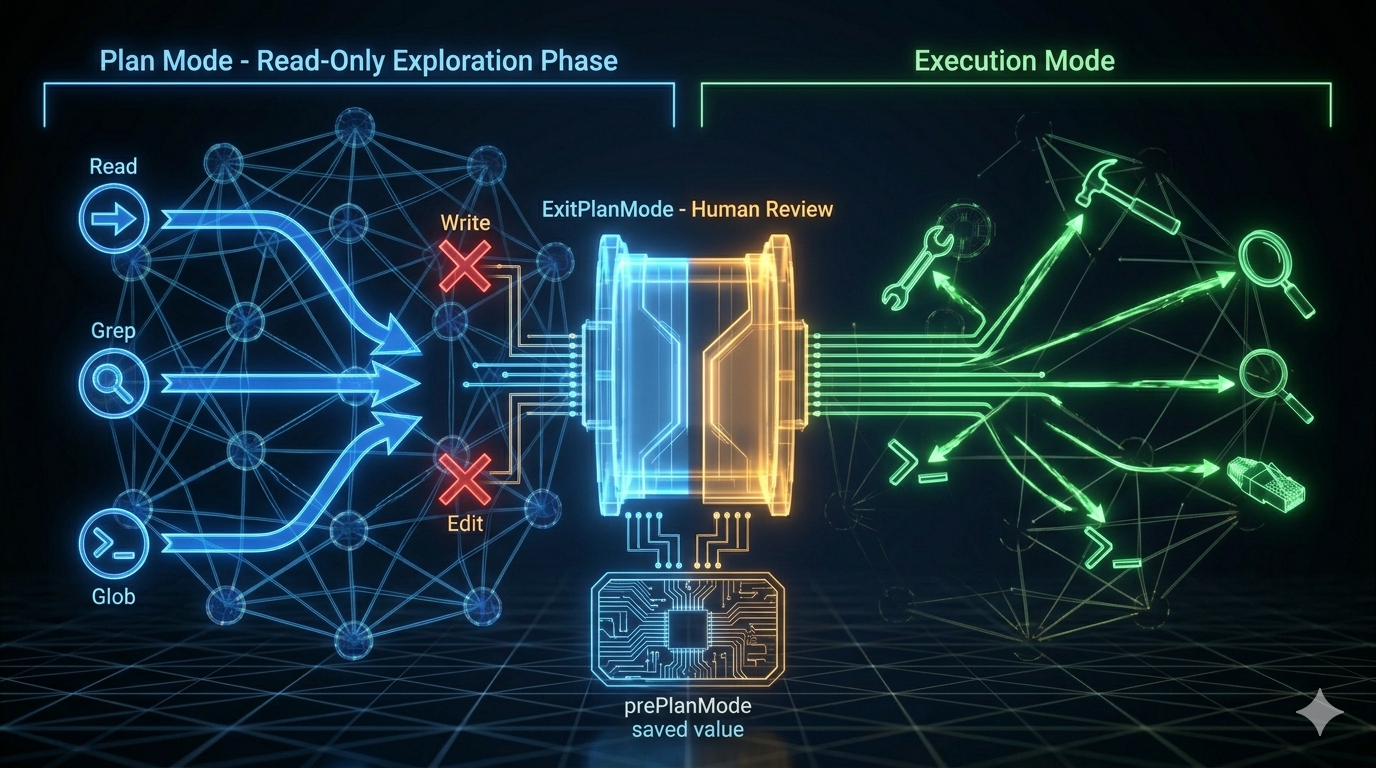
<p>Plan Mode separates agent behavior into two phases: a read-only exploration phase where the agent understands the problem, and an execution phase where it acts on that understanding. The key insight is that during the planning phase, there are no side effects — no files modified, no commands run. The cost of discovering and correcting a misunderstanding is zero.</p>

<blockquote>
  <p><a href="/engineering/architecture/2026/04/21/streaming-architecture-agent-performance-part-10.html">Part 10</a> covered streaming performance. This post covers the planning architecture that shapes when agents act.</p>
</blockquote>

<hr />

<h2 id="the-problem-premature-action">The Problem: Premature Action</h2>

<p>Without a planning phase, an autonomous agent faces a dilemma on complex tasks: act immediately (high risk of misunderstanding) or re-read the same files in every turn without committing to a direction (inefficient).</p>

<p>The table below shows what happens with and without Plan Mode:</p>

<table>
  <thead>
    <tr>
      <th>Scenario</th>
      <th>Without Plan Mode</th>
      <th>With Plan Mode</th>
    </tr>
  </thead>
  <tbody>
    <tr>
      <td>Misunderstood requirements</td>
      <td>Implemented wrong feature; needs rollback</td>
      <td>Discovered misunderstanding in read-only phase; zero-cost correction</td>
    </tr>
    <tr>
      <td>Ignored existing patterns</td>
      <td>Code inconsistent with project style</td>
      <td>Explored patterns first; implementation matches</td>
    </tr>
    <tr>
      <td>Poor solution choice</td>
      <td>Implemented slow approach; needs rewrite</td>
      <td>Compared solutions before acting</td>
    </tr>
    <tr>
      <td>Missed edge cases</td>
      <td>Found post-implementation; rework</td>
      <td>Enumerated in plan; incorporated before acting</td>
    </tr>
  </tbody>
</table>

<p>Every row in that table describes a real kind of agent failure. Plan Mode doesn’t prevent all of them — but it catches the ones that stem from acting without understanding.</p>

<hr />

<h2 id="the-mode-switch-how-read-only-becomes-enforced">The Mode Switch: How Read-Only Becomes Enforced</h2>

<p>Plan Mode isn’t a suggestion. It’s an enforced permission mode change.</p>

<p>When the agent enters Plan Mode:</p>

<ol>
  <li>The current permission mode is saved to <code class="language-plaintext highlighter-rouge">prePlanMode</code></li>
  <li>The permission context switches to <code class="language-plaintext highlighter-rouge">plan</code> mode</li>
  <li>In <code class="language-plaintext highlighter-rouge">plan</code> mode, Write tools return <code class="language-plaintext highlighter-rouge">deny</code> from the permission pipeline (Stage 3: <code class="language-plaintext highlighter-rouge">checkPermissions</code>)</li>
  <li>The agent receives a clear behavioral instruction set</li>
</ol>

<div class="language-plaintext highlighter-rouge"><div class="highlight"><pre class="highlight"><code>In plan mode, you should:
1. Thoroughly explore the codebase to understand existing patterns
2. Identify similar features and architectural approaches
3. Consider multiple approaches and their trade-offs
4. Use AskUserQuestion if you need to clarify the approach
5. Design a concrete implementation strategy
6. When ready, use ExitPlanMode to present your plan for approval
</code></pre></div></div>

<p>The six-step sequence has a structure: steps 1–2 are divergent (broad exploration), steps 3–4 are convergent transition (focused analysis, open to questions), steps 5–6 are fully convergent (concrete plan, ready to present). The instructions encode a cognitive model, not just a to-do list.</p>

<p><img src="/assets/images/posts/2026-04-23-plan-mode-think-before-act-part-11/Plan Mode Architecture.jpeg" alt="Plan Mode Architecture" /></p>

<hr />

<h2 id="the-sub-agent-constraint">The Sub-Agent Constraint</h2>

<p>Sub-agents cannot enter Plan Mode. This is an architectural constraint, not a policy choice.</p>

<p>The reason: Plan Mode requires the user to review and approve a plan before execution begins. If a sub-agent enters Plan Mode, it blocks waiting for user approval — but the user may not know the sub-agent exists, and may not be watching for approval requests from nested agents. The entire parent agent’s execution stalls on an invisible approval request.</p>

<p>The constraint is enforced in <code class="language-plaintext highlighter-rouge">EnterPlanModeTool.call()</code>: the first check is whether the call is in an agent context. If it is, the tool throws an error immediately. Plan Mode is only for the main conversation.</p>

<hr />

<h2 id="exiting-plan-mode-the-approval-gate">Exiting Plan Mode: The Approval Gate</h2>

<p>The exit is more complex than the entrance. <code class="language-plaintext highlighter-rouge">ExitPlanModeV2</code> handles several scenarios.</p>

<p><strong>Mode restoration with circuit breaker.</strong> The saved <code class="language-plaintext highlighter-rouge">prePlanMode</code> value is read and restored. But there’s a guard: if <code class="language-plaintext highlighter-rouge">prePlanMode</code> was <code class="language-plaintext highlighter-rouge">auto</code>, the system checks whether auto mode’s gate is currently open. If it was closed during the planning phase (due to a circuit breaker trigger or policy change), the system falls back to <code class="language-plaintext highlighter-rouge">default</code> mode.</p>

<p>Why? There’s a time window between entering and exiting Plan Mode. The state that allowed auto mode at entry may no longer be valid at exit. Restoring to auto mode blindly would bypass security controls that were activated in the interim.</p>

<div class="language-plaintext highlighter-rouge"><div class="highlight"><pre class="highlight"><code>prePlanMode = "auto"
  ↓
Is auto mode gate open?
  Yes → Restore to auto mode
  No  → Fall back to default mode (security takes priority)
</code></pre></div></div>

<p><strong>The approval UI.</strong> After presenting the plan, the user reviews it. If the plan looks correct, they approve — the agent switches back to execution mode and begins implementation. If not, they request changes — the agent remains in Plan Mode for another round of exploration.</p>

<p>This is the human-in-the-loop moment. Not at every tool call (that’s the default permission mode), not never (that’s bypass mode) — but at the right moment: when the full plan is visible and the user can make an informed judgment.</p>

<hr />

<h2 id="plan-execute-workflow-in-practice">Plan-Execute Workflow in Practice</h2>

<p>A concrete example: adding pagination to a REST API.</p>

<p><strong>Exploration phase (Plan Mode):</strong></p>

<div class="language-plaintext highlighter-rouge"><div class="highlight"><pre class="highlight"><code>Tool calls (all read-only):
1. Glob("src/routes/*.ts")           ← discover route files
2. Glob("src/models/*.ts")           ← discover model files
3. Grep("limit|offset|page|cursor")  ← existing pagination patterns
4. Read("src/routes/users.ts")       ← typical route implementation
5. Read("src/middleware/validate.ts") ← validation patterns
6. Grep("interface.*Response")       ← response type definitions
</code></pre></div></div>

<p>Discoveries: Express + TypeScript, 12 route files, no existing pagination, Zod validation middleware, Prisma ORM.</p>

<p><strong>Analysis phase (still Plan Mode):</strong></p>

<p>The agent compares offset pagination (simple, worse at scale) vs cursor pagination (complex, better at scale), considers the current project’s scale, and selects an approach.</p>

<p><strong>Plan presentation (ExitPlanMode):</strong></p>

<div class="language-markdown highlighter-rouge"><div class="highlight"><pre class="highlight"><code><span class="gu">## Pagination Implementation Plan</span>

Solution: Offset pagination (project scale doesn't warrant cursor complexity)

Steps:
<span class="p">1.</span> Create src/types/pagination.ts — type definitions
<span class="p">2.</span> Create src/middleware/pagination.ts — parameter parsing
<span class="p">3.</span> Modify src/routes/users.ts — first route implementation
<span class="p">4.</span> Add Zod validation — limit (1–100), offset (&gt;=0)
<span class="p">5.</span> Update ApiResponse type — pagination metadata

Files affected: 2 new, 3 modified
Risk: Low — additive change, no modification to existing functionality
</code></pre></div></div>

<p><strong>User approves. Execution phase begins.</strong></p>

<p>Zero side effects occurred during the exploration and planning. The agent now acts with full context.</p>

<hr />

<h2 id="background-scheduling-cron-and-remote-triggers">Background Scheduling: Cron and Remote Triggers</h2>

<p>Plan Mode handles interactive planning within a session. But agent harnesses also need to schedule tasks that run without user interaction: nightly code reviews, periodic health checks, automated report generation.</p>

<p>Claude Code supports two scheduling mechanisms:</p>

<p><strong>Cron jobs (<code class="language-plaintext highlighter-rouge">CronCreate</code>):</strong> Session-scoped recurring prompts. Standard five-field cron syntax in local timezone. Jobs fire when the REPL is idle. A 7-day auto-expiry prevents zombie jobs from accumulating.</p>

<div class="language-plaintext highlighter-rouge"><div class="highlight"><pre class="highlight"><code>"Run smoke tests every morning at 9"
→ CronCreate: cron="57 8 * * *", recurring=true

"Remind me to check the deploy in 30 minutes"
→ CronCreate: cron="&lt;now+30&gt;", recurring=false
</code></pre></div></div>

<p>Note the off-by-a-minute pattern: <code class="language-plaintext highlighter-rouge">57 8</code> instead of <code class="language-plaintext highlighter-rouge">0 9</code>. When many users ask for “9am,” all their jobs land at the same API timestamp. Offset by a few minutes reduces thundering herd.</p>

<p><strong>Remote triggers:</strong> Long-lived triggers that persist beyond the session. Configured via API, they can fire on external events or remote schedules. Useful for CI/CD integration: trigger an agent run when a PR is opened, a deploy completes, or a monitoring alert fires.</p>

<p>The integration point with Plan Mode: a scheduled agent can be configured to run in Plan Mode, surfacing a plan for human review before any destructive operations execute. This combines autonomous scheduling with mandatory oversight for high-risk operations.</p>

<hr />

<h2 id="two-user-models-external-vs-internal">Two User Models: External vs. Internal</h2>

<p>An interesting design detail from the source: Plan Mode presents different behavioral guidance to different user types.</p>

<p>For external users, the system encourages Plan Mode: “For implementation tasks, consider using Plan Mode first.” Safety and alignment take priority.</p>

<p>For internal (Anthropic) users, the guidance is more direct: “Start working immediately; clarify through questions when in doubt.” Efficiency and fluency take priority.</p>

<p>This reflects a genuine trade-off. Plan Mode adds overhead — an extra exploration phase, an approval step. For users who deeply trust the agent and work at speed, that overhead isn’t worth it. For users who are still building trust in the agent’s behavior, the overhead is entirely worth it.</p>

<p>The lesson for harness builders: one mode doesn’t fit all users. Build the planning pattern for the use case, then tune the defaults for your audience.</p>

<hr />

<h2 id="key-takeaways">Key Takeaways</h2>

<ul>
  <li><strong>Premature Action</strong> is the most expensive agent failure mode. It stems from acting before understanding. Plan Mode’s architectural solution is a read-only phase where exploration has no cost.</li>
  <li><strong>Mode switch is enforced</strong>, not advisory. In <code class="language-plaintext highlighter-rouge">plan</code> mode, Write tools return <code class="language-plaintext highlighter-rouge">deny</code> from the permission pipeline. The constraint is structural, not just instructional.</li>
  <li><strong>Sub-agents cannot enter Plan Mode.</strong> A nested plan approval request would block the parent agent invisibly. Plan Mode is main-conversation only.</li>
  <li><strong>Exit with circuit breaker.</strong> If <code class="language-plaintext highlighter-rouge">prePlanMode</code> was <code class="language-plaintext highlighter-rouge">auto</code> and the auto-mode gate closed during the planning phase, fall back to <code class="language-plaintext highlighter-rouge">default</code>. Don’t bypass controls that activated mid-session.</li>
  <li><strong>The six-step planning sequence</strong> encodes a cognitive model: diverge (explore) → converge-transition (analyze) → fully converge (present plan).</li>
  <li><strong>Cron scheduling</strong> provides session-scoped recurring tasks. Remote triggers provide persistent external-event-driven invocations. Both integrate with Plan Mode for human-in-the-loop oversight.</li>
</ul>

<hr />

<h2 id="whats-next">What’s Next</h2>

<p>In <strong><a href="/engineering/architecture/2026/04/25/build-your-own-agent-harness-blueprint-part-12.html">Part 12: Build Your Own Agent Harness — The Practical Blueprint</a></strong>, we synthesize the series into a practical guide:</p>

<ul>
  <li>The decision flowchart: when to use a simple API call vs. function calling vs. a full harness</li>
  <li>Six-step implementation roadmap: dialog loop → tools → permissions → context → memory → hooks</li>
  <li>Pseudocode skeleton for the minimal viable harness</li>
  <li>Production readiness checklist</li>
  <li>Framework comparison: build-your-own vs. LangGraph, CrewAI, AutoGen</li>
</ul>

<hr />

<h2 id="references">References</h2>

<p><strong>Planning and workflow patterns</strong></p>
<ul>
  <li><a href="https://www.anthropic.com/research/building-effective-agents">Building Effective Agents</a> — Anthropic Research</li>
  <li><a href="https://www.anthropic.com/engineering/harness-design-long-running-apps">Harness Design for Long-Running Applications</a> — Anthropic Engineering</li>
  <li><a href="https://code.claude.com/docs/en/common-workflows">Claude Code Common Workflows</a> — Official docs</li>
</ul>

<p><strong>Architecture analysis</strong></p>
<ul>
  <li><a href="https://arxiv.org/html/2604.14228v1">Dive into Claude Code: Design Space of AI Agent Systems</a> — arxiv</li>
  <li><a href="https://generativeprogrammer.com/p/12-agentic-harness-patterns-from">12 Agentic Harness Patterns from Claude Code</a> — Generative Programmer</li>
  <li><a href="https://www.penligent.ai/hackinglabs/inside-claude-code-the-architecture-behind-tools-memory-hooks-and-mcp/">Inside Claude Code: Architecture Behind Tools, Memory, Hooks, and MCP</a> — Penligent</li>
</ul>]]></content><author><name>SherlockLiu</name></author><category term="Engineering" /><category term="Architecture" /><category term="AI" /><category term="AI Agents" /><category term="Claude Code" /><category term="System Design" /><category term="Architecture" /><category term="Agent Harness" /><category term="Plan Mode" /><category term="Workflows" /><category term="Scheduling" /><category term="TypeScript" /><summary type="html"><![CDATA[The most expensive agent mistakes happen in the first few turns, before the agent understands the full picture. Plan Mode is the architectural pattern that prevents premature action — and here's how it's built.]]></summary><media:thumbnail xmlns:media="http://search.yahoo.com/mrss/" url="https://sherlockliu.co.uk/assets/images/posts/2026-04-23-plan-mode-think-before-act-part-11/hero.jpeg" /><media:content medium="image" url="https://sherlockliu.co.uk/assets/images/posts/2026-04-23-plan-mode-think-before-act-part-11/hero.jpeg" xmlns:media="http://search.yahoo.com/mrss/" /></entry><entry><title type="html">Streaming Architecture: Building Agents That Feel Fast (Part 10)</title><link href="https://sherlockliu.co.uk/engineering/architecture/2026/04/21/streaming-architecture-agent-performance-part-10.html" rel="alternate" type="text/html" title="Streaming Architecture: Building Agents That Feel Fast (Part 10)" /><published>2026-04-21T00:00:00+01:00</published><updated>2026-04-21T00:00:00+01:00</updated><id>https://sherlockliu.co.uk/engineering/architecture/2026/04/21/streaming-architecture-agent-performance-part-10</id><content type="html" xml:base="https://sherlockliu.co.uk/engineering/architecture/2026/04/21/streaming-architecture-agent-performance-part-10.html"><![CDATA[<p><em>Series: The Agent Harness — Part 10 of 12</em></p>

<hr />

<p>An agent can be architecturally correct — proper permission pipeline, solid memory system, working context compression — and still feel unusably slow. The problem isn’t correctness, it’s latency perception.</p>

<p>The gap between “instant response” and “waiting to load” is usually measured in how early the agent starts showing output, not how quickly the underlying computation finishes. Streaming is what closes that gap. And streaming isn’t just a UI feature you add at the end — it’s an architectural constraint that shapes how every component is built.</p>

<blockquote>
  <p><a href="/engineering/architecture/2026/04/19/subagents-coordinators-skills-multi-agent-part-9.html">Part 9</a> covered multi-agent orchestration. This post covers the performance architecture those agents run on.</p>
</blockquote>

<hr />

<h2 id="queryengine-the-session-state-owner">QueryEngine: The Session State Owner</h2>

<p>Most harness implementations pass session state through function parameters: the message list, the abort controller, the file cache. This works until it doesn’t — every new state field requires updating all function signatures across the call chain.</p>

<p>Claude Code’s solution is a class: <code class="language-plaintext highlighter-rouge">QueryEngine</code>. One session, one instance. State lives as instance properties. Adding a new field requires only updating the constructor, not every function that touches session state.</p>

<div class="language-typescript highlighter-rouge"><div class="highlight"><pre class="highlight"><code><span class="kd">class</span> <span class="nc">QueryEngine</span> <span class="p">{</span>
  <span class="k">private</span> <span class="nx">messages</span><span class="p">:</span> <span class="nx">Message</span><span class="p">[]</span>
  <span class="k">private</span> <span class="nx">abortController</span><span class="p">:</span> <span class="nx">AbortController</span>
  <span class="k">private</span> <span class="nx">deniedPermissions</span><span class="p">:</span> <span class="nb">Set</span><span class="o">&lt;</span><span class="kr">string</span><span class="o">&gt;</span>
  <span class="k">private</span> <span class="nx">usage</span><span class="p">:</span> <span class="nx">TokenUsage</span>
  <span class="k">private</span> <span class="nx">fileStateCache</span><span class="p">:</span> <span class="nb">Map</span><span class="o">&lt;</span><span class="kr">string</span><span class="p">,</span> <span class="nx">FileState</span><span class="o">&gt;</span>
  <span class="k">private</span> <span class="nx">discoveredSkills</span><span class="p">:</span> <span class="nb">Set</span><span class="o">&lt;</span><span class="kr">string</span><span class="o">&gt;</span>

  <span class="k">async</span> <span class="o">*</span><span class="nf">submitMessage</span><span class="p">(</span><span class="nx">input</span><span class="p">:</span> <span class="kr">string</span><span class="p">):</span> <span class="nx">AsyncGenerator</span><span class="o">&lt;</span><span class="nx">StreamEvent</span><span class="o">&gt;</span> <span class="p">{</span>
    <span class="c1">// Each call starts a new turn; state persists between turns</span>
  <span class="p">}</span>
<span class="p">}</span>
</code></pre></div></div>

<p><strong>Single ownership matters in concurrent scenarios.</strong> If multiple components simultaneously read from and write to a shared message list, messages can arrive out of order or get processed twice. The class provides a natural mutual exclusion boundary: all state modifications go through one owner.</p>

<p><code class="language-plaintext highlighter-rouge">submitMessage</code> is an AsyncGenerator — callers consume events one at a time without waiting for the turn to complete. The UI renders each token as it arrives. Tool results surface immediately. The user sees progress.</p>

<hr />

<h2 id="streaming-vs-non-streaming-the-real-performance-difference">Streaming vs. Non-Streaming: The Real Performance Difference</h2>

<p>The performance argument for streaming isn’t about raw computation time. It’s about when work starts.</p>

<p>Consider a model response that triggers three tool calls over 5 seconds:</p>

<table>
  <thead>
    <tr>
      <th>Strategy</th>
      <th>Second 1</th>
      <th>Second 2</th>
      <th>Second 3–5</th>
      <th>Finish</th>
    </tr>
  </thead>
  <tbody>
    <tr>
      <td><strong>Non-streaming</strong></td>
      <td>Waiting</td>
      <td>Waiting</td>
      <td>Waiting</td>
      <td>All tools start → complete</td>
    </tr>
    <tr>
      <td><strong>Streaming</strong></td>
      <td>Tool 1 starts</td>
      <td>Tool 2 starts</td>
      <td>Tool 3 starts</td>
      <td>Tools complete during model output</td>
    </tr>
  </tbody>
</table>

<p>In streaming mode, Tool 1 starts executing at second 1. By the time the model finishes generating at second 5, the tools may already be done. Non-streaming mode waits 5 seconds for the complete response, then begins tool execution.</p>

<p>The latency difference is the model’s entire generation time. For complex multi-tool turns, that’s meaningful.</p>

<p>Streaming also means the user sees partial output immediately. A tool response that takes 2 seconds to stream feels faster than one that dumps 2 seconds of accumulated output at once.</p>

<hr />

<h2 id="streaming-processing-token-by-token">Streaming Processing: Token by Token</h2>

<p>The API returns streaming events: <code class="language-plaintext highlighter-rouge">message_start</code>, <code class="language-plaintext highlighter-rouge">content_block_start</code>, <code class="language-plaintext highlighter-rouge">content_block_delta</code>, <code class="language-plaintext highlighter-rouge">content_block_stop</code>, <code class="language-plaintext highlighter-rouge">message_delta</code>, <code class="language-plaintext highlighter-rouge">message_stop</code>.</p>

<p>The system processes each event as it arrives:</p>

<ul>
  <li><code class="language-plaintext highlighter-rouge">message_start</code> → reset usage counters for the new message</li>
  <li><code class="language-plaintext highlighter-rouge">content_block_start</code> with type <code class="language-plaintext highlighter-rouge">tool_use</code> → immediately prepare tool execution context</li>
  <li><code class="language-plaintext highlighter-rouge">content_block_delta</code> → append to incremental buffer, attempt incremental JSON parsing</li>
  <li><code class="language-plaintext highlighter-rouge">content_block_stop</code> → hand completed tool call to StreamingToolExecutor</li>
  <li><code class="language-plaintext highlighter-rouge">message_delta</code> → accumulate token usage</li>
</ul>

<p>The key moment is <code class="language-plaintext highlighter-rouge">content_block_start</code> with <code class="language-plaintext highlighter-rouge">tool_use</code>. The system doesn’t wait for <code class="language-plaintext highlighter-rouge">content_block_stop</code> to prepare. It pre-looks up tool definitions and permission contexts as soon as it knows a tool call is coming. By the time the parameters arrive, setup is already done.</p>

<h3 id="incremental-json-parsing">Incremental JSON Parsing</h3>

<p>Tool parameters are JSON, but they arrive character by character in streaming. Traditional <code class="language-plaintext highlighter-rouge">JSON.parse()</code> requires a complete string. The harness maintains an accumulation buffer, appending each delta, and attempts parsing at key boundary events.</p>

<div class="language-plaintext highlighter-rouge"><div class="highlight"><pre class="highlight"><code>Streaming arrives: {"path": "/src/ind
Buffer:            {"path": "/src/ind   ← not valid JSON yet
                   {"path": "/src/index.ts"}  ← valid at content_block_stop
</code></pre></div></div>

<p>Heavy computation belongs at boundary events (<code class="language-plaintext highlighter-rouge">content_block_stop</code>), not on every delta. A delta may contain one or two tokens. Parsing overhead on every delta costs more than it saves.</p>

<hr />

<h2 id="streamingtoolexecutor-execute-on-arrival">StreamingToolExecutor: Execute on Arrival</h2>

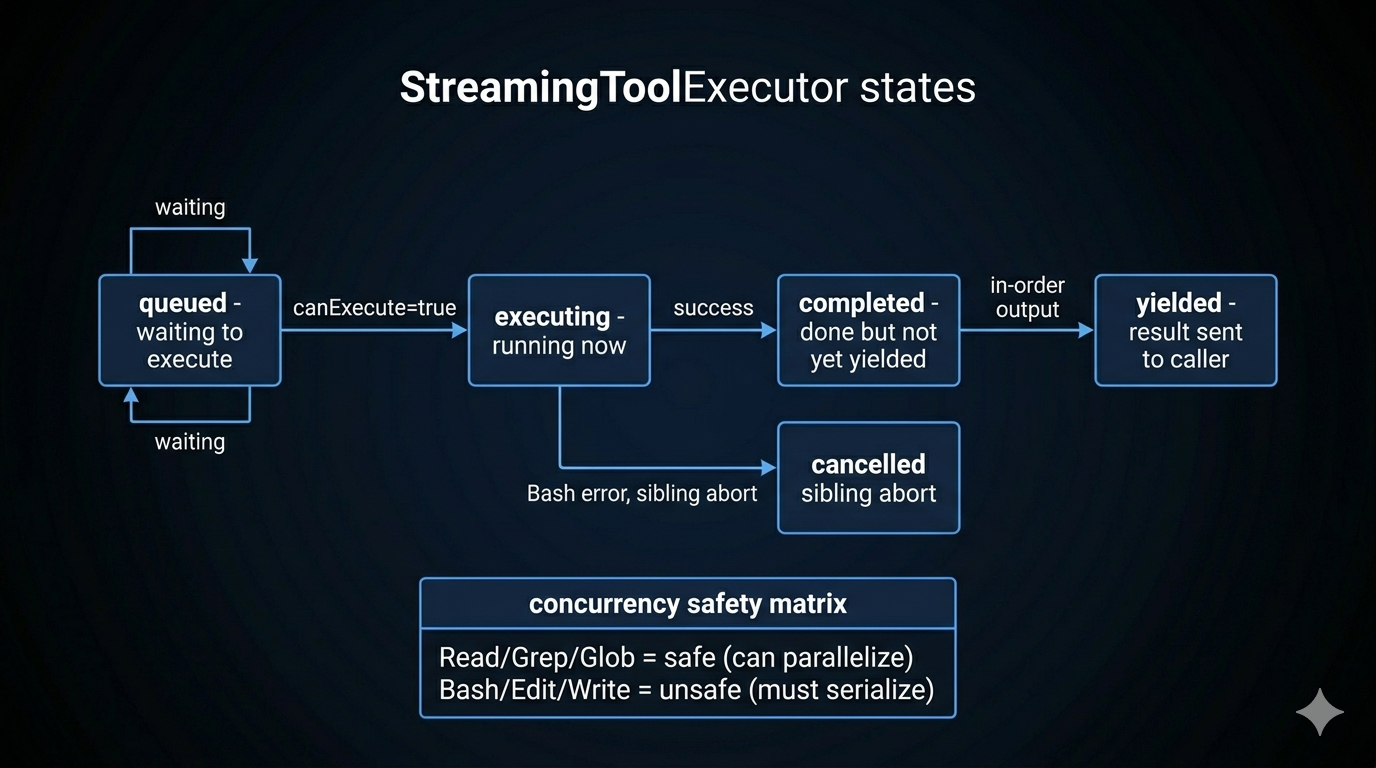
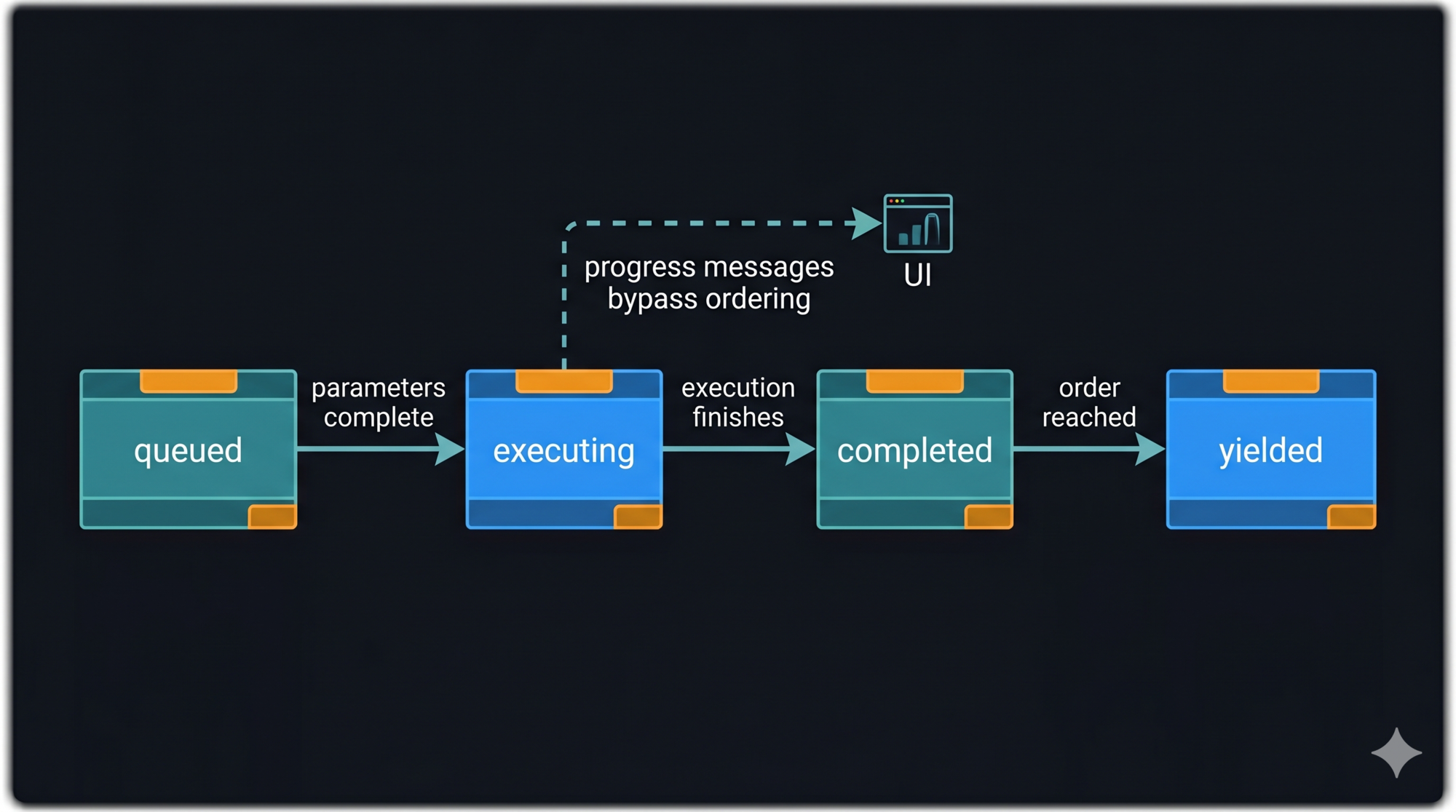
<p><code class="language-plaintext highlighter-rouge">StreamingToolExecutor</code> is the component that executes tools immediately as their parameter blocks complete, rather than waiting for the entire model response.</p>

<p>Each tool tracked by the executor passes through four states:</p>

<div class="language-plaintext highlighter-rouge"><div class="highlight"><pre class="highlight"><code>queued → executing → completed → yielded
</code></pre></div></div>

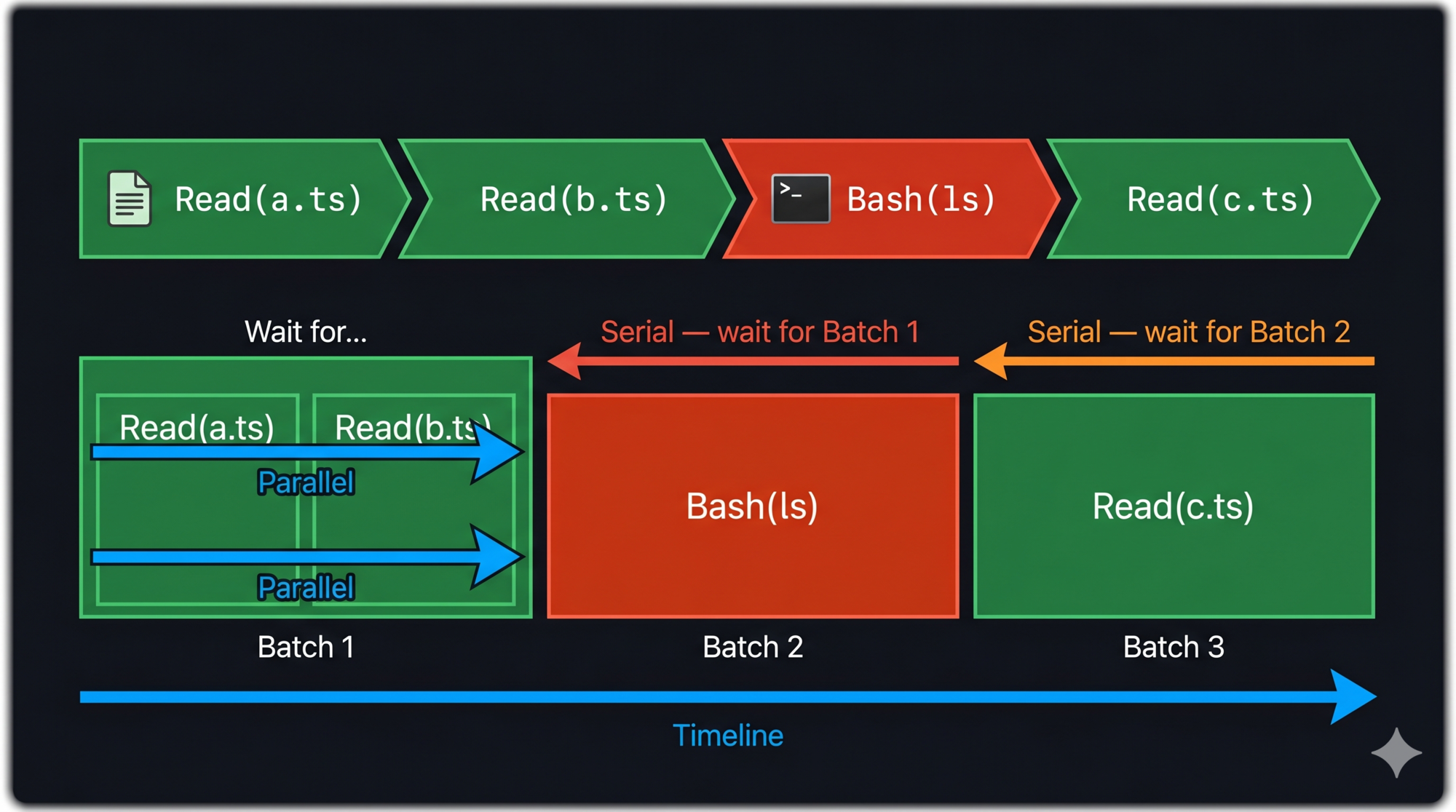
<p>When a new tool call completes its parameter block, it enters <code class="language-plaintext highlighter-rouge">queued</code> and immediately triggers execution logic. Whether it can execute depends on one rule:</p>

<p><strong>A tool can execute if and only if:</strong> no tools are currently executing, OR all currently executing tools AND the new tool are concurrency-safe.</p>

<p>Non-concurrency-safe tools execute exclusively — nothing runs in parallel with them.</p>

<p><img src="/assets/images/posts/2026-04-21-streaming-architecture-agent-performance-part-10/StreamingToolExecutor State Machine.jpeg" alt="StreamingToolExecutor State Machine" /></p>

<h3 id="safe-vs-unsafe-the-concurrency-matrix">Safe vs. Unsafe: The Concurrency Matrix</h3>

<table>
  <thead>
    <tr>
      <th>Tool Class</th>
      <th>Concurrency Safe</th>
      <th>Reason</th>
    </tr>
  </thead>
  <tbody>
    <tr>
      <td>Read, Grep, Glob, Search</td>
      <td>Yes</td>
      <td>Read-only, no side effects</td>
    </tr>
    <tr>
      <td>Bash, Edit, Write</td>
      <td>No</td>
      <td>Side effects; may conflict</td>
    </tr>
  </tbody>
</table>

<p>Read-only tools parallelize freely. Write tools serialize.</p>

<p>Why not do fine-grained dependency analysis between Bash commands? Theoretically, <code class="language-plaintext highlighter-rouge">echo hello</code> and <code class="language-plaintext highlighter-rouge">echo world</code> could run in parallel while <code class="language-plaintext highlighter-rouge">mkdir foo &amp;&amp; echo bar &gt; foo/file.txt</code> has a dependency. But parsing shell semantics reliably is expensive and error-prone. The conservative rule — Bash is always unsafe — is simpler, more maintainable, and the extra second of serialization is rarely noticeable.</p>

<h3 id="order-guarantee">Order Guarantee</h3>

<p>Results are always emitted in request order, regardless of execution order. A faster tool (completing at state <code class="language-plaintext highlighter-rouge">completed</code>) waits until all previous tools have been yielded before its result is forwarded.</p>

<p>This matters for the conversation history: tool results must appear in the same order as the tool calls that produced them. If Bash Tool 3 completes before Read Tool 1, Tool 3 waits in <code class="language-plaintext highlighter-rouge">completed</code> state until Tools 1 and 2 have been yielded.</p>

<h3 id="sibling-abort-on-bash-failure">Sibling Abort on Bash Failure</h3>

<p>When a Bash command fails, all other parallel tools (siblings) are cancelled. This prevents cascading issues where later steps depend on a failed earlier step. Bash is the primary execution primitive; its failure usually means the overall plan is wrong, not just one step.</p>

<hr />

<h2 id="startup-performance-parallel-prefetch-and-lazy-load">Startup Performance: Parallel Prefetch and Lazy Load</h2>

<p>Response latency during a conversation is the primary performance metric. But startup latency matters too — a CLI tool that takes 3 seconds to start feels broken.</p>

<p>Claude Code handles both:</p>

<p><strong>Parallel prefetching:</strong> Tools, skills, and MCP servers are initialized in parallel at startup. Independent initializations don’t wait for each other. The expensive operations (spawning MCP server processes, loading skill files) happen concurrently.</p>

<p><strong>Lazy loading:</strong> The <code class="language-plaintext highlighter-rouge">ToolSearchTool</code> (<a href="/engineering/architecture/2026/04/07/the-tool-system-how-agents-act-part-3.html">Part 3</a>) allows the agent to discover tools on demand rather than loading all tool schemas upfront. Sending 50 tool definitions to the model costs tokens every turn. Lazy discovery means only the tools currently needed are included in the request.</p>

<p><strong>deferred loading:</strong> Some tools are registered but not loaded until first use. The initialization cost is spread across the session rather than frontloaded.</p>

<hr />

<h2 id="prompt-cache-strategy">Prompt Cache Strategy</h2>

<p>The Anthropic API’s prompt cache is byte-prefix matching — if consecutive requests share the same prefix, the cached prefix is reused, saving input token costs and latency.</p>

<p>Three rules for cache-stable requests:</p>

<p><strong>1. Stable system prompt prefix.</strong> The system prompt should not change between turns within a session. Dynamic elements (current time, session ID) should go at the end of the system prompt, not the beginning. A change at byte position N invalidates the cache for everything from position N onward.</p>

<p><strong>2. Consistent tool definitions.</strong> Tool schemas included in the API request are part of the cache key. Tools should not appear/disappear between turns unless necessary. This is why the Fork pattern (<a href="/engineering/architecture/2026/04/19/subagents-coordinators-skills-multi-agent-part-9.html">Part 9</a>) passes exact tool bytes to sub-agents rather than reconstructing.</p>

<p><strong>3. Message history order.</strong> The conversation history prefix is part of the cache key. Don’t reorder messages between turns (they shouldn’t be reordered anyway — this is a hygiene note).</p>

<p>Cache hits dramatically reduce turn latency. A 30,000-token system prompt that costs $0.30 at standard input rates costs $0.008 at cache rates. For heavy users, this compounds across dozens of turns per session.</p>

<hr />

<h2 id="key-takeaways">Key Takeaways</h2>

<ul>
  <li><strong>Streaming is an architectural choice</strong>, not a UI feature. It shapes every component: the loop abstraction, tool execution timing, event types, buffer management.</li>
  <li><strong>QueryEngine</strong> owns session state as a class. Single ownership prevents concurrent state corruption. <code class="language-plaintext highlighter-rouge">submitMessage</code> is an <code class="language-plaintext highlighter-rouge">AsyncGenerator</code> — callers consume events immediately.</li>
  <li><strong>Execute on arrival:</strong> StreamingToolExecutor starts tool execution as soon as parameter blocks complete, not when the entire model response arrives.</li>
  <li><strong>Concurrency safety is binary:</strong> read-only tools parallelize, write tools serialize. Conservative simplicity over fragile dependency analysis.</li>
  <li><strong>Results yield in request order</strong> regardless of completion order. Faster tools wait in <code class="language-plaintext highlighter-rouge">completed</code> state.</li>
  <li><strong>Sibling abort</strong> cancels all parallel tools when a Bash command fails — prevents cascading from a broken plan.</li>
  <li><strong>Cache stability</strong> requires stable system prompt prefix, consistent tool definitions, and stable message history ordering.</li>
</ul>

<hr />

<h2 id="whats-next">What’s Next</h2>

<p>In <strong><a href="/engineering/architecture/2026/04/23/plan-mode-think-before-act-part-11.html">Part 11: Plan Mode — The Architecture of Thinking Before Acting</a></strong>, we cover the planning system:</p>

<ul>
  <li>Why autonomous agents need a “thinking space” before acting</li>
  <li>The mode switch mechanism: how read-only becomes the enforced constraint</li>
  <li>The six-step planning workflow the model follows</li>
  <li>The approval gate: where human-in-the-loop belongs in an autonomous system</li>
  <li>Background scheduling for long-running workflows</li>
</ul>

<hr />

<h2 id="references">References</h2>

<p><strong>Streaming and performance</strong></p>
<ul>
  <li><a href="https://www.anthropic.com/research/building-effective-agents">Building Effective Agents</a> — Anthropic Research</li>
  <li><a href="https://explore.n1n.ai/blog/master-claude-api-streaming-tool-use-2026-04-07">Master the Claude API for Streaming and Tool Use</a> — n1n.ai</li>
  <li><a href="https://code.claude.com/docs/en/common-workflows">Claude Code Common Workflows</a> — Official docs</li>
</ul>

<p><strong>Architecture analysis</strong></p>
<ul>
  <li><a href="https://arxiv.org/html/2604.14228v1">Dive into Claude Code: Design Space of AI Agent Systems</a> — arxiv</li>
  <li><a href="https://bits-bytes-nn.github.io/insights/agentic-ai/2026/03/31/claude-code-architecture-analysis.html">Claude Code Architecture Analysis</a></li>
  <li><a href="https://sathwick.xyz/blog/claude-code.html">Reverse-Engineering Claude Code</a></li>
</ul>]]></content><author><name>SherlockLiu</name></author><category term="Engineering" /><category term="Architecture" /><category term="AI" /><category term="AI Agents" /><category term="Claude Code" /><category term="System Design" /><category term="Architecture" /><category term="Agent Harness" /><category term="Streaming" /><category term="Performance" /><category term="AsyncGenerator" /><category term="Concurrency" /><category term="TypeScript" /><summary type="html"><![CDATA[An agent that takes 10 seconds to respond feels broken even if it's correct. Streaming isn't just a UX feature — it's an architectural choice that shapes every component. Here's how to build agents that feel fast.]]></summary><media:thumbnail xmlns:media="http://search.yahoo.com/mrss/" url="https://sherlockliu.co.uk/assets/images/posts/2026-04-21-streaming-architecture-agent-performance-part-10/hero.jpeg" /><media:content medium="image" url="https://sherlockliu.co.uk/assets/images/posts/2026-04-21-streaming-architecture-agent-performance-part-10/hero.jpeg" xmlns:media="http://search.yahoo.com/mrss/" /></entry><entry><title type="html">Sub-Agents, Coordinators, and Skills: Multi-Agent Orchestration (Part 9)</title><link href="https://sherlockliu.co.uk/engineering/architecture/2026/04/19/subagents-coordinators-skills-multi-agent-part-9.html" rel="alternate" type="text/html" title="Sub-Agents, Coordinators, and Skills: Multi-Agent Orchestration (Part 9)" /><published>2026-04-19T00:00:00+01:00</published><updated>2026-04-19T00:00:00+01:00</updated><id>https://sherlockliu.co.uk/engineering/architecture/2026/04/19/subagents-coordinators-skills-multi-agent-part-9</id><content type="html" xml:base="https://sherlockliu.co.uk/engineering/architecture/2026/04/19/subagents-coordinators-skills-multi-agent-part-9.html"><![CDATA[<p><em>Series: The Agent Harness — Part 9 of 12</em></p>

<hr />

<p>A single agent hits two kinds of ceilings: capability ceilings (it doesn’t have the right tools for a sub-problem) and context ceilings (the task is too large to fit in one conversation). Multi-agent architectures solve both — but introduce coordination problems that are worse than the original problem if you don’t design them carefully.</p>

<p>This post covers the full multi-agent stack: spawning sub-agents that share context efficiently (Fork pattern), orchestrating specialist workers via a dedicated coordinator (Coordinator pattern), packaging reusable behaviors as skills, and connecting to external tool ecosystems via MCP.</p>

<blockquote>
  <p><a href="/engineering/architecture/2026/04/17/the-hook-system-extension-points-part-8.html">Part 8</a> covered the hook system. This post covers multi-agent orchestration built on top of it.</p>
</blockquote>

<hr />

<h2 id="four-built-in-agent-types-specialist-design">Four Built-In Agent Types: Specialist Design</h2>

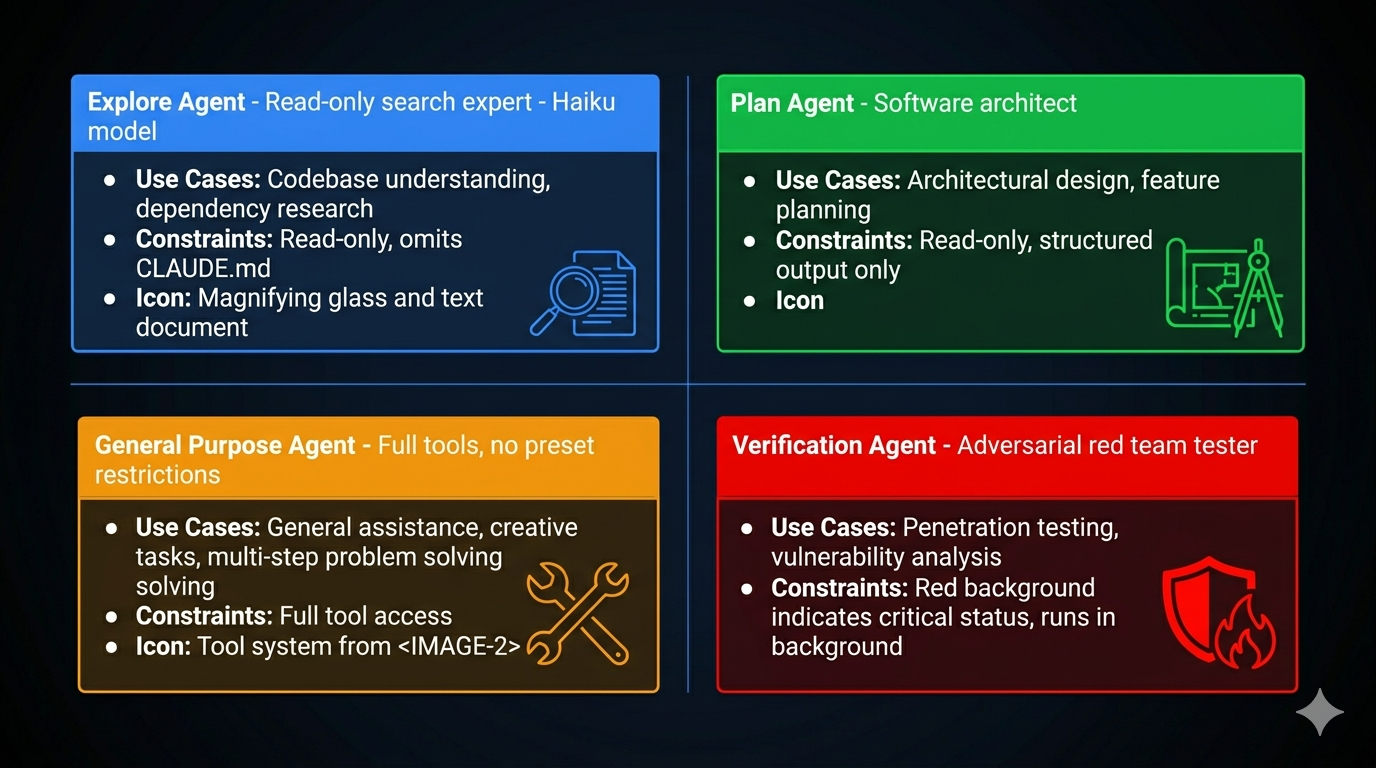
<p>Before discussing orchestration patterns, understand what you’re orchestrating. Claude Code ships four built-in agent types — each a specialist with specific capability constraints.</p>

<p><img src="/assets/images/posts/2026-04-19-subagents-coordinators-skills-multi-agent-part-9/Four Agent Types.jpeg" alt="Four Agent Types" /></p>

<h3 id="explore-read-only-code-archaeology">Explore: Read-Only Code Archaeology</h3>

<p>The Explore agent is built for speed and safety. Two design decisions define it:</p>

<p><strong>Dual-lock read-only enforcement:</strong> The system prompt prohibits file modifications <em>and</em> the tool list physically excludes Edit, Write, and similar tools. Soft constraint (prompt) plus hard constraint (tool unavailability). Even if the model hallucinates a desire to modify a file, it can’t — the tool doesn’t exist in its tool set.</p>

<p><strong>Token optimization:</strong> Explore omits CLAUDE.md. CLAUDE.md typically contains coding conventions, commit message formats, PR templates — completely useless to a search agent. Omitting it reduces token consumption and noise, letting the model focus on search. Estimated savings: 5–15 billion tokens per week across the user base.</p>

<p>Best for: finding where something is defined, tracing call chains, understanding dependencies, mapping project structure.</p>

<h3 id="plan-software-architect">Plan: Software Architect</h3>

<p>Plan reuses Explore’s read-only toolset but plays a different role. Its output is structured: implementation steps in priority order, key files needing modification, risk assessment, dependency mapping between steps.</p>

<p>The architectural insight: Plan omits CLAUDE.md not because it’s irrelevant, but because it <em>shouldn’t</em> influence planning. Planning is about structure; implementation conventions are execution details. Let the planner focus on “what to do,” not “how to name things.”</p>

<h3 id="general-purpose-default-executor">General Purpose: Default Executor</h3>

<p>Full tool access. No preset restrictions. The security boundary is entirely the global permission layer. The design philosophy: “trust by default, push the boundary to the perimeter.” Maximum flexibility for the agent, maximum responsibility for the harness.</p>

<p>Anti-pattern: using General Purpose for read-only tasks. Use Explore instead — cheaper model, no CLAUDE.md noise, no accidental-modification risk.</p>

<h3 id="verification-adversarial-tester">Verification: Adversarial Tester</h3>

<p>The Verification agent is explicitly designed to <em>break</em> the code being verified. Red background in the UI emphasizes its adversarial role. It always runs in the background (doesn’t block the main agent), cannot modify project files, and is prohibited from verbal confirmation — it must actually run tests.</p>

<p>The system prompt explicitly warns against two failure modes:</p>
<ul>
  <li><strong>Verification avoidance:</strong> “The code looks correct” without running tests</li>
  <li><strong>Surface correctness trap:</strong> Passing happy-path tests while missing boundary conditions, concurrency issues, or error paths</li>
</ul>

<p>This is red team methodology applied to agent verification: don’t confirm it works, try to make it fail.</p>

<p>Why background? Three reasons: users don’t need real-time visibility into the verification process; background mode frees the main thread; isolation prevents verification from being interrupted by user input.</p>

<hr />

<h2 id="the-fork-pattern-cache-safe-parallel-execution">The Fork Pattern: Cache-Safe Parallel Execution</h2>

<p>When the main agent needs to delegate multiple independent sub-tasks, the naive approach sends each sub-agent a full copy of the conversation history. At 50,000 tokens of history, three sub-agents cost 150,000 tokens just for the prefix. That’s expensive and slow.</p>

<p>The Fork pattern eliminates this redundancy by leveraging the API’s prompt cache.</p>

<h3 id="how-cache-sharing-works">How Cache Sharing Works</h3>

<p>The API’s prompt cache is byte-prefix matching. Two requests share a cache when their inputs are identical up to a prefix. The Fork pattern exploits this: all Fork sub-agents share the same conversation history prefix.</p>

<p>The message structure for a forked sub-agent:</p>

<div class="language-plaintext highlighter-rouge"><div class="highlight"><pre class="highlight"><code>[...conversation history]           ← shared prefix (hits cache)
[assistant turn with tool_use blocks]  ← shared (same for all forks)
[user turn with placeholder results]   ← shared fixed string: "Fork started -- processing in background"
[sub-task directive]                ← unique per fork
</code></pre></div></div>

<p>Only the final directive differs between sub-agents. Everything else is identical byte-for-byte, maximizing cache hits.</p>

<p><strong>The token math:</strong></p>

<div class="language-plaintext highlighter-rouge"><div class="highlight"><pre class="highlight"><code>Traditional sub-agents (no cache):
  3 sub-agents × 62,000 tokens each = 186,000 input tokens

Fork sub-agents (with cache):
  Shared prefix:    62,000 tokens (established by first request)
  3 × directive:    3 × 200 tokens = 600 new tokens
  Total:            62,600 tokens

Savings: ~66%
</code></pre></div></div>

<p>At scale (dozens of fork calls per session), the savings compound significantly.</p>

<h3 id="the-byte-level-cache-requirement">The Byte-Level Cache Requirement</h3>

<p>Cache matching is byte-precise, not semantic. One extra space invalidates the match. This is why the Fork pattern passes the raw rendered bytes of the parent agent’s system prompt to sub-agents rather than reconstructing it. Reconstruction could produce byte-level differences (whitespace, attribute ordering) that break cache matching even when the content is logically identical.</p>

<p>Five dimensions must match exactly:</p>
<ol>
  <li>System prompt (rendered bytes)</li>
  <li>User context (CLAUDE.md content)</li>
  <li>System context</li>
  <li>Tool definitions + model selection</li>
  <li>Conversation history prefix</li>
</ol>

<p>This also explains why the Fork pattern uses <code class="language-plaintext highlighter-rouge">useExactTools</code> — it reuses the parent’s tool pool directly rather than re-resolving, maintaining byte-level tool definition consistency.</p>

<h3 id="recursive-fork-protection">Recursive Fork Protection</h3>

<p>Fork sub-agents retain the Agent tool to keep tool definitions cache-consistent. This creates a risk: sub-agents forking their own sub-agents, causing exponential resource growth.</p>

<p>Protection is dual-layer:</p>
<ol>
  <li><strong>querySource marker</strong> (primary): A runtime marker in the fork context that identifies “I was forked.” It’s outside the conversation history and survives context compression.</li>
  <li><strong>Message scanning</strong> (fallback): Detects fork directive tags in edge cases where the querySource marker wasn’t preserved.</li>
</ol>

<p>The fork directive also explicitly states behavioral norms: “You are a Fork worker, not the main agent. You are prohibited from generating sub-agents.”</p>

<hr />

<h2 id="the-coordinator-pattern-centralized-orchestration">The Coordinator Pattern: Centralized Orchestration</h2>

<p>The Fork pattern is peer parallelism: equal agents sharing context, each running independently. The Coordinator pattern is centralized orchestration: one agent manages all the others.</p>

<p>Think of it as construction: the Fork pattern is a crew where everyone knows the blueprint and works independently. The Coordinator pattern is a project manager who assigns tasks, tracks dependencies, handles blocked workers, and manages shared resources.</p>

<h3 id="the-coordinators-tool-set">The Coordinator’s Tool Set</h3>

<p>The coordinator has exactly four tools: <code class="language-plaintext highlighter-rouge">Agent</code> (spawn a worker), <code class="language-plaintext highlighter-rouge">TaskStop</code> (stop a worker), <code class="language-plaintext highlighter-rouge">SendMessage</code> (communicate with a worker), and a structured output tool. It has no Read, Write, Edit, or Bash — it cannot do work itself.</p>

<div class="language-plaintext highlighter-rouge"><div class="highlight"><pre class="highlight"><code>Coordinator tools:   Agent, TaskStop, SendMessage, StructuredOutput
Worker tools:        Read, Write, Edit, Bash, Grep, Glob, WebSearch, Skill, MCP
</code></pre></div></div>

<p>This separation is strict. The coordinator manages. Workers execute. The coordinator never inspects a worker’s results through another worker (information chain decay) — it receives results directly.</p>

<h3 id="coordinator-vs-fork-when-to-use-each">Coordinator vs. Fork: When to Use Each</h3>

<table>
  <thead>
    <tr>
      <th>Dimension</th>
      <th>Fork</th>
      <th>Coordinator</th>
    </tr>
  </thead>
  <tbody>
    <tr>
      <td>Structure</td>
      <td>Centerless, peer agents</td>
      <td>Centralized, hierarchical</td>
    </tr>
    <tr>
      <td>Use case</td>
      <td>Same context, independent parallel tasks</td>
      <td>Complex task decomposition, dependencies</td>
    </tr>
    <tr>
      <td>State management</td>
      <td>Each fork independent</td>
      <td>Coordinator tracks global state</td>
    </tr>
    <tr>
      <td>Communication</td>
      <td>None between forks</td>
      <td>Coordinator mediates all communication</td>
    </tr>
    <tr>
      <td>Overhead</td>
      <td>Low (lightweight)</td>
      <td>Higher (dedicated coordinator process)</td>
    </tr>
    <tr>
      <td>Debugging</td>
      <td>Simple</td>
      <td>More complex</td>
    </tr>
  </tbody>
</table>

<p>Fork when: you need to run the same type of task against multiple targets in parallel. Coordinator when: you have a complex pipeline where workers have dependencies, shared resources, or require dynamic task reassignment.</p>

<hr />

<h2 id="skills-packaged-reusable-behaviors">Skills: Packaged Reusable Behaviors</h2>

<p>Beyond tools (single operations) and agents (full conversations), the harness needs a middle layer: reusable prompt templates that can be invoked like commands. That’s the skill system.</p>

<p>Skills are Markdown files with YAML frontmatter:</p>

<div class="language-markdown highlighter-rouge"><div class="highlight"><pre class="highlight"><code><span class="nn">---</span>
<span class="na">name</span><span class="pi">:</span> <span class="s">security-audit</span>
<span class="na">description</span><span class="pi">:</span> <span class="s">Analyze security vulnerabilities in code</span>
<span class="na">tools</span><span class="pi">:</span> <span class="pi">[</span><span class="nv">Bash</span><span class="pi">,</span> <span class="nv">Read</span><span class="pi">,</span> <span class="nv">Grep</span><span class="pi">,</span> <span class="nv">Glob</span><span class="pi">]</span>
<span class="na">disallowedTools</span><span class="pi">:</span> <span class="pi">[</span><span class="nv">Write</span><span class="pi">]</span>
<span class="na">model</span><span class="pi">:</span> <span class="s">haiku</span>
<span class="na">background</span><span class="pi">:</span> <span class="kc">true</span>
<span class="nn">---</span>

You are a code security audit expert. Analyze the provided code for:
<span class="p">1.</span> Common attack vectors (XSS, SQL injection, CSRF)
<span class="p">2.</span> Insecure dependencies
<span class="p">3.</span> Credential handling issues
</code></pre></div></div>

<p>The frontmatter declares what tools the skill uses, which model, whether it runs in background, and what lifecycle hooks it attaches. The body is the system prompt.</p>

<h3 id="four-level-skill-hierarchy">Four-Level Skill Hierarchy</h3>

<p>Skills load from five sources, in priority order:</p>

<div class="language-plaintext highlighter-rouge"><div class="highlight"><pre class="highlight"><code>managedSkillsDir    (enterprise policy — highest priority)
userSkillsDir       (~/.claude/skills/ — personal global)
projectSkillsDirs   (.claude/skills/ — team-shared)
additionalDirs      (--add-dir paths)
legacyCommands      (/commands/ directory)
</code></pre></div></div>

<p>Deduplication uses <code class="language-plaintext highlighter-rouge">realpath</code> to resolve symlinks — the same physical file accessed via different paths is not loaded twice.</p>

<h3 id="built-in-skills">Built-in Skills</h3>

<p>Claude Code ships core built-in skills compiled into the binary: <code class="language-plaintext highlighter-rouge">verify</code>, <code class="language-plaintext highlighter-rouge">debug</code>, <code class="language-plaintext highlighter-rouge">simplify</code>, <code class="language-plaintext highlighter-rouge">remember</code>, <code class="language-plaintext highlighter-rouge">batch</code>, <code class="language-plaintext highlighter-rouge">stuck</code>, <code class="language-plaintext highlighter-rouge">update-config</code>. Feature-gated skills (<code class="language-plaintext highlighter-rouge">loop</code>, <code class="language-plaintext highlighter-rouge">schedule</code>, <code class="language-plaintext highlighter-rouge">claude-api</code>) are only registered when the corresponding feature flag is enabled.</p>

<p>Built-in skills that need reference files (like <code class="language-plaintext highlighter-rouge">verify</code>) use a lazy singleton extraction pattern: files are compiled into the binary and extracted to a secure temporary directory on first invocation. File writes use <code class="language-plaintext highlighter-rouge">O_NOFOLLOW | O_EXCL</code> flags to prevent symlink attacks, with <code class="language-plaintext highlighter-rouge">0o700</code> directory permissions and <code class="language-plaintext highlighter-rouge">0o600</code> file permissions.</p>

<hr />

<h2 id="mcp-the-external-capability-protocol">MCP: The External Capability Protocol</h2>

<p>Skills and agents handle packaged behaviors within the harness. MCP (Model Context Protocol) handles connections to external tool ecosystems: databases, filesystems, APIs, IDE integrations, cloud services.</p>

<h3 id="why-a-standard-matters">Why a Standard Matters</h3>

<p>Without MCP, every AI application needs custom integrations for every external tool. A database vendor would need separate adapters for Claude, ChatGPT, Cursor, and every other AI tool. MCP is the USB-C standard for AI tool connectivity: implement an MCP server once, work with every MCP-compatible client.</p>

<p>MCP follows three design principles:</p>
<ul>
  <li><strong>Protocol as contract:</strong> Servers declare capabilities; clients discover them via standardized requests</li>
  <li><strong>Transport agnostic:</strong> Same server protocol over stdio, HTTP, WebSocket, or in-process calls</li>
  <li><strong>Security by design:</strong> Default distrust, permission checks at every layer</li>
</ul>

<h3 id="eight-transport-protocols">Eight Transport Protocols</h3>

<table>
  <thead>
    <tr>
      <th>Protocol</th>
      <th>Best For</th>
    </tr>
  </thead>
  <tbody>
    <tr>
      <td><code class="language-plaintext highlighter-rouge">stdio</code></td>
      <td>Local development tools, filesystem access, CLI wrappers — lowest latency, natural process isolation</td>
    </tr>
    <tr>
      <td><code class="language-plaintext highlighter-rouge">sse</code></td>
      <td>Remote HTTP services, cloud-deployed MCP servers</td>
    </tr>
    <tr>
      <td><code class="language-plaintext highlighter-rouge">http</code></td>
      <td>Streaming HTTP responses (new MCP spec)</td>
    </tr>
    <tr>
      <td><code class="language-plaintext highlighter-rouge">ws</code></td>
      <td>Real-time bidirectional communication</td>
    </tr>
    <tr>
      <td><code class="language-plaintext highlighter-rouge">sse-ide</code> / <code class="language-plaintext highlighter-rouge">ws-ide</code></td>
      <td>IDE extension integration</td>
    </tr>
    <tr>
      <td><code class="language-plaintext highlighter-rouge">sdk</code></td>
      <td>In-process calls, near-zero overhead</td>
    </tr>
    <tr>
      <td><code class="language-plaintext highlighter-rouge">claudeai-proxy</code></td>
      <td>Claude.ai platform</td>
    </tr>
  </tbody>
</table>

<p>For local tools: <code class="language-plaintext highlighter-rouge">stdio</code>. For remote services: <code class="language-plaintext highlighter-rouge">sse</code> or <code class="language-plaintext highlighter-rouge">http</code>. For IDE extensions: <code class="language-plaintext highlighter-rouge">sse-ide</code> or <code class="language-plaintext highlighter-rouge">ws-ide</code>. For SDK embedding: <code class="language-plaintext highlighter-rouge">sdk</code>.</p>

<h3 id="mcp-tools-are-first-class-citizens">MCP Tools Are First-Class Citizens</h3>

<p>Once an MCP server connects, its tools are mapped to native Claude Code tool objects. They enter the same four-stage permission pipeline, participate in the same concurrency scheduling, and can be intercepted by PreToolUse hooks — identical to built-in tools.</p>

<p>This is the power of the tool abstraction (<a href="/engineering/architecture/2026/04/07/the-tool-system-how-agents-act-part-3.html">Part 3</a>): new capabilities can be added without changing the core execution engine. MCP tools are registered, not special-cased.</p>

<h3 id="seven-configuration-scopes">Seven Configuration Scopes</h3>

<p>MCP servers can be configured at seven levels, following the same priority hierarchy as the rest of the configuration system (<a href="/engineering/architecture/2026/04/11/configuration-as-architecture-settings-part-5.html">Part 5</a>): managed policy → local → user → project → command-line → agent-specific → programmatic. Higher scopes override lower ones for the same server name.</p>

<p>The security implication: <code class="language-plaintext highlighter-rouge">projectSettings</code> is excluded from write access to the memory path (same as general config), preventing a malicious repository from redirecting MCP operations to sensitive locations.</p>

<hr />

<h2 id="the-capability-hierarchy">The Capability Hierarchy</h2>

<p>Put it together: four layers of capability, each building on the last.</p>

<div class="language-plaintext highlighter-rouge"><div class="highlight"><pre class="highlight"><code>Tool         → Single operation (Read, Bash, Grep)
Skill        → Reusable prompt template (security-audit, verify)
Agent        → Specialized autonomous sub-agent (Explore, Verify)
MCP Server   → External ecosystem connection (GitHub, databases, cloud services)
</code></pre></div></div>

<p>The harness architect’s job is to know which layer to use for each capability requirement. Tools for granular operations. Skills for repeatable workflows. Agents for specialized autonomous tasks. MCP for external ecosystem integration.</p>

<hr />

<h2 id="key-takeaways">Key Takeaways</h2>

<ul>
  <li><strong>Four built-in agents</strong> cover the software engineering workflow: Explore (read-only search), Plan (architecture), General (execution), Verify (adversarial testing). Constraints are enforced at both prompt and tool levels.</li>
  <li><strong>Fork pattern</strong> shares conversation context via byte-level API cache matching. All forks share a common prefix; only the final directive differs. ~66% token savings at typical conversation lengths.</li>
  <li><strong>Cache requires byte consistency.</strong> Pass rendered bytes, not reconstructed content. Use <code class="language-plaintext highlighter-rouge">useExactTools</code> to maintain tool definition consistency across forks.</li>
  <li><strong>Coordinator pattern</strong> uses a dedicated orchestrator with only management tools (Agent, TaskStop, SendMessage). Workers have execution tools. The coordinator receives results directly — no worker-inspecting-worker chains.</li>
  <li><strong>Skills</strong> are reusable Markdown prompt templates, loadable from five sources with priority ordering. Built-ins are compiled into the binary with secure lazy extraction.</li>
  <li><strong>MCP</strong> is the external capability protocol — implement once, work with all MCP clients. MCP tools are first-class: same permission pipeline, same concurrency scheduling, same hook interception as built-in tools.</li>
</ul>

<hr />

<h2 id="whats-next">What’s Next</h2>

<p>In <strong><a href="/engineering/architecture/2026/04/21/streaming-architecture-agent-performance-part-10.html">Part 10: Streaming Architecture — Building Agents That Feel Fast</a></strong>, we cover the performance layer:</p>

<ul>
  <li>QueryEngine as the session state owner: why a class beats function parameters</li>
  <li>How the StreamingToolExecutor executes tools as parameter tokens arrive</li>
  <li>Concurrency safety: the rules governing which tools can run in parallel</li>
  <li>Startup performance: parallel prefetching and lazy loading</li>
  <li>Prompt caching strategy: how to build requests that reliably hit the cache</li>
</ul>

<hr />

<h2 id="references">References</h2>

<p><strong>Multi-agent systems</strong></p>
<ul>
  <li><a href="https://www.anthropic.com/research/building-effective-agents">Building Effective Agents</a> — Anthropic Research</li>
  <li><a href="https://www.anthropic.com/engineering/harness-design-long-running-apps">Harness Design for Long-Running Applications</a> — Anthropic Engineering</li>
  <li><a href="https://code.claude.com/docs/en/overview">Claude Code Overview</a> — Official docs</li>
</ul>

<p><strong>MCP and protocols</strong></p>
<ul>
  <li><a href="https://modelcontextprotocol.io/">Model Context Protocol</a> — MCP Specification</li>
</ul>

<p><strong>Architecture analysis</strong></p>
<ul>
  <li><a href="https://www.penligent.ai/hackinglabs/inside-claude-code-the-architecture-behind-tools-memory-hooks-and-mcp/">Inside Claude Code: Architecture Behind Tools, Memory, Hooks, and MCP</a> — Penligent</li>
  <li><a href="https://arxiv.org/html/2604.14228v1">Dive into Claude Code: Design Space of AI Agent Systems</a> — arxiv</li>
  <li><a href="https://generativeprogrammer.com/p/12-agentic-harness-patterns-from">12 Agentic Harness Patterns from Claude Code</a> — Generative Programmer</li>
</ul>]]></content><author><name>SherlockLiu</name></author><category term="Engineering" /><category term="Architecture" /><category term="AI" /><category term="AI Agents" /><category term="Claude Code" /><category term="System Design" /><category term="Architecture" /><category term="Agent Harness" /><category term="Sub-Agents" /><category term="MCP" /><category term="Skills" /><category term="Orchestration" /><category term="TypeScript" /><summary type="html"><![CDATA[Single agents hit capability ceilings. Multi-agent systems hit coordination problems. Here's the architecture for both: the Fork pattern for parallel execution, the Coordinator pattern for enterprise orchestration, and skills + MCP for the capability extension layer.]]></summary><media:thumbnail xmlns:media="http://search.yahoo.com/mrss/" url="https://sherlockliu.co.uk/assets/images/posts/2026-04-19-subagents-coordinators-skills-multi-agent-part-9/hero.jpeg" /><media:content medium="image" url="https://sherlockliu.co.uk/assets/images/posts/2026-04-19-subagents-coordinators-skills-multi-agent-part-9/hero.jpeg" xmlns:media="http://search.yahoo.com/mrss/" /></entry><entry><title type="html">The Hook System: Extension Points That Don’t Break the Core (Part 8)</title><link href="https://sherlockliu.co.uk/engineering/architecture/2026/04/17/the-hook-system-extension-points-part-8.html" rel="alternate" type="text/html" title="The Hook System: Extension Points That Don’t Break the Core (Part 8)" /><published>2026-04-17T00:00:00+01:00</published><updated>2026-04-17T00:00:00+01:00</updated><id>https://sherlockliu.co.uk/engineering/architecture/2026/04/17/the-hook-system-extension-points-part-8</id><content type="html" xml:base="https://sherlockliu.co.uk/engineering/architecture/2026/04/17/the-hook-system-extension-points-part-8.html"><![CDATA[<p><em>Series: The Agent Harness — Part 8 of 12</em></p>

<hr />

<p>The permission pipeline (<a href="/engineering/architecture/2026/04/09/the-permission-pipeline-agent-safety-part-4.html">Part 4</a>) answers: <em>can the agent do this?</em> The configuration system (<a href="/engineering/architecture/2026/04/11/configuration-as-architecture-settings-part-5.html">Part 5</a>) answers: <em>how is the agent configured?</em> But neither answers: <em>what should happen immediately before and after every meaningful agent action?</em></p>

<p>That’s the hook system’s job.</p>

<p>A hook is a piece of custom logic — a shell command, an LLM call, a webhook — that attaches to a lifecycle event and runs without modifying the agent’s core. A team’s security requirements are different from a CI pipeline’s. An enterprise’s audit needs are different from an individual developer’s. The hook system is how you satisfy all of them from the same codebase.</p>

<p>The design pattern is Observer + Chain of Responsibility: each lifecycle event is a signal, multiple hooks can subscribe to it, they fire in priority order, and any hook can block signal propagation.</p>

<blockquote>
  <p><a href="/engineering/architecture/2026/04/15/context-management-compression-problem-part-7.html">Part 7</a> covered context compression. This post covers how to extend agent behavior at lifecycle boundaries.</p>
</blockquote>

<hr />

<h2 id="five-hook-types-choosing-the-right-execution-engine">Five Hook Types: Choosing the Right Execution Engine</h2>

<p>Not every hook scenario has the same latency budget or capability requirement. Claude Code defines five hook types, each with a different execution model.</p>

<p><img src="/assets/images/posts/2026-04-17-the-hook-system-extension-points-part-8/Five Hook Types.jpeg" alt="Five Hook Types" /></p>

<h3 id="command-hook-the-default-choice">Command Hook: The Default Choice</h3>

<p>Shell execution. Runs synchronously by default (blocks until complete). Supports custom timeout, a status message shown to users while running, and an <code class="language-plaintext highlighter-rouge">once</code> flag for one-shot initialization tasks.</p>

<div class="language-json highlighter-rouge"><div class="highlight"><pre class="highlight"><code><span class="p">{</span><span class="w">
  </span><span class="nl">"hooks"</span><span class="p">:</span><span class="w"> </span><span class="p">{</span><span class="w">
    </span><span class="nl">"PreToolUse"</span><span class="p">:</span><span class="w"> </span><span class="p">[{</span><span class="w">
      </span><span class="nl">"matcher"</span><span class="p">:</span><span class="w"> </span><span class="s2">"Bash"</span><span class="p">,</span><span class="w">
      </span><span class="nl">"hooks"</span><span class="p">:</span><span class="w"> </span><span class="p">[{</span><span class="w">
        </span><span class="nl">"type"</span><span class="p">:</span><span class="w"> </span><span class="s2">"command"</span><span class="p">,</span><span class="w">
        </span><span class="nl">"command"</span><span class="p">:</span><span class="w"> </span><span class="s2">"python3 scripts/validate_command.py"</span><span class="p">,</span><span class="w">
        </span><span class="nl">"timeout"</span><span class="p">:</span><span class="w"> </span><span class="mi">5000</span><span class="p">,</span><span class="w">
        </span><span class="nl">"message"</span><span class="p">:</span><span class="w"> </span><span class="s2">"Validating bash command safety..."</span><span class="w">
      </span><span class="p">}]</span><span class="w">
    </span><span class="p">}]</span><span class="w">
  </span><span class="p">}</span><span class="w">
</span><span class="p">}</span><span class="w">
</span></code></pre></div></div>

<p>Use Command hooks when: running safety checks, executing linters, calling CLI tools, checking preconditions before operations.</p>

<h3 id="prompt-hook-when-rules-cant-express-it">Prompt Hook: When Rules Can’t Express It</h3>

<p>Calls an LLM to evaluate the hook input. The placeholder <code class="language-plaintext highlighter-rouge">$ARGUMENTS</code> is replaced with the hook’s input JSON. The model returns a structured decision.</p>

<div class="language-json highlighter-rouge"><div class="highlight"><pre class="highlight"><code><span class="p">{</span><span class="w">
  </span><span class="nl">"type"</span><span class="p">:</span><span class="w"> </span><span class="s2">"prompt"</span><span class="p">,</span><span class="w">
  </span><span class="nl">"prompt"</span><span class="p">:</span><span class="w"> </span><span class="s2">"Analyze this file write. If it modifies src/core/, return {</span><span class="se">\"</span><span class="s2">decision</span><span class="se">\"</span><span class="s2">: </span><span class="se">\"</span><span class="s2">block</span><span class="se">\"</span><span class="s2">, </span><span class="se">\"</span><span class="s2">reason</span><span class="se">\"</span><span class="s2">: </span><span class="se">\"</span><span class="s2">Core module changes require review</span><span class="se">\"</span><span class="s2">}. Otherwise return {</span><span class="se">\"</span><span class="s2">decision</span><span class="se">\"</span><span class="s2">: </span><span class="se">\"</span><span class="s2">approve</span><span class="se">\"</span><span class="s2">}. Input: $ARGUMENTS"</span><span class="w">
</span><span class="p">}</span><span class="w">
</span></code></pre></div></div>

<p>Use Prompt hooks when: the approval decision requires semantic understanding that a regex or script can’t provide. “Is this code modification safe?” is not a question a shell script can answer reliably.</p>

<h3 id="agent-hook-multi-step-validation">Agent Hook: Multi-Step Validation</h3>

<p>Like Prompt, but designed for validation that requires multiple reasoning steps. A code review that needs to read related tests, run them, check coverage, and only then make a decision — that’s an Agent hook.</p>

<p>Use Agent hooks when: the hook itself needs to perform a mini-investigation before reaching a verdict.</p>

<h3 id="http-hook-external-system-integration">HTTP Hook: External System Integration</h3>

<p>POSTs the hook input JSON to a configured URL. Supports custom headers and environment variable interpolation via an <code class="language-plaintext highlighter-rouge">allowedEnvVars</code> whitelist.</p>

<div class="language-json highlighter-rouge"><div class="highlight"><pre class="highlight"><code><span class="p">{</span><span class="w">
  </span><span class="nl">"type"</span><span class="p">:</span><span class="w"> </span><span class="s2">"http"</span><span class="p">,</span><span class="w">
  </span><span class="nl">"url"</span><span class="p">:</span><span class="w"> </span><span class="s2">"https://audit.internal.company.com/api/log"</span><span class="p">,</span><span class="w">
  </span><span class="nl">"headers"</span><span class="p">:</span><span class="w"> </span><span class="p">{</span><span class="w"> </span><span class="nl">"Authorization"</span><span class="p">:</span><span class="w"> </span><span class="s2">"Bearer $AUDIT_TOKEN"</span><span class="w"> </span><span class="p">},</span><span class="w">
  </span><span class="nl">"allowedEnvVars"</span><span class="p">:</span><span class="w"> </span><span class="p">[</span><span class="s2">"AUDIT_TOKEN"</span><span class="p">]</span><span class="w">
</span><span class="p">}</span><span class="w">
</span></code></pre></div></div>

<p>Use HTTP hooks when: audit trails need to land in a SIEM system, approval flows live in external services, CI/CD systems need notification of agent actions.</p>

<blockquote>
  <p><strong>Security note:</strong> <code class="language-plaintext highlighter-rouge">allowedEnvVars</code> should contain only the specific variables you need. Never open the whole environment — in multi-user deployments, that’s a credential leak waiting to happen.</p>
</blockquote>

<h3 id="function-hook-runtime-only">Function Hook: Runtime-Only</h3>

<p>TypeScript callbacks registered at runtime. Cannot be persisted to configuration files — they exist only for the session. Used for SDK embedding where deep runtime integration is needed.</p>

<p>The reason Function hooks can’t be persisted is architectural: persisting them would mean serializing executable code references to JSON. That’s the boundary between <em>declarative configuration</em> (Command/Prompt/Agent/HTTP) and <em>imperative code</em> (Function). Mixing both in the same config system creates unpredictable behavior and security risks.</p>

<hr />

<h2 id="three-execution-modes-for-command-hooks">Three Execution Modes for Command Hooks</h2>

<p>Beyond hook type, Command hooks have three execution modes:</p>

<p><strong>Synchronous (default):</strong> Blocks the agent. The operation doesn’t proceed until the hook completes. Use this for pre-approval flows: “check before acting.”</p>

<p><strong>Asynchronous (<code class="language-plaintext highlighter-rouge">async: true</code>):</strong> Runs in background. The agent continues immediately. Hook results are not visible to the model. Use this for fire-and-forget logging and notifications.</p>

<p><strong>Async-rewake (<code class="language-plaintext highlighter-rouge">asyncRewake: true</code>):</strong> Runs in background, but if the hook exits with code 2, it injects an error message that wakes the model to continue. Normal exit (0) doesn’t disturb the agent. Use this for long-running monitors: “don’t interrupt me unless something’s wrong.”</p>

<p>The async-rewake pattern is particularly useful for <code class="language-plaintext highlighter-rouge">Stop</code> event hooks: monitor conditions in the background and only intervene when the agent is about to stop without finishing its work.</p>

<hr />

<h2 id="26-lifecycle-events-the-agents-observable-moments">26 Lifecycle Events: The Agent’s Observable Moments</h2>

<p>Claude Code defines 26 lifecycle events organized into six categories.</p>

<p><img src="/assets/images/posts/2026-04-17-the-hook-system-extension-points-part-8/Lifecycle Event Map.jpeg" alt="Lifecycle Event Map" /></p>

<h3 id="the-tool-call-sandwich-pretooluse--posttooluse--posttoolusefailure">The Tool Call Sandwich: PreToolUse / PostToolUse / PostToolUseFailure</h3>

<p>The most-used events. They form a sandwich around every tool execution.</p>

<p><strong>PreToolUse</strong> fires before execution. It’s the primary interception point:</p>
<ul>
  <li>Block the operation (<code class="language-plaintext highlighter-rouge">decision: "block"</code>)</li>
  <li>Modify the tool’s input parameters (<code class="language-plaintext highlighter-rouge">updatedInput</code>)</li>
  <li>Log for audit purposes</li>
</ul>

<p>Exit code semantics:</p>
<ul>
  <li><code class="language-plaintext highlighter-rouge">0</code> — silent pass (nothing shown to model)</li>
  <li><code class="language-plaintext highlighter-rouge">2</code> — block the tool call (stderr shown to model)</li>
  <li>Other non-zero — warning but continue (stderr shown to user)</li>
</ul>

<p><strong>PostToolUse</strong> fires after success. Carries both the tool’s input and output. Can override MCP tool output via <code class="language-plaintext highlighter-rouge">updatedMCPToolOutput</code>.</p>

<blockquote>
  <p><strong>Tip:</strong> PostToolUse hooks should almost always be async. The tool is done; there’s no reason to block the agent’s next action for an audit log write.</p>
</blockquote>

<p><strong>PostToolUseFailure</strong> fires on failure. Carries <code class="language-plaintext highlighter-rouge">error</code>, <code class="language-plaintext highlighter-rouge">error_type</code>, <code class="language-plaintext highlighter-rouge">is_interrupt</code>, and <code class="language-plaintext highlighter-rouge">is_timeout</code> — enough diagnostic data to route to different recovery strategies or monitoring systems.</p>

<h3 id="userpromptsubmit-the-translation-layer">UserPromptSubmit: The Translation Layer</h3>

<p>Fires after user input arrives, before the model sees it. This is your chance to:</p>
<ul>
  <li>Inject context the user didn’t provide (current git branch, project state)</li>
  <li>Block messages that trigger quota limits or content policies</li>
  <li>Expand brief questions into more complete prompts</li>
</ul>

<div class="language-json highlighter-rouge"><div class="highlight"><pre class="highlight"><code><span class="p">{</span><span class="w">
  </span><span class="nl">"hooks"</span><span class="p">:</span><span class="w"> </span><span class="p">{</span><span class="w">
    </span><span class="nl">"UserPromptSubmit"</span><span class="p">:</span><span class="w"> </span><span class="p">[{</span><span class="w">
      </span><span class="nl">"hooks"</span><span class="p">:</span><span class="w"> </span><span class="p">[{</span><span class="w">
        </span><span class="nl">"type"</span><span class="p">:</span><span class="w"> </span><span class="s2">"command"</span><span class="p">,</span><span class="w">
        </span><span class="nl">"command"</span><span class="p">:</span><span class="w"> </span><span class="s2">"echo '{</span><span class="se">\"</span><span class="s2">additionalContext</span><span class="se">\"</span><span class="s2">: </span><span class="se">\"</span><span class="s2">Branch: '$(git branch --show-current)'. Recent commits: '$(git log --oneline -3)'</span><span class="se">\"</span><span class="s2">}'"</span><span class="p">,</span><span class="w">
        </span><span class="nl">"message"</span><span class="p">:</span><span class="w"> </span><span class="s2">"Attaching git context..."</span><span class="w">
      </span><span class="p">}]</span><span class="w">
    </span><span class="p">}]</span><span class="w">
  </span><span class="p">}</span><span class="w">
</span><span class="p">}</span><span class="w">
</span></code></pre></div></div>

<p>The <code class="language-plaintext highlighter-rouge">additionalContext</code> field injects information into the model’s context without modifying the user’s original message. The user’s input is preserved; the model gets more to work with.</p>

<h3 id="stop-the-completion-gate">Stop: The Completion Gate</h3>

<p>Fires before the agent ends its response. If exit code 2 is returned, the agent continues — the stderr message is injected and the model picks up from there.</p>

<p>This event exists because LLMs sometimes stop before fully completing a task. A completeness check at <code class="language-plaintext highlighter-rouge">Stop</code> can detect unfinished items and force continuation:</p>

<div class="language-json highlighter-rouge"><div class="highlight"><pre class="highlight"><code><span class="p">{</span><span class="w">
  </span><span class="nl">"hooks"</span><span class="p">:</span><span class="w"> </span><span class="p">{</span><span class="w">
    </span><span class="nl">"Stop"</span><span class="p">:</span><span class="w"> </span><span class="p">[{</span><span class="w">
      </span><span class="nl">"hooks"</span><span class="p">:</span><span class="w"> </span><span class="p">[{</span><span class="w">
        </span><span class="nl">"type"</span><span class="p">:</span><span class="w"> </span><span class="s2">"command"</span><span class="p">,</span><span class="w">
        </span><span class="nl">"command"</span><span class="p">:</span><span class="w"> </span><span class="s2">"python3 scripts/check_task_completion.py"</span><span class="p">,</span><span class="w">
        </span><span class="nl">"asyncRewake"</span><span class="p">:</span><span class="w"> </span><span class="kc">true</span><span class="w">
      </span><span class="p">}]</span><span class="w">
    </span><span class="p">}]</span><span class="w">
  </span><span class="p">}</span><span class="w">
</span><span class="p">}</span><span class="w">
</span></code></pre></div></div>

<h3 id="precompact--postcompact-customizing-compression">PreCompact / PostCompact: Customizing Compression</h3>

<p><code class="language-plaintext highlighter-rouge">PreCompact</code> fires before context compression. Its stdout is appended as custom instructions to the compression prompt — enabling project-specific guidance on what to preserve.</p>

<div class="language-plaintext highlighter-rouge"><div class="highlight"><pre class="highlight"><code>"Preserve all database schema decisions and migration rationale."
"Keep the security review comments from earlier in the session."
</code></pre></div></div>

<p>This is the escape hatch for AutoCompact’s one-size-fits-all summary. Different projects define “important” differently; <code class="language-plaintext highlighter-rouge">PreCompact</code> lets you encode that definition.</p>

<p>Exit code 2 on <code class="language-plaintext highlighter-rouge">PreCompact</code> blocks compression entirely — useful when you’re mid-debugging and don’t want the context reorganized.</p>

<h3 id="sessionstart--sessionend-session-bookending">SessionStart / SessionEnd: Session Bookending</h3>

<p><code class="language-plaintext highlighter-rouge">SessionStart</code> fires when the session opens. Its stdout is shown to the model. Blocking errors are <em>ignored</em> — if hooks could prevent session startup, one misconfigured hook would make the system unusable. Core initialization can’t be hijacked by extension logic.</p>

<p><code class="language-plaintext highlighter-rouge">SessionEnd</code> has a 1,500ms hard timeout. It runs during the shutdown sequence; any operation exceeding the limit is forcibly terminated. Keep it lightweight.</p>

<h3 id="the-full-event-table">The Full Event Table</h3>

<table>
  <thead>
    <tr>
      <th>Event</th>
      <th>Category</th>
      <th>Blockable</th>
      <th>Primary Use</th>
    </tr>
  </thead>
  <tbody>
    <tr>
      <td>PreToolUse</td>
      <td>Tool</td>
      <td>Yes</td>
      <td>Intercept / modify tool input</td>
    </tr>
    <tr>
      <td>PostToolUse</td>
      <td>Tool</td>
      <td>No</td>
      <td>Audit / post-process output</td>
    </tr>
    <tr>
      <td>PostToolUseFailure</td>
      <td>Tool</td>
      <td>No</td>
      <td>Failure diagnosis</td>
    </tr>
    <tr>
      <td>UserPromptSubmit</td>
      <td>User</td>
      <td>Yes</td>
      <td>Context injection / filtering</td>
    </tr>
    <tr>
      <td>Notification</td>
      <td>User</td>
      <td>No</td>
      <td>External notification routing</td>
    </tr>
    <tr>
      <td>SessionStart</td>
      <td>Session</td>
      <td>No*</td>
      <td>Environment initialization</td>
    </tr>
    <tr>
      <td>SessionEnd</td>
      <td>Session</td>
      <td>No</td>
      <td>Cleanup / session summary</td>
    </tr>
    <tr>
      <td>Stop</td>
      <td>Session</td>
      <td>Yes</td>
      <td>Completeness check / force continue</td>
    </tr>
    <tr>
      <td>StopFailure</td>
      <td>Session</td>
      <td>No</td>
      <td>API error reporting</td>
    </tr>
    <tr>
      <td>SubagentStart</td>
      <td>Sub-agent</td>
      <td>No</td>
      <td>Sub-agent monitoring</td>
    </tr>
    <tr>
      <td>SubagentStop</td>
      <td>Sub-agent</td>
      <td>Yes</td>
      <td>Result validation</td>
    </tr>
    <tr>
      <td>PreCompact</td>
      <td>Compression</td>
      <td>Yes</td>
      <td>Custom compression instructions</td>
    </tr>
    <tr>
      <td>PostCompact</td>
      <td>Compression</td>
      <td>No</td>
      <td>Compression quality check</td>
    </tr>
    <tr>
      <td>PermissionRequest</td>
      <td>Permission</td>
      <td>Yes</td>
      <td>Auto-approve flows</td>
    </tr>
    <tr>
      <td>PermissionDenied</td>
      <td>Permission</td>
      <td>No</td>
      <td>Alternative suggestions</td>
    </tr>
    <tr>
      <td>ConfigChange</td>
      <td>Config</td>
      <td>Yes</td>
      <td>Change auditing</td>
    </tr>
    <tr>
      <td>Setup</td>
      <td>Init</td>
      <td>No</td>
      <td>Environment preparation</td>
    </tr>
    <tr>
      <td>FileChanged</td>
      <td>Environment</td>
      <td>No</td>
      <td>Cache invalidation</td>
    </tr>
    <tr>
      <td>CwdChanged</td>
      <td>Environment</td>
      <td>No</td>
      <td>Directory change notification</td>
    </tr>
    <tr>
      <td>InstructionsLoaded</td>
      <td>Instructions</td>
      <td>No</td>
      <td>Instruction audit</td>
    </tr>
  </tbody>
</table>

<p>*SessionStart blocking is ignored (graceful degradation).</p>

<hr />

<h2 id="the-structured-response-protocol">The Structured Response Protocol</h2>

<p>A hook doesn’t just run — it communicates a decision. The output is structured JSON:</p>

<div class="language-json highlighter-rouge"><div class="highlight"><pre class="highlight"><code><span class="p">{</span><span class="w">
  </span><span class="nl">"decision"</span><span class="p">:</span><span class="w"> </span><span class="s2">"approve"</span><span class="p">,</span><span class="w">           </span><span class="err">//</span><span class="w"> </span><span class="err">or</span><span class="w"> </span><span class="s2">"block"</span><span class="w">
  </span><span class="nl">"reason"</span><span class="p">:</span><span class="w"> </span><span class="s2">"..."</span><span class="p">,</span><span class="w">                  </span><span class="err">//</span><span class="w"> </span><span class="err">block</span><span class="w"> </span><span class="err">reason</span><span class="w"> </span><span class="err">(when</span><span class="w"> </span><span class="err">blocking)</span><span class="w">
  </span><span class="nl">"additionalContext"</span><span class="p">:</span><span class="w"> </span><span class="s2">"..."</span><span class="p">,</span><span class="w">       </span><span class="err">//</span><span class="w"> </span><span class="err">injected</span><span class="w"> </span><span class="err">into</span><span class="w"> </span><span class="err">model</span><span class="w"> </span><span class="err">context</span><span class="w">
  </span><span class="nl">"hookSpecificOutput"</span><span class="p">:</span><span class="w"> </span><span class="p">{</span><span class="w">
    </span><span class="nl">"hookEventName"</span><span class="p">:</span><span class="w"> </span><span class="s2">"PreToolUse"</span><span class="p">,</span><span class="w">
    </span><span class="nl">"updatedInput"</span><span class="p">:</span><span class="w"> </span><span class="p">{</span><span class="w"> </span><span class="err">...</span><span class="w"> </span><span class="p">},</span><span class="w">        </span><span class="err">//</span><span class="w"> </span><span class="err">modified</span><span class="w"> </span><span class="err">tool</span><span class="w"> </span><span class="err">input</span><span class="w">
    </span><span class="nl">"permissionDecision"</span><span class="p">:</span><span class="w"> </span><span class="s2">"allow"</span><span class="w">   </span><span class="err">//</span><span class="w"> </span><span class="err">override</span><span class="w"> </span><span class="err">permission</span><span class="w"> </span><span class="err">decision</span><span class="w">
  </span><span class="p">}</span><span class="w">
</span><span class="p">}</span><span class="w">
</span></code></pre></div></div>

<p>The stdout channel carries unstructured output (shown to users on non-zero exit). The JSON is the structured control channel.</p>

<p>Default behavior when output isn’t valid JSON: continue execution. A malformed hook output silently passes — this prevents a bad hook from accidentally blocking operations.</p>

<h3 id="exit-codes-and-json-work-together">Exit Codes and JSON Work Together</h3>

<p>Both dimensions jointly determine the outcome:</p>

<table>
  <thead>
    <tr>
      <th>Exit Code</th>
      <th>JSON Decision</th>
      <th>Result</th>
    </tr>
  </thead>
  <tbody>
    <tr>
      <td>0</td>
      <td>approve or absent</td>
      <td>Pass</td>
    </tr>
    <tr>
      <td>0</td>
      <td>block</td>
      <td>Block (JSON takes priority)</td>
    </tr>
    <tr>
      <td>2</td>
      <td>any</td>
      <td>Block, stderr shown to model</td>
    </tr>
    <tr>
      <td>Other non-zero</td>
      <td>approve</td>
      <td>Warning but continue</td>
    </tr>
    <tr>
      <td>Other non-zero</td>
      <td>block</td>
      <td>Block</td>
    </tr>
  </tbody>
</table>

<p>Don’t let exit codes and JSON express contradictory intents — that’s confusing to maintain and produces unexpected behavior.</p>

<hr />

<h2 id="priority-ordering">Priority Ordering</h2>

<p>When multiple hooks fire for the same event, they execute in priority order:</p>

<div class="language-plaintext highlighter-rouge"><div class="highlight"><pre class="highlight"><code>userSettings    (highest — user's global config)
projectSettings
localSettings
pluginHook
builtinHook
sessionHook     (lowest)
</code></pre></div></div>

<p>User configuration has highest priority. This is the “user sovereignty” principle: your personal security preferences can override what a project or plugin does.</p>

<p>All matching hooks execute — a block decision by one hook doesn’t skip the rest (they just see the blocked state). But the operation is blocked once any hook returns <code class="language-plaintext highlighter-rouge">decision: "block"</code> or exits with code 2.</p>

<hr />

<h2 id="three-layer-security-model">Three-Layer Security Model</h2>

<p>Hook configuration is powerful. A <code class="language-plaintext highlighter-rouge">PreToolUse</code> hook can execute arbitrary shell commands. A misconfigured or malicious hook is a serious risk. Claude Code gates hook execution through three layers:</p>

<div class="language-plaintext highlighter-rouge"><div class="highlight"><pre class="highlight"><code>Layer 1: disableAllHooks (policySettings)
  → Emergency kill switch. Disables everything.

Layer 2: allowManagedHooksOnly (policySettings)
  → Only enterprise-administrator-configured hooks run.
  → User/project/local hooks are blocked.

Layer 3: Workspace trust check
  → Hooks from untrusted workspaces are blocked.
  → Defense against supply chain attacks via cloned repos.
</code></pre></div></div>

<p>The workspace trust check is the most important for everyday use. When you clone an open-source project, its <code class="language-plaintext highlighter-rouge">.claude/settings.json</code> may contain hooks. Without workspace trust gating, those hooks execute automatically — potentially exfiltrating environment variables on every tool call. Workspace trust requires explicit user consent before any hook from that workspace runs.</p>

<p>This is the same supply chain attack vector described in <a href="/engineering/architecture/2026/04/11/configuration-as-architecture-settings-part-5.html">Part 5</a> for <code class="language-plaintext highlighter-rouge">projectSettings</code>. The defense is the same: explicit trust, not implicit.</p>

<hr />

<h2 id="key-takeaways">Key Takeaways</h2>

<ul>
  <li>Hooks attach custom logic to lifecycle events without touching the agent’s core. The patterns are Observer (subscribe to events) + Chain of Responsibility (priority ordering, any hook can block).</li>
  <li><strong>Five hook types:</strong> Command (shell), Prompt (LLM evaluation), Agent (multi-step), HTTP (webhook), Function (runtime-only). Choose based on latency tolerance and capability need.</li>
  <li><strong>Three execution modes for Command:</strong> sync (block), async (fire and forget), async-rewake (background with conditional wake).</li>
  <li><strong>26 lifecycle events</strong> across six categories. The most important: <code class="language-plaintext highlighter-rouge">PreToolUse</code> (intercept before), <code class="language-plaintext highlighter-rouge">UserPromptSubmit</code> (modify user input), <code class="language-plaintext highlighter-rouge">Stop</code> (force continuation), <code class="language-plaintext highlighter-rouge">PreCompact</code> (customize compression).</li>
  <li>Hook output is structured JSON (<code class="language-plaintext highlighter-rouge">decision</code>, <code class="language-plaintext highlighter-rouge">updatedInput</code>, <code class="language-plaintext highlighter-rouge">additionalContext</code>) plus exit codes. Both channels matter. Keep them consistent.</li>
  <li>Priority: userSettings &gt; projectSettings &gt; localSettings &gt; plugin &gt; builtin &gt; session. User configuration wins.</li>
  <li><strong>Three-layer security:</strong> global disable → managed-hooks-only → workspace trust. Workspace trust is the defense against supply chain attacks from cloned repositories.</li>
</ul>

<hr />

<h2 id="whats-next">What’s Next</h2>

<p>In <strong><a href="/engineering/architecture/2026/04/19/subagents-coordinators-skills-multi-agent-part-9.html">Part 9: Sub-Agents, Coordinators, and Skills — Multi-Agent Orchestration</a></strong>, we cover multi-agent patterns:</p>

<ul>
  <li>The Fork pattern: how sub-agents share prompt cache without wasting tokens</li>
  <li>Built-in agent types: Explore, Plan, General, Verification — and their design constraints</li>
  <li>The Coordinator pattern: one agent orchestrating many specialists</li>
  <li>Skills and plugins: packaged reusable behaviors beyond tools</li>
  <li>MCP: the external capability protocol and why a standard matters</li>
</ul>

<hr />

<h2 id="references">References</h2>

<p><strong>Hook systems and extensibility</strong></p>
<ul>
  <li><a href="https://code.claude.com/docs/en/hooks">Claude Code Hooks Reference</a> — Official docs</li>
  <li><a href="https://www.anthropic.com/research/building-effective-agents">Building Effective Agents</a> — Anthropic Research</li>
  <li><a href="https://www.anthropic.com/engineering/harness-design-long-running-apps">Harness Design for Long-Running Applications</a> — Anthropic Engineering</li>
</ul>

<p><strong>Architecture analysis</strong></p>
<ul>
  <li><a href="https://www.penligent.ai/hackinglabs/inside-claude-code-the-architecture-behind-tools-memory-hooks-and-mcp/">Inside Claude Code: Architecture Behind Tools, Memory, Hooks, and MCP</a> — Penligent</li>
  <li><a href="https://arxiv.org/html/2604.14228v1">Dive into Claude Code: Design Space of AI Agent Systems</a> — arxiv</li>
  <li><a href="https://generativeprogrammer.com/p/12-agentic-harness-patterns-from">12 Agentic Harness Patterns from Claude Code</a> — Generative Programmer</li>
</ul>]]></content><author><name>SherlockLiu</name></author><category term="Engineering" /><category term="Architecture" /><category term="AI" /><category term="AI Agents" /><category term="Claude Code" /><category term="System Design" /><category term="Architecture" /><category term="Agent Harness" /><category term="Hooks" /><category term="Extension Points" /><category term="Lifecycle" /><category term="Security" /><category term="TypeScript" /><summary type="html"><![CDATA[Every operator has different requirements for how an agent should behave. The hook system is how you satisfy them without forking. Here's the architecture behind 26 lifecycle events, 5 hook types, and a security model that prevents operator customization from becoming an attack surface.]]></summary><media:thumbnail xmlns:media="http://search.yahoo.com/mrss/" url="https://sherlockliu.co.uk/assets/images/posts/2026-04-17-the-hook-system-extension-points-part-8/hero.jpeg" /><media:content medium="image" url="https://sherlockliu.co.uk/assets/images/posts/2026-04-17-the-hook-system-extension-points-part-8/hero.jpeg" xmlns:media="http://search.yahoo.com/mrss/" /></entry><entry><title type="html">Context Management: The Compression Problem (Part 7)</title><link href="https://sherlockliu.co.uk/engineering/architecture/2026/04/15/context-management-compression-problem-part-7.html" rel="alternate" type="text/html" title="Context Management: The Compression Problem (Part 7)" /><published>2026-04-15T00:00:00+01:00</published><updated>2026-04-15T00:00:00+01:00</updated><id>https://sherlockliu.co.uk/engineering/architecture/2026/04/15/context-management-compression-problem-part-7</id><content type="html" xml:base="https://sherlockliu.co.uk/engineering/architecture/2026/04/15/context-management-compression-problem-part-7.html"><![CDATA[<p><em>Series: The Agent Harness — Part 7 of 12</em></p>

<hr />

<p>The context window is the agent’s working memory. Everything the agent knows — conversation history, tool results, intermediate reasoning — has to fit on it at once. And unlike human working memory, it has a hard ceiling.</p>

<p>For short tasks, this isn’t a problem. For long-running autonomous agents — the kind that read dozens of files, run multiple tool chains, and iterate over hundreds of turns — the ceiling is the central engineering problem.</p>

<p>Most frameworks handle this badly: they truncate the oldest messages when you get close to the limit. That works until it doesn’t. You lose the decision that explained why the current approach was chosen. You lose the error that the agent just recovered from. You lose the context that would have prevented the next mistake.</p>

<p>The right solution isn’t truncation. It’s a cascade: try the cheapest intervention first, escalate only when cheaper options are insufficient, and never compress more information than necessary.</p>

<blockquote>
  <p><a href="/engineering/architecture/2026/04/13/the-memory-system-how-agents-remember-part-6.html">Part 6</a> covered the memory system for cross-session persistence. This post covers context management within a session.</p>
</blockquote>

<hr />

<h2 id="the-effective-window-formula">The Effective Window Formula</h2>

<p>Before you can manage a context window, you need to know how much space you actually have.</p>

<p>The naive answer is: “whatever the model’s maximum context is.” That’s wrong. The LLM also needs room to <em>output</em> a response. If you fill the context to capacity and ask for a summary, the summary generation itself can fail — there’s no room to produce output.</p>

<p>Claude Code reserves the lesser of the model’s maximum output tokens and 20,000 tokens as a hard output reservation:</p>

<div class="language-plaintext highlighter-rouge"><div class="highlight"><pre class="highlight"><code>Effective Window = Model Window - Reserved Output Tokens
</code></pre></div></div>

<p>For a 200K token model with 16K max output:</p>
<ul>
  <li>Reserved = min(16,384, 20,000) = 16,384 tokens</li>
  <li>Effective = 200,000 - 16,384 = <strong>183,616 tokens</strong></li>
</ul>

<p>Those 183,616 tokens are your actual budget for conversation history. Plan around that number, not the headline context size.</p>

<hr />

<h2 id="the-four-warning-thresholds">The Four Warning Thresholds</h2>

<p>Claude Code maintains four progressively tighter thresholds based on the effective window:</p>

<table>
  <thead>
    <tr>
      <th>Zone</th>
      <th>Usage Level</th>
      <th>Response</th>
    </tr>
  </thead>
  <tbody>
    <tr>
      <td>Safe zone</td>
      <td>0–85%</td>
      <td>Normal operation</td>
    </tr>
    <tr>
      <td>Warning</td>
      <td>~85%</td>
      <td>Show yellow indicator</td>
    </tr>
    <tr>
      <td>Danger</td>
      <td>~90%</td>
      <td>Trigger auto-compression</td>
    </tr>
    <tr>
      <td>Blocked</td>
      <td>~95%</td>
      <td>Reject new requests</td>
    </tr>
  </tbody>
</table>

<p>These aren’t just UI states — they drive actual system behavior. The warning threshold exists so users see the problem while there’s still time to act. The danger threshold triggers compression while there’s still enough room to generate a quality summary. The blocked threshold is the hard stop: if compression has failed and usage is this high, sending more API calls would fail anyway.</p>

<p>The spacing between thresholds matters. There’s a 5% buffer between each level so that the system doesn’t thrash between states if usage is hovering near a boundary.</p>

<hr />

<h2 id="the-circuit-breaker">The Circuit Breaker</h2>

<p>Auto-compression requires an LLM call. If the API is down, the network is flaky, or the conversation structure itself is malformed, compression fails. Without a circuit breaker, the system retries on every subsequent turn — making doomed API calls indefinitely.</p>

<p>Claude Code uses a classic circuit breaker pattern with a threshold of three consecutive failures:</p>

<div class="language-plaintext highlighter-rouge"><div class="highlight"><pre class="highlight"><code>CLOSED (normal) → compression fails → counter increments
counter reaches 3 → OPEN (stop attempting)
New session or manual compression success → CLOSED (reset)
</code></pre></div></div>

<p><img src="/assets/images/posts/2026-04-15-context-management-compression-problem-part-7/Circuit Breaker States.jpeg" alt="Circuit Breaker States" /></p>

<p>Before the circuit breaker existed, Claude Code observed 1,279 sessions with over 50 consecutive compression failures each — some reaching 3,272 consecutive failures. That’s approximately 250,000 wasted API calls per day. After the circuit breaker, cascading failures dropped to zero.</p>

<p><strong>The lesson:</strong> Any system that retries on failure without a counter is vulnerable to this class of avalanche. The fix is two lines of state and a threshold check.</p>

<hr />

<h2 id="the-four-level-compression-cascade">The Four-Level Compression Cascade</h2>

<p>Compression is not a single operation. It’s a cascade of four levels, each more aggressive than the last. The system tries the cheapest option first and escalates only when cheaper options have already fired.</p>

<p><img src="/assets/images/posts/2026-04-15-context-management-compression-problem-part-7/Four-Level Compression Cascade.jpeg" alt="Four-Level Compression Cascade" /></p>

<h3 id="level-1-snip--zero-llm-cost">Level 1: Snip — Zero LLM Cost</h3>

<p>Snip replaces old tool result content with a marker: <code class="language-plaintext highlighter-rouge">[Old tool result content cleared]</code>. No LLM call. No information synthesis. Just token clearance.</p>

<p>Why replace rather than delete? Because deleting messages breaks the message chain — subsequent turns may reference earlier tool call IDs. The marker preserves structural integrity while freeing the tokens.</p>

<p>Snip is triggered manually (user marks messages as no longer needed) and is the first method tried. After reading 10 large files to analyze an architecture, those file contents are often no longer needed once the analysis is done. Snip reclaims that space immediately.</p>

<h3 id="level-2-microcompact--time-triggered-cache-cleanup">Level 2: MicroCompact — Time-Triggered Cache Cleanup</h3>

<p>MicroCompact fires when a configured time interval has elapsed since the last assistant message. When that threshold is crossed, the server-side prompt cache has already expired — the full context would need to be resent on the next API call anyway. At that point, old tool results are just wasted payload.</p>

<p>MicroCompact keeps the most recent N tool results (configurable, minimum 1) and replaces everything older with the clearance marker.</p>

<p>The time-trigger is elegant: it converts a natural conversation pause into a compression event, at the moment when clearing costs the least (cache was expired anyway).</p>

<p><strong>Compressible tool types:</strong> Read, Bash, Grep, Glob, WebSearch, WebFetch, Edit, Write.</p>

<h3 id="level-3-collapse--proactive-context-restructuring">Level 3: Collapse — Proactive Context Restructuring</h3>

<p>Collapse shifts the philosophy from “react when full” to “restructure before full.” It activates at 90% context utilization (before the danger threshold) and proactively reorganizes the message structure.</p>

<p>The key distinction from Level 4: Collapse is selective. It restructures groups of messages rather than summarizing everything into one flat summary. More original detail survives. This is why it runs at 90% instead of waiting for 95%.</p>

<h3 id="level-4-autocompact--full-llm-summary">Level 4: AutoCompact — Full LLM Summary</h3>

<p>AutoCompact is the final fallback. It calls the LLM to produce a complete conversation summary, replacing the compressed history with a structured document.</p>

<p>The process:</p>

<ol>
  <li>Fire <code class="language-plaintext highlighter-rouge">PreCompact</code> hook (user can inject custom compression instructions)</li>
  <li>Select compression prompt template (full history, partial from a point, or partial up to a point)</li>
  <li>Stream summary generation via a restricted one-turn agent</li>
  <li>If the prompt is too long, truncate the oldest API turn group and retry (up to 3 times)</li>
  <li>Rebuild context: boundary marker + summary + re-injected attachments</li>
  <li>Fire <code class="language-plaintext highlighter-rouge">PostCompact</code> hook</li>
</ol>

<p>The output is always in a fixed order: boundary marker → summary messages → retained messages → attachments → hook results. Consistent ordering matters for the agent to correctly identify what has and hasn’t been compressed.</p>

<hr />

<h2 id="the-dual-phase-prompt-thinking-vs-output">The Dual-Phase Prompt: Thinking vs. Output</h2>

<p>AutoCompact’s compression prompt asks the model to produce two XML blocks:</p>

<div class="language-xml highlighter-rouge"><div class="highlight"><pre class="highlight"><code><span class="nt">&lt;analysis&gt;</span>
  [Chain-of-thought: organize thoughts, identify what matters,
   ensure comprehensive coverage before writing the summary]
<span class="nt">&lt;/analysis&gt;</span>

<span class="nt">&lt;summary&gt;</span>
  ## Goals and Intent
  ## Key Decisions and Changes
  ## Unresolved Issues
  ## File Change Summary
  ... (9 structured sections total)
<span class="nt">&lt;/summary&gt;</span>
</code></pre></div></div>

<p>The <code class="language-plaintext highlighter-rouge">&lt;analysis&gt;</code> block is a scratchpad — it improves summary quality by giving the model a thinking space before committing to the summary. Then it’s <strong>discarded before entering the final context</strong>. The thinking didn’t need to be remembered; only the result does.</p>

<p>This is the dual-phase compression principle: <strong>thinking is the process, the summary is the result.</strong> Don’t put the process in the context window.</p>

<p>Without the analysis phase, the model tends to miss things — it writes the summary too quickly without reasoning through the full history. With it, but keeping it in context, you waste tokens on a scratchpad. The discard step is what makes this work.</p>

<hr />

<h2 id="the-compactboundarymessage">The CompactBoundaryMessage</h2>

<p>After each compression, a <code class="language-plaintext highlighter-rouge">CompactBoundaryMessage</code> is inserted into the message stream. It marks the dividing line between pre-compression and post-compression history and carries metadata:</p>

<ul>
  <li>Trigger type: manual or automatic</li>
  <li>Pre-compression token count</li>
  <li>Number of messages included in the compression</li>
  <li>A <code class="language-plaintext highlighter-rouge">logicalParentUuid</code> linking it to the last message before compression</li>
</ul>

<p>Why does the boundary marker matter? Because subsequent compression operations need to know which messages have already been summarized. Without it, you’d re-summarize already-summarized content — a waste at best, confused history at worst.</p>

<hr />

<h2 id="post-compression-token-budget">Post-Compression Token Budget</h2>

<p>After AutoCompact, the system re-injects some content back: recent attachments, hook results, skills. Without a budget, this re-injection can trigger another compression immediately.</p>

<p>Hard limits:</p>

<table>
  <thead>
    <tr>
      <th>Budget</th>
      <th>Value</th>
      <th>What it protects</th>
    </tr>
  </thead>
  <tbody>
    <tr>
      <td>Total budget</td>
      <td>50,000 tokens</td>
      <td>Total re-injection ceiling</td>
    </tr>
    <tr>
      <td>Per file</td>
      <td>5,000 tokens</td>
      <td>Prevents one large file from consuming all budget</td>
    </tr>
    <tr>
      <td>Per skill</td>
      <td>5,000 tokens</td>
      <td>Same protection for skill definitions</td>
    </tr>
    <tr>
      <td>Skills subtotal</td>
      <td>25,000 tokens</td>
      <td>Prevents skill spam</td>
    </tr>
    <tr>
      <td>Max files restored</td>
      <td>5</td>
      <td>Prevents reopening too many files</td>
    </tr>
  </tbody>
</table>

<p>These limits ensure the conversation doesn’t immediately re-inflate after compression. The common mistake is re-loading all previously-read files after compression. Don’t. Only reload what’s needed for the current task.</p>

<hr />

<h2 id="proactive-vs-reactive-when-to-compress">Proactive vs. Reactive: When to Compress</h2>

<p>The worst time to compress is when the system forces you to. By then, you’re at 90%+ utilization, the model is under token pressure, and the summary will miss things.</p>

<p>The best time is when <em>you</em> decide to — at a natural milestone, with guidance about what matters.</p>

<div class="language-plaintext highlighter-rouge"><div class="highlight"><pre class="highlight"><code>Reactive compression (don't):
  Turn 80: Context fills. Auto-compress fires.
  Summary loses some context. Maybe the critical decision.

Proactive compression (do):
  Turn 50: Analysis phase complete.
  User triggers /compact with: "preserve all database schema decisions"
  Compression is targeted. Important content explicitly preserved.
</code></pre></div></div>

<p>Three practical patterns:</p>

<p><strong>Phased work:</strong> Research → compress → planning → compress → implementation. Each phase starts with a clean context budget.</p>

<p><strong>Manual Snip:</strong> After reading files you no longer need, use Snip to clear them before they drain the budget.</p>

<p><strong>Memory + Compression:</strong> Before triggering compression, save key decisions to the memory system (<a href="/engineering/architecture/2026/04/13/the-memory-system-how-agents-remember-part-6.html">Part 6</a>). After compression, the memory is still there. This combination prevents the “we made that decision three hours ago and the summary lost it” problem.</p>

<hr />

<h2 id="key-takeaways">Key Takeaways</h2>

<ul>
  <li><strong>Effective window = model window − reserved output tokens.</strong> Reserve space for compression output or compression itself can fail.</li>
  <li><strong>Four-level cascade:</strong> Snip (zero cost) → MicroCompact (time-triggered) → Collapse (proactive restructuring) → AutoCompact (full LLM summary). Try cheap options first; escalate only when necessary.</li>
  <li><strong>Circuit breaker:</strong> Three consecutive failures → stop attempting. Without it, one broken API session generates thousands of wasted calls.</li>
  <li><strong>Dual-phase prompt:</strong> <code class="language-plaintext highlighter-rouge">&lt;analysis&gt;</code> scratchpad improves summary quality; discard it before storing. Thinking is the process; the summary is the result.</li>
  <li><strong>CompactBoundaryMessage</strong> prevents double-compression of already-summarized content.</li>
  <li><strong>Post-compression token budget</strong> (50K total, 5K/file) prevents immediate re-inflation after compression.</li>
  <li><strong>Proactive beats reactive.</strong> Compress at milestones with guidance, not when the system forces you to.</li>
</ul>

<hr />

<h2 id="whats-next">What’s Next</h2>

<p>In <strong><a href="/engineering/architecture/2026/04/17/the-hook-system-extension-points-part-8.html">Part 8: The Hook System — Extension Points That Don’t Break the Core</a></strong>, we cover the lifecycle extension system:</p>

<ul>
  <li>26 lifecycle events and which ones are actually worth hooking</li>
  <li>Five hook types: when to use a shell command vs. an LLM call vs. a webhook</li>
  <li>The structured JSON response protocol — how hooks communicate decisions, not just output</li>
  <li>Three-layer security model: global disable, managed-hooks-only, workspace trust</li>
</ul>

<hr />

<h2 id="references">References</h2>

<p><strong>Context management</strong></p>
<ul>
  <li><a href="https://www.anthropic.com/research/building-effective-agents">Building Effective Agents</a> — Anthropic Research</li>
  <li><a href="https://www.anthropic.com/engineering/harness-design-long-running-apps">Harness Design for Long-Running Applications</a> — Anthropic Engineering</li>
  <li><a href="https://code.claude.com/docs/en/overview">Claude Code Overview</a> — Official docs</li>
</ul>

<p><strong>Architecture analysis</strong></p>
<ul>
  <li><a href="https://arxiv.org/html/2604.14228v1">Dive into Claude Code: Design Space of AI Agent Systems</a> — arxiv</li>
  <li><a href="https://www.penligent.ai/hackinglabs/inside-claude-code-the-architecture-behind-tools-memory-hooks-and-mcp/">Inside Claude Code: Architecture Behind Tools, Memory, Hooks, and MCP</a> — Penligent</li>
  <li><a href="https://generativeprogrammer.com/p/12-agentic-harness-patterns-from">12 Agentic Harness Patterns from Claude Code</a> — Generative Programmer</li>
</ul>]]></content><author><name>SherlockLiu</name></author><category term="Engineering" /><category term="Architecture" /><category term="AI" /><category term="AI Agents" /><category term="Claude Code" /><category term="System Design" /><category term="Architecture" /><category term="Agent Harness" /><category term="Context" /><category term="Compression" /><category term="Token Budget" /><category term="TypeScript" /><summary type="html"><![CDATA[Every long-running agent eventually hits the context window ceiling. The question isn't whether — it's when, and how gracefully you handle it. Here's the four-level compression architecture that keeps agents running without crashing.]]></summary><media:thumbnail xmlns:media="http://search.yahoo.com/mrss/" url="https://sherlockliu.co.uk/assets/images/posts/2026-04-15-context-management-compression-problem-part-7/hero.jpeg" /><media:content medium="image" url="https://sherlockliu.co.uk/assets/images/posts/2026-04-15-context-management-compression-problem-part-7/hero.jpeg" xmlns:media="http://search.yahoo.com/mrss/" /></entry><entry><title type="html">The Memory System: How Agents Remember Across Sessions (Part 6)</title><link href="https://sherlockliu.co.uk/engineering/architecture/2026/04/13/the-memory-system-how-agents-remember-part-6.html" rel="alternate" type="text/html" title="The Memory System: How Agents Remember Across Sessions (Part 6)" /><published>2026-04-13T00:00:00+01:00</published><updated>2026-04-13T00:00:00+01:00</updated><id>https://sherlockliu.co.uk/engineering/architecture/2026/04/13/the-memory-system-how-agents-remember-part-6</id><content type="html" xml:base="https://sherlockliu.co.uk/engineering/architecture/2026/04/13/the-memory-system-how-agents-remember-part-6.html"><![CDATA[<p><em>Series: The Agent Harness — Part 6 of 12</em></p>

<hr />

<p>Every conversation with a stateless agent starts from zero. It doesn’t know your name, your coding style, your project’s architectural constraints, or the feedback you gave it last Tuesday. You explain the same context every time. It makes the same mistakes it made last week.</p>

<p>This isn’t a model limitation. It’s a harness limitation.</p>

<p>The model could use that information — it just doesn’t have it. Your job as a harness builder is to get it there. That means building a memory system: a mechanism that persists what matters across sessions and loads it back at conversation start.</p>

<p>But “save everything” is worse than saving nothing. It bloats the context window, buries signal under noise, and teaches the agent to treat stale state as current fact. The interesting engineering is in what to save, how to organize it, how to extract it without blocking the main loop, and how to load it without blowing the token budget.</p>

<blockquote>
  <p><a href="/engineering/architecture/2026/04/11/configuration-as-architecture-settings-part-5.html">Part 5</a> covered the configuration system. This post covers the memory system that rides on top of it.</p>
</blockquote>

<hr />

<h2 id="the-core-question-what-is-worth-remembering">The Core Question: What Is Worth Remembering?</h2>

<p>Before designing a memory system, answer one question: <strong>what information can’t be derived from the current project state at runtime?</strong></p>

<p>Code patterns, file structure, API route lists, library versions — all of these can be obtained in milliseconds via a tool call (<code class="language-plaintext highlighter-rouge">ls</code>, <code class="language-plaintext highlighter-rouge">grep</code>, <code class="language-plaintext highlighter-rouge">cat package.json</code>). For a human developer, memorizing them saves hours of re-reading. For an agent, the cost to re-acquire them is a few hundred tokens. The value of a memory is proportional to how hard it is to re-acquire. Low re-acquisition cost = low memory value.</p>

<p>What has high re-acquisition cost? Information that lives in people’s minds or external systems:</p>

<ul>
  <li><strong>Who the user is</strong> — their expertise, role, how they like to work</li>
  <li><strong>Validated practices</strong> — what the agent got right, what got corrected</li>
  <li><strong>Project decisions</strong> — why things are the way they are (the “why” is never in the code)</li>
  <li><strong>External system pointers</strong> — the Grafana dashboard URL, the Linear project, the Slack channel</li>
</ul>

<p>These four categories form the closed type system used by Claude Code’s memory architecture. The closed design is intentional.</p>

<hr />

<h2 id="a-closed-four-type-system-and-why-closed-is-the-right-call">A Closed Four-Type System (And Why “Closed” Is the Right Call)</h2>

<p>Claude Code constrains memory to exactly four types: <code class="language-plaintext highlighter-rouge">user</code>, <code class="language-plaintext highlighter-rouge">feedback</code>, <code class="language-plaintext highlighter-rouge">project</code>, and <code class="language-plaintext highlighter-rouge">reference</code>. No custom types allowed.</p>

<p>This seems restrictive. It isn’t. An open type system has a fatal flaw in agent contexts: type explosion. Different users and projects create dozens of types. The agent can’t efficiently determine relevance. Classifications overlap. The index bloats. A closed system trades apparent flexibility for consistent, reliable relevance reasoning.</p>

<p><img src="/assets/images/posts/2026-04-13-the-memory-system-how-agents-remember-part-6/Four Memory Types.jpeg" alt="Four Memory Types" /></p>

<h3 id="user--who-youre-working-with"><code class="language-plaintext highlighter-rouge">user</code> — Who You’re Working With</h3>

<p>Stores role, expertise, and communication preferences. An agent that remembers “ten years of Go, first week of React” frames all frontend explanations in backend analogues. An agent that remembers “junior developer, new to TypeScript” keeps examples concrete and avoids jargon.</p>

<div class="language-plaintext highlighter-rouge"><div class="highlight"><pre class="highlight"><code>When to save: User shares their background, role, or working preferences
How to use:   Calibrate explanation depth, vocabulary, and analogy selection
</code></pre></div></div>

<p>This is cross-project information — stored in the user’s global directory, it applies everywhere.</p>

<h3 id="feedback--validated-rules"><code class="language-plaintext highlighter-rouge">feedback</code> — Validated Rules</h3>

<p>Records both corrections (“don’t mock the database in integration tests”) and confirmations (“yes, the single bundled PR was the right call”). Most systems only save failures. That’s wrong. If you only record what went wrong, the agent grows overly cautious and drifts away from approaches that were already validated.</p>

<div class="language-plaintext highlighter-rouge"><div class="highlight"><pre class="highlight"><code>When to save: User corrects an approach OR confirms a non-obvious choice without pushback
Structure:    The rule itself → Why: (the reason given) → How to apply: (when it triggers)
</code></pre></div></div>

<p>The <code class="language-plaintext highlighter-rouge">Why</code> field is critical. “Don’t mock the database” without context is a rule to blindly follow. “Don’t mock the database — we got burned when mock tests passed but the migration failed” is a rule you can reason about in edge cases.</p>

<h3 id="project--why-things-are-the-way-they-are"><code class="language-plaintext highlighter-rouge">project</code> — Why Things Are the Way They Are</h3>

<p>Records decisions, deadlines, and work in progress. The code shows what was built. The memory explains why.</p>

<div class="language-plaintext highlighter-rouge"><div class="highlight"><pre class="highlight"><code>When to save: Who is doing what, why, and by when
Structure:    The fact or decision → Why: (motivation) → How to apply: (what it changes)
Special:      Always convert relative dates to absolute ("next Thursday" → "2026-05-08")
</code></pre></div></div>

<p>Relative dates decay. A memory saved today that says “launches next week” will say “launches next week” in six months — worse than useless. Absolute dates stay accurate.</p>

<h3 id="reference--external-system-pointers"><code class="language-plaintext highlighter-rouge">reference</code> — External System Pointers</h3>

<p>Pointers to things that don’t live in the codebase: dashboards, documentation, ticketing projects, Slack channels.</p>

<div class="language-plaintext highlighter-rouge"><div class="highlight"><pre class="highlight"><code>When to save: You learn the location of an external resource and what it's for
How to use:   When the user references an external system or you need to check external state
</code></pre></div></div>

<hr />

<h2 id="the-index-memorymd">The Index: MEMORY.md</h2>

<p>The memory directory contains two components: individual memory files and an index.</p>

<p><code class="language-plaintext highlighter-rouge">MEMORY.md</code> is automatically loaded at the start of every conversation. It’s not a memory — it’s a table of contents. One line per entry, each line a link and a hook description:</p>

<div class="language-markdown highlighter-rouge"><div class="highlight"><pre class="highlight"><code><span class="p">-</span> <span class="p">[</span><span class="nv">pre-commit-lint-requirement</span><span class="p">](</span><span class="sx">feedback_lint.md</span><span class="p">)</span> — Run npm run lint before every commit; CI failed for a day over unlinted code
<span class="p">-</span> <span class="p">[</span><span class="nv">user-go-background</span><span class="p">](</span><span class="sx">user_role.md</span><span class="p">)</span> — Deep Go expertise, new to React; use backend analogues for frontend explanations
<span class="p">-</span> <span class="p">[</span><span class="nv">auth-rewrite-motivation</span><span class="p">](</span><span class="sx">project_auth.md</span><span class="p">)</span> — Auth middleware rewrite driven by legal compliance, not tech debt
</code></pre></div></div>

<p>The index has hard capacity limits: <strong>200 lines and 25KB</strong>, whichever triggers first.</p>

<p>Why two limits? They catch different problems:</p>

<ul>
  <li><strong>Line limit</strong> protects comprehension efficiency. Even short lines add cognitive overhead. Over 200 entries, the index is no longer a quick browse — it’s a document to parse.</li>
  <li><strong>Byte limit</strong> protects the token budget. Long descriptions (approaching the 150-character per-entry limit) on 200 entries could reach 30KB. That’s real cost per conversation.</li>
</ul>

<p>Line truncation runs first. This means: when entries are few but verbose, the byte limit triggers; when entries are many but terse, the line limit triggers. Either way, there’s a ceiling.</p>

<p><img src="/assets/images/posts/2026-04-13-the-memory-system-how-agents-remember-part-6/Memory Architecture.jpeg" alt="Memory Architecture" /></p>

<hr />

<h2 id="what-not-to-save">What NOT to Save</h2>

<p>The exclusion list is as important as the inclusion list.</p>

<p><strong>Don’t save:</strong></p>
<ul>
  <li>Code patterns, file structure, architecture — derivable by reading the code</li>
  <li>Git history — <code class="language-plaintext highlighter-rouge">git log</code> is authoritative</li>
  <li>Debugging solutions — the fix is in the code; the commit message has the context</li>
  <li>Anything already in <code class="language-plaintext highlighter-rouge">CLAUDE.md</code></li>
  <li>Ephemeral task details — current session state, in-progress work</li>
</ul>

<p>The test: <em>“If this memory were deleted, would the agent’s behavior be substantively different?”</em> If not, don’t save it.</p>

<p>When a user asks to save something that fails this test, redirect toward what’s actually worth keeping. If they want to save a PR list, ask what was surprising or non-obvious about it. That’s the part that belongs in memory.</p>

<hr />

<h2 id="the-background-extraction-problem">The Background Extraction Problem</h2>

<p>There’s a timing problem at the heart of memory systems: the best moment to extract memories from a conversation is <em>after it ends</em> — but that’s also when the user is waiting for the next thing.</p>

<p>Memory extraction requires an LLM call. If you run it synchronously at conversation end, you’re adding latency on every turn. That’s unacceptable.</p>

<p>The solution is background extraction: a forked agent that runs in parallel while the user continues.</p>

<h3 id="the-fork-pattern">The Fork Pattern</h3>

<p>Claude Code extracts memories via <code class="language-plaintext highlighter-rouge">runForkedAgent</code> — a background agent that’s a near-perfect copy of the main conversation:</p>

<ul>
  <li>Same system prompt</li>
  <li>Same tool definitions</li>
  <li><strong>Shared prompt cache</strong></li>
</ul>

<p>The fork triggers at the end of each complete query loop (when the model returns a text response with no tool calls pending).</p>

<p><img src="/assets/images/posts/2026-04-13-the-memory-system-how-agents-remember-part-6/Background Extraction Fork.jpeg" alt="Background Extraction Fork" /></p>

<div class="language-plaintext highlighter-rouge"><div class="highlight"><pre class="highlight"><code>Direct extraction in main loop:
  + Simple implementation
  - Adds wait time on every turn
  - Consumes main conversation's token budget
  - Extraction failures risk destabilizing the main session

Fork-based background extraction:
  + Zero user-visible latency
  + Independent token budget
  + Failures don't affect main conversation
  + Cache sharing dramatically reduces cost
  - Requires mutex mechanism to prevent duplicate writes
</code></pre></div></div>

<p>User experience wins. The implementation complexity is worth it.</p>

<h3 id="the-mutex-preventing-duplicate-extraction">The Mutex: Preventing Duplicate Extraction</h3>

<p>There’s a logical conflict: if the main agent has already written a memory during a conversation, the background agent might independently analyze the same conversation and write the same memory.</p>

<p>The mutex check solves this cleanly: if the main agent has written any memory file during the current session, the background extraction skips entirely. The two are mutually exclusive — one runs, the other doesn’t.</p>

<p>This is eventual consistency rather than strict coordination. No locks, no inter-process communication. Just: “did anyone already handle this? If yes, skip.”</p>

<h3 id="the-tool-permission-allowlist-least-privilege">The Tool Permission Allowlist: Least Privilege</h3>

<p>The background agent needs enough access to do its job. Not more.</p>

<table>
  <thead>
    <tr>
      <th>Tool</th>
      <th>Permission</th>
      <th>Reason</th>
    </tr>
  </thead>
  <tbody>
    <tr>
      <td>Read / Grep / Glob</td>
      <td>Unrestricted</td>
      <td>Need to read code to understand conversation context</td>
    </tr>
    <tr>
      <td>Bash</td>
      <td>Read-only commands only</td>
      <td>Can verify state, cannot modify files or execute destructive commands</td>
    </tr>
    <tr>
      <td>Write / Edit</td>
      <td>Memory directory only</td>
      <td>Can write memory files, cannot touch project code</td>
    </tr>
    <tr>
      <td>All other tools</td>
      <td>Denied</td>
      <td>No side effects — no network calls, no external services</td>
    </tr>
  </tbody>
</table>

<p>The boundary is precise: read everything needed to understand context, write only to the memory directory, touch nothing else. A background agent that silently modifies project code during memory extraction would be dangerous and untraceable.</p>

<h3 id="throttling-and-trailing-extraction">Throttling and Trailing Extraction</h3>

<p>Extraction doesn’t run after every conversation. A counter-based throttle means it fires only every N turns. This is a cost-benefit trade: each extraction is an API call. For frequent short conversations (quick Q&amp;A), extraction cost can exceed extraction value. Throttling improves information density per extraction.</p>

<p>But throttling creates a gap: what if two conversations complete while one extraction is running? The later conversation’s context could be lost.</p>

<p>The trailing extraction mechanism handles this. When an extraction is running and another conversation completes, the new context is staged. After the current extraction finishes, a trailing extraction runs immediately using the staged context — bypassing the throttle counter. Already-completed work shouldn’t be delayed.</p>

<hr />

<h2 id="cache-aware-architecture">Cache-Aware Architecture</h2>

<p>The background agent reuses the main conversation’s prompt cache. This is a significant cost optimization that shapes an architectural decision you might not notice until you understand why it’s there.</p>

<p><strong>The numbers:</strong></p>

<div class="language-plaintext highlighter-rouge"><div class="highlight"><pre class="highlight"><code>System prompt + tool definitions ≈ 30,000 tokens
Message history ≈ 50,000 tokens (medium conversation)

Without cache sharing:
  Background agent resends 80,000 tokens → ~$0.24

With cache sharing:
  Background agent reuses cached prefix → ~$0.008

Savings: ~97%
</code></pre></div></div>

<p>For heavy users (dozens of conversations per day), this difference compounds.</p>

<h3 id="the-hidden-constraint-tool-list-consistency">The Hidden Constraint: Tool List Consistency</h3>

<p>Cache sharing has a non-obvious requirement: <strong>the tool list is part of the API cache key</strong>. If the background agent uses a different set of tools than the main conversation, the cache key doesn’t match. No cache hit.</p>

<p>This explains a subtle design choice: instead of giving the background agent a smaller tool list, the background agent uses the <em>same tool list</em> with permissions enforced via a <code class="language-plaintext highlighter-rouge">canUseTool</code> callback at execution time. The tool definitions are identical — only the runtime behavior differs.</p>

<div class="language-plaintext highlighter-rouge"><div class="highlight"><pre class="highlight"><code>Approach A (breaks cache):
  Main agent tools:       [Read, Write, Edit, Bash, Grep, Glob, ...]
  Background agent tools: [Read, Grep, Glob, MemoryWrite]
  → Different cache keys → cache miss

Approach B (preserves cache):
  Main agent tools:       [Read, Write, Edit, Bash, Grep, Glob, ...]
  Background agent tools: [Read, Write, Edit, Bash, Grep, Glob, ...]  ← same
  Permission filter:       canUseTool() callback → blocks write outside memory dir
  → Same cache keys → cache hit
</code></pre></div></div>

<p><strong>Design principle:</strong> Consistent interface, variable behavior. Keep cache-sensitive parameters (tool lists, system prompt prefixes) stable. Put differentiation in runtime execution control.</p>

<hr />

<h2 id="memory-is-a-clue-not-a-conclusion">Memory Is a Clue, Not a Conclusion</h2>

<p>The most important principle for reading memory is this: <strong>memory is a point-in-time snapshot, not current fact.</strong></p>

<div class="language-plaintext highlighter-rouge"><div class="highlight"><pre class="highlight"><code>"Memory says X exists" ≠ "X currently exists."
</code></pre></div></div>

<p>Code gets refactored. Files move. Dependencies upgrade. A memory saved six months ago about <code class="language-plaintext highlighter-rouge">src/auth/handler.ts</code> is a pointer to investigate, not a guarantee the file is still there.</p>

<p>Before acting on a memory:</p>
<ul>
  <li>If it names a file path: check that the file exists</li>
  <li>If it names a function or flag: grep for it</li>
  <li>If the user is about to act on your recommendation: verify first</li>
</ul>

<p>The three levels of trust are:</p>

<table>
  <thead>
    <tr>
      <th>Level</th>
      <th>Approach</th>
      <th>Problem</th>
    </tr>
  </thead>
  <tbody>
    <tr>
      <td>Level 0</td>
      <td>No trust — re-acquire everything</td>
      <td>Memory has no value</td>
    </tr>
    <tr>
      <td><strong>Level 1</strong></td>
      <td><strong>Trust as clue — verify before acting</strong></td>
      <td><strong>← Correct balance</strong></td>
    </tr>
    <tr>
      <td>Level 2</td>
      <td>Trust as fact — memory is current truth</td>
      <td>Stale memories cause wrong actions</td>
    </tr>
  </tbody>
</table>

<p>Level 1 is the right balance. Memories guide where to look. Current state determines what’s true.</p>

<p>This rule is easiest to follow for “why” memories (architecture decisions, motivation behind choices) — these almost never become stale. It’s most important for “what” memories (file locations, version numbers, team member roles) — these change regularly.</p>

<hr />

<h2 id="key-takeaways">Key Takeaways</h2>

<ul>
  <li>The right question for memory design is: <strong>what information can’t be re-acquired at runtime?</strong> Code, history, and structure can be. User preferences, decision rationale, and external pointers can’t.</li>
  <li>A <strong>closed four-type system</strong> (user, feedback, project, reference) enables reliable relevance reasoning. Flexibility in type taxonomy costs you consistency in retrieval.</li>
  <li>The <strong>MEMORY.md index</strong> has dual capacity protection: 200 lines (comprehension limit) and 25KB (token budget limit), with line truncation applied first.</li>
  <li><strong>Background fork extraction</strong> — triggered after each completed query loop, running in parallel — gives you memory extraction without user-visible latency.</li>
  <li>The <strong>mutex</strong> between main agent writes and background extraction prevents duplicate memories. When the main agent writes, the background skips.</li>
  <li><strong>Cache-aware design</strong>: the background agent uses the same tool list as the main agent, with permissions enforced at runtime via callback. Same tool definitions = same cache key = cache hit.</li>
  <li><strong>Memory is a clue, not a conclusion.</strong> Verify file paths and flags before acting on them. Trust “why” memories directly; verify “what” memories against current state.</li>
</ul>

<hr />

<h2 id="whats-next">What’s Next</h2>

<p>In <strong><a href="/engineering/architecture/2026/04/15/context-management-compression-problem-part-7.html">Part 7: Context Management — The Compression Problem</a></strong>, we tackle the finite context window:</p>

<ul>
  <li>The four-level progressive compression cascade: why you try cheap methods first</li>
  <li>The circuit breaker pattern: how to stop compression loops from running forever</li>
  <li>Prompt cache stability: why the order of your preprocessing pipeline matters</li>
  <li>How a compression summary differs from a compression log — and why it matters for agent reasoning</li>
</ul>

<hr />

<h2 id="references">References</h2>

<p><strong>Memory and persistence</strong></p>
<ul>
  <li><a href="https://www.anthropic.com/research/building-effective-agents">Building Effective Agents</a> — Anthropic Research</li>
  <li><a href="https://www.anthropic.com/engineering/harness-design-long-running-apps">Harness Design for Long-Running Applications</a> — Anthropic Engineering</li>
  <li><a href="https://code.claude.com/docs/en/overview">Claude Code Overview</a> — Official docs</li>
</ul>

<p><strong>Architecture analysis</strong></p>
<ul>
  <li><a href="https://www.penligent.ai/hackinglabs/inside-claude-code-the-architecture-behind-tools-memory-hooks-and-mcp/">Inside Claude Code: Architecture Behind Tools, Memory, Hooks, and MCP</a> — Penligent</li>
  <li><a href="https://arxiv.org/html/2604.14228v1">Dive into Claude Code: Design Space of AI Agent Systems</a> — arxiv</li>
  <li><a href="https://generativeprogrammer.com/p/12-agentic-harness-patterns-from">12 Agentic Harness Patterns from Claude Code</a> — Generative Programmer</li>
</ul>]]></content><author><name>SherlockLiu</name></author><category term="Engineering" /><category term="Architecture" /><category term="AI" /><category term="AI Agents" /><category term="Claude Code" /><category term="System Design" /><category term="Architecture" /><category term="Agent Harness" /><category term="Memory" /><category term="Persistence" /><category term="Cache" /><category term="TypeScript" /><summary type="html"><![CDATA[Every session starts fresh — unless you build a memory system. Here's how to design one that stores what matters, skips what doesn't, and extracts memories without blocking your main loop.]]></summary><media:thumbnail xmlns:media="http://search.yahoo.com/mrss/" url="https://sherlockliu.co.uk/assets/images/posts/2026-04-13-the-memory-system-how-agents-remember-part-6/hero.jpeg" /><media:content medium="image" url="https://sherlockliu.co.uk/assets/images/posts/2026-04-13-the-memory-system-how-agents-remember-part-6/hero.jpeg" xmlns:media="http://search.yahoo.com/mrss/" /></entry><entry><title type="html">Configuration as Architecture: The Multi-Layer Settings Problem (Part 5)</title><link href="https://sherlockliu.co.uk/engineering/architecture/2026/04/11/configuration-as-architecture-settings-part-5.html" rel="alternate" type="text/html" title="Configuration as Architecture: The Multi-Layer Settings Problem (Part 5)" /><published>2026-04-11T00:00:00+01:00</published><updated>2026-04-11T00:00:00+01:00</updated><id>https://sherlockliu.co.uk/engineering/architecture/2026/04/11/configuration-as-architecture-settings-part-5</id><content type="html" xml:base="https://sherlockliu.co.uk/engineering/architecture/2026/04/11/configuration-as-architecture-settings-part-5.html"><![CDATA[<p><em>Series: The Agent Harness — Part 5 of 12</em></p>

<hr />

<p>Every application has settings. But most applications have a single, well-understood set of users who control those settings.</p>

<p>An Agent harness doesn’t. It has to serve:</p>

<ul>
  <li><strong>Individual developers</strong> who want personal model preferences and shortcut permissions</li>
  <li><strong>Project teams</strong> who need shared standards and consistent hooks across all contributors</li>
  <li><strong>Enterprise administrators</strong> who need to enforce security policies that can’t be overridden</li>
  <li><strong>Plugin authors</strong> who provide base defaults for their tools</li>
  <li><strong>CI/CD pipelines</strong> that inject one-time overrides without touching any persistent config</li>
</ul>

<p>Each of these stakeholders has legitimate, non-overlapping needs. They all configure the same system. The needs conflict constantly. When “user allows <code class="language-plaintext highlighter-rouge">npm publish</code>” meets “project denies <code class="language-plaintext highlighter-rouge">npm publish</code>” meets “enterprise locks the model list” — who wins?</p>

<p>A flat config file has no good answer. A priority hierarchy does.</p>

<blockquote>
  <p><a href="/engineering/architecture/2026/04/09/the-permission-pipeline-agent-safety-part-4.html">Part 4</a> covered the permission pipeline. This post covers the configuration system that feeds it.</p>
</blockquote>

<hr />

<h2 id="the-six-layer-priority-hierarchy">The Six-Layer Priority Hierarchy</h2>

<p>Claude Code resolves configuration conflicts through a six-layer priority system. Lower layers provide defaults; higher layers override them.</p>

<div class="language-plaintext highlighter-rouge"><div class="highlight"><pre class="highlight"><code>pluginSettings      (lowest — plugin base defaults)
userSettings        ↑ personal global preferences
projectSettings     ↑ team-shared, committed to git
localSettings       ↑ personal project overrides, gitignored
flagSettings        ↑ CLI-injected, one-time override
policySettings      (highest — enterprise lockdown)
</code></pre></div></div>

<p>Later layers shadow earlier ones. If <code class="language-plaintext highlighter-rouge">userSettings</code> says <code class="language-plaintext highlighter-rouge">model: "claude-sonnet-4"</code> and <code class="language-plaintext highlighter-rouge">localSettings</code> says <code class="language-plaintext highlighter-rouge">model: "claude-opus-4"</code>, the effective value is <code class="language-plaintext highlighter-rouge">"claude-opus-4"</code>.</p>

<p>The geological strata analogy is accurate: each layer of rock was deposited at a different time, and you can read the full history by looking at all layers — but the surface layer is what you see first.</p>

<p><img src="/assets/images/posts/2026-04-11-configuration-as-architecture-settings-part-5/Six-Layer Config Priority.jpeg" alt="Six-Layer Config Priority" /></p>

<hr />

<h2 id="three-merge-semantics-and-why-each-one-exists">Three Merge Semantics (And Why Each One Exists)</h2>

<p>The merge isn’t a simple “later layer overrides earlier.” Different field types use different merge strategies. The choice of strategy isn’t arbitrary — each is designed to prevent a specific class of misconfiguration.</p>

<h3 id="arrays-concatenate-and-deduplicate">Arrays: Concatenate and Deduplicate</h3>

<p>Permission rules, hooks, and allow-lists are arrays. They accumulate from all layers.</p>

<div class="language-json highlighter-rouge"><div class="highlight"><pre class="highlight"><code><span class="err">//</span><span class="w"> </span><span class="err">userSettings</span><span class="w">
</span><span class="p">{</span><span class="w"> </span><span class="nl">"permissions"</span><span class="p">:</span><span class="w"> </span><span class="p">{</span><span class="w"> </span><span class="nl">"allow"</span><span class="p">:</span><span class="w"> </span><span class="p">[</span><span class="s2">"Bash(npm *)"</span><span class="p">,</span><span class="w"> </span><span class="s2">"Bash(node *)"</span><span class="p">]</span><span class="w"> </span><span class="p">}</span><span class="w"> </span><span class="p">}</span><span class="w">

</span><span class="err">//</span><span class="w"> </span><span class="err">projectSettings</span><span class="w">
</span><span class="p">{</span><span class="w"> </span><span class="nl">"permissions"</span><span class="p">:</span><span class="w"> </span><span class="p">{</span><span class="w"> </span><span class="nl">"allow"</span><span class="p">:</span><span class="w"> </span><span class="p">[</span><span class="s2">"Bash(npm run lint)"</span><span class="p">,</span><span class="w"> </span><span class="s2">"Read(*)"</span><span class="p">]</span><span class="w"> </span><span class="p">}</span><span class="w"> </span><span class="p">}</span><span class="w">

</span><span class="err">//</span><span class="w"> </span><span class="err">localSettings</span><span class="w">
</span><span class="p">{</span><span class="w"> </span><span class="nl">"permissions"</span><span class="p">:</span><span class="w"> </span><span class="p">{</span><span class="w"> </span><span class="nl">"allow"</span><span class="p">:</span><span class="w"> </span><span class="p">[</span><span class="s2">"Bash(git *)"</span><span class="p">]</span><span class="w"> </span><span class="p">}</span><span class="w"> </span><span class="p">}</span><span class="w">

</span><span class="err">//</span><span class="w"> </span><span class="err">Result:</span><span class="w"> </span><span class="err">concatenated</span><span class="w"> </span><span class="err">and</span><span class="w"> </span><span class="err">deduplicated</span><span class="w">
</span><span class="p">{</span><span class="w"> </span><span class="nl">"permissions"</span><span class="p">:</span><span class="w"> </span><span class="p">{</span><span class="w"> </span><span class="nl">"allow"</span><span class="p">:</span><span class="w"> </span><span class="p">[</span><span class="s2">"Bash(npm *)"</span><span class="p">,</span><span class="w"> </span><span class="s2">"Bash(node *)"</span><span class="p">,</span><span class="w"> </span><span class="s2">"Bash(npm run lint)"</span><span class="p">,</span><span class="w"> </span><span class="s2">"Read(*)"</span><span class="p">,</span><span class="w"> </span><span class="s2">"Bash(git *)"</span><span class="p">]</span><span class="w"> </span><span class="p">}</span><span class="w"> </span><span class="p">}</span><span class="w">
</span></code></pre></div></div>

<p>Why concatenate instead of replace? Because each layer should only declare the rules <em>it wants to add</em>. If a higher-priority layer’s array replaced a lower-priority layer’s array, you’d have to repeat every lower-layer rule in every higher layer to avoid accidentally losing coverage. Missing one rule becomes a security hole.</p>

<p><strong>The anti-pattern:</strong> You cannot revoke a lower-layer rule by omitting it in a higher layer (arrays concatenate). To revoke, explicitly add a deny rule.</p>

<h3 id="objects-deep-merge">Objects: Deep Merge</h3>

<p>Nested objects merge field by field. A higher-priority layer can override specific nested keys without replacing the whole object.</p>

<div class="language-json highlighter-rouge"><div class="highlight"><pre class="highlight"><code><span class="err">//</span><span class="w"> </span><span class="err">projectSettings</span><span class="w">
</span><span class="p">{</span><span class="w"> </span><span class="nl">"hooks"</span><span class="p">:</span><span class="w"> </span><span class="p">{</span><span class="w"> </span><span class="nl">"PreToolUse"</span><span class="p">:</span><span class="w"> </span><span class="p">[{</span><span class="w"> </span><span class="err">...</span><span class="w"> </span><span class="err">audit</span><span class="w"> </span><span class="err">hook</span><span class="w"> </span><span class="err">...</span><span class="w"> </span><span class="p">}]</span><span class="w"> </span><span class="p">}</span><span class="w"> </span><span class="p">}</span><span class="w">

</span><span class="err">//</span><span class="w"> </span><span class="err">localSettings</span><span class="w"> </span><span class="err">—</span><span class="w"> </span><span class="err">overrides</span><span class="w"> </span><span class="err">one</span><span class="w"> </span><span class="err">nested</span><span class="w"> </span><span class="err">field</span><span class="w"> </span><span class="err">only</span><span class="w">
</span><span class="p">{</span><span class="w"> </span><span class="nl">"hooks"</span><span class="p">:</span><span class="w"> </span><span class="p">{</span><span class="w"> </span><span class="nl">"PostToolUse"</span><span class="p">:</span><span class="w"> </span><span class="p">[{</span><span class="w"> </span><span class="err">...</span><span class="w"> </span><span class="err">my</span><span class="w"> </span><span class="err">hook</span><span class="w"> </span><span class="err">...</span><span class="w"> </span><span class="p">}]</span><span class="w"> </span><span class="p">}</span><span class="w"> </span><span class="p">}</span><span class="w">

</span><span class="err">//</span><span class="w"> </span><span class="err">Result:</span><span class="w"> </span><span class="err">both</span><span class="w"> </span><span class="err">nested</span><span class="w"> </span><span class="err">fields</span><span class="w"> </span><span class="err">survive</span><span class="w">
</span><span class="p">{</span><span class="w"> </span><span class="nl">"hooks"</span><span class="p">:</span><span class="w"> </span><span class="p">{</span><span class="w"> </span><span class="nl">"PreToolUse"</span><span class="p">:</span><span class="w"> </span><span class="p">[{</span><span class="w"> </span><span class="err">...</span><span class="w"> </span><span class="p">}],</span><span class="w"> </span><span class="nl">"PostToolUse"</span><span class="p">:</span><span class="w"> </span><span class="p">[{</span><span class="w"> </span><span class="err">...</span><span class="w"> </span><span class="p">}]</span><span class="w"> </span><span class="p">}</span><span class="w"> </span><span class="p">}</span><span class="w">
</span></code></pre></div></div>

<h3 id="scalars-later-wins">Scalars: Later Wins</h3>

<p>Simple values (strings, booleans, numbers) follow straightforward override semantics. <code class="language-plaintext highlighter-rouge">model: "claude-opus-4"</code> in <code class="language-plaintext highlighter-rouge">localSettings</code> overrides <code class="language-plaintext highlighter-rouge">model: "claude-sonnet-4"</code> in <code class="language-plaintext highlighter-rouge">userSettings</code>.</p>

<blockquote>
  <p><strong>Design lesson:</strong> Match your merge strategy to the semantic meaning of the field. Permission rules are additive (arrays concatenate). Configuration namespaces are hierarchical (objects deep-merge). Single-value preferences are override-able (scalars replace).</p>
</blockquote>

<hr />

<h2 id="the-security-boundary-why-projectsettings-is-treated-differently">The Security Boundary: Why <code class="language-plaintext highlighter-rouge">projectSettings</code> Is Treated Differently</h2>

<p>Here’s a security fact that most documentation glosses over: <code class="language-plaintext highlighter-rouge">projectSettings</code> (<code class="language-plaintext highlighter-rouge">.claude/settings.json</code>) lives in your project directory and gets committed to git. That means when you clone a third-party repository, you automatically load their configuration.</p>

<p>Now consider what configuration can do: configure hooks that execute shell commands, set permission modes, configure which model is used. A malicious <code class="language-plaintext highlighter-rouge">.claude/settings.json</code> could include a <code class="language-plaintext highlighter-rouge">PreToolUse</code> hook that silently exfiltrates environment variables (<code class="language-plaintext highlighter-rouge">API_KEY</code>, <code class="language-plaintext highlighter-rouge">AWS_SECRET_ACCESS_KEY</code>) on every tool call.</p>

<p>This is a supply chain attack vector unique to agent harnesses.</p>

<p>Claude Code’s defense: <strong>systematically exclude <code class="language-plaintext highlighter-rouge">projectSettings</code> from all security-sensitive checks</strong>.</p>

<p>The functions that determine whether auto mode can bypass permission dialogs, whether the permission prompt can be skipped, whether the classifier can auto-approve — all of them read from <code class="language-plaintext highlighter-rouge">userSettings</code>, <code class="language-plaintext highlighter-rouge">localSettings</code>, <code class="language-plaintext highlighter-rouge">flagSettings</code>, and <code class="language-plaintext highlighter-rouge">policySettings</code>. <code class="language-plaintext highlighter-rouge">projectSettings</code> is explicitly excluded.</p>

<p>The code comments say it directly: <em>“projectSettings is intentionally excluded — a malicious project could otherwise auto-bypass the dialog (RCE risk).”</em></p>

<p>The trust levels reflect this:</p>

<table>
  <thead>
    <tr>
      <th>Source</th>
      <th>Trust</th>
      <th>Why</th>
    </tr>
  </thead>
  <tbody>
    <tr>
      <td><code class="language-plaintext highlighter-rouge">policySettings</code></td>
      <td>Highest</td>
      <td>Enterprise-administered, audited</td>
    </tr>
    <tr>
      <td><code class="language-plaintext highlighter-rouge">flagSettings</code></td>
      <td>High</td>
      <td>User explicitly passed this flag</td>
    </tr>
    <tr>
      <td><code class="language-plaintext highlighter-rouge">localSettings</code></td>
      <td>High</td>
      <td>User wrote this file, on their own filesystem</td>
    </tr>
    <tr>
      <td><code class="language-plaintext highlighter-rouge">userSettings</code></td>
      <td>High</td>
      <td>User’s own global config</td>
    </tr>
    <tr>
      <td><code class="language-plaintext highlighter-rouge">projectSettings</code></td>
      <td>Low</td>
      <td>May come from a cloned third-party repo</td>
    </tr>
    <tr>
      <td><code class="language-plaintext highlighter-rouge">pluginSettings</code></td>
      <td>Lowest</td>
      <td>Plugin ecosystem, requires separate verification</td>
    </tr>
  </tbody>
</table>

<p>The lesson: <strong>not all config sources are equally trusted</strong>, and your architecture should make the trust levels explicit rather than treating all config as equivalent.</p>

<h3 id="enterprise-mode-allowmanagedhooksonly">Enterprise Mode: <code class="language-plaintext highlighter-rouge">allowManagedHooksOnly</code></h3>

<p>When <code class="language-plaintext highlighter-rouge">policySettings</code> sets <code class="language-plaintext highlighter-rouge">allowManagedHooksOnly: true</code>, only hooks from <code class="language-plaintext highlighter-rouge">policySettings</code> itself are executed. All hooks from user/project/local sources are skipped.</p>

<p>For organizations with compliance requirements (financial institutions, healthcare), this ensures only audited, administrator-approved hooks ever run — regardless of what individual projects or developers configure.</p>

<hr />

<h2 id="feature-flags-compile-time-vs-runtime">Feature Flags: Compile-Time vs Runtime</h2>

<p>Claude Code distinguishes between two types of feature flags:</p>

<h3 id="compile-time-flags">Compile-Time Flags</h3>

<p>The <code class="language-plaintext highlighter-rouge">feature()</code> function evaluates at build time. When a feature is disabled, the corresponding code is removed by the bundler’s tree-shaking. The tool doesn’t just fail to register — it doesn’t exist in the binary at all.</p>

<p>This has a security implication: internal tools (debugging tools, REPL tools, experimental features) that are disabled in external builds don’t appear in the distributed artifact. No dead code to reverse-engineer. No feature detection from the outside.</p>

<h3 id="runtime-flags-growthbook">Runtime Flags (GrowthBook)</h3>

<p>GrowthBook-based flags are evaluated at runtime. These enable A/B testing and gradual rollouts — enable a new tool for 10% of users, monitor behavior, expand to 50%, then 100%.</p>

<p>For an agent harness, the difference matters:</p>

<ul>
  <li><strong>Compile-time</strong>: “This feature is not available in this build.” Zero runtime cost. Clean binaries.</li>
  <li><strong>Runtime</strong>: “This feature is being rolled out gradually.” Requires server-side configuration. Enables targeted rollouts.</li>
</ul>

<blockquote>
  <p><strong>Pattern to steal:</strong> Use compile-time flags to gate features that genuinely shouldn’t exist in certain builds (internal tools, experimental APIs). Use runtime flags for gradual rollout control. Don’t conflate the two.</p>
</blockquote>

<hr />

<h2 id="appstate-a-minimalist-state-store">AppState: A Minimalist State Store</h2>

<p>Configuration defines <em>what the agent can do</em>. AppState holds <em>what the agent is currently doing</em>.</p>

<p>Claude Code’s AppState contains 50+ state fields covering:</p>
<ul>
  <li>Current settings and permission context</li>
  <li>UI state (streaming, rendering)</li>
  <li>Session state (messages, tool context)</li>
  <li>MCP server connections</li>
  <li>Plugin and skill registrations</li>
  <li>Communication state (notifications, attachments)</li>
</ul>

<p>The state store itself is remarkably small — approximately 34 lines. It follows the Zustand pattern:</p>

<div class="language-typescript highlighter-rouge"><div class="highlight"><pre class="highlight"><code><span class="kd">function</span> <span class="nf">createStore</span><span class="o">&lt;</span><span class="nx">T</span><span class="o">&gt;</span><span class="p">(</span><span class="nx">initialState</span><span class="p">:</span> <span class="nx">T</span><span class="p">)</span> <span class="p">{</span>
  <span class="kd">let</span> <span class="nx">state</span> <span class="o">=</span> <span class="nx">initialState</span>
  <span class="kd">const</span> <span class="nx">listeners</span> <span class="o">=</span> <span class="k">new</span> <span class="nb">Set</span><span class="o">&lt;</span><span class="p">()</span> <span class="o">=&gt;</span> <span class="k">void</span><span class="o">&gt;</span><span class="p">()</span>

  <span class="k">return</span> <span class="p">{</span>
    <span class="na">getState</span><span class="p">:</span> <span class="p">()</span> <span class="o">=&gt;</span> <span class="nx">state</span><span class="p">,</span>
    <span class="na">setState</span><span class="p">:</span> <span class="p">(</span><span class="na">updater</span><span class="p">:</span> <span class="p">(</span><span class="na">prev</span><span class="p">:</span> <span class="nx">T</span><span class="p">)</span> <span class="o">=&gt;</span> <span class="nx">T</span><span class="p">)</span> <span class="o">=&gt;</span> <span class="p">{</span>
      <span class="kd">const</span> <span class="nx">next</span> <span class="o">=</span> <span class="nf">updater</span><span class="p">(</span><span class="nx">state</span><span class="p">)</span>
      <span class="k">if </span><span class="p">(</span><span class="nx">next</span> <span class="o">!==</span> <span class="nx">state</span><span class="p">)</span> <span class="p">{</span>  <span class="c1">// Reference equality check</span>
        <span class="nx">state</span> <span class="o">=</span> <span class="nx">next</span>
        <span class="nx">listeners</span><span class="p">.</span><span class="nf">forEach</span><span class="p">(</span><span class="nx">fn</span> <span class="o">=&gt;</span> <span class="nf">fn</span><span class="p">())</span>
      <span class="p">}</span>
    <span class="p">},</span>
    <span class="na">subscribe</span><span class="p">:</span> <span class="p">(</span><span class="na">listener</span><span class="p">:</span> <span class="p">()</span> <span class="o">=&gt;</span> <span class="k">void</span><span class="p">)</span> <span class="o">=&gt;</span> <span class="p">{</span>
      <span class="nx">listeners</span><span class="p">.</span><span class="nf">add</span><span class="p">(</span><span class="nx">listener</span><span class="p">)</span>
      <span class="k">return </span><span class="p">()</span> <span class="o">=&gt;</span> <span class="nx">listeners</span><span class="p">.</span><span class="k">delete</span><span class="p">(</span><span class="nx">listener</span><span class="p">)</span>  <span class="c1">// Cleanup function</span>
    <span class="p">}</span>
  <span class="p">}</span>
<span class="p">}</span>
</code></pre></div></div>

<p>Three design decisions worth noting:</p>

<p><strong>Updater function pattern.</strong> <code class="language-plaintext highlighter-rouge">setState</code> accepts <code class="language-plaintext highlighter-rouge">(prev: T) =&gt; T</code> rather than the new state value. This ensures every update explicitly derives from the previous state, preventing the “stale state” problem where two concurrent updates each read the same old state and one overwrites the other.</p>

<p><strong>Reference equality check.</strong> Notifications only fire when the state object actually changes (<code class="language-plaintext highlighter-rouge">next !== state</code>). If an updater returns the same object reference (no-op update), no listeners are notified. This prevents unnecessary re-renders.</p>

<p><strong>Cleanup functions.</strong> <code class="language-plaintext highlighter-rouge">subscribe</code> returns a function to remove the listener. No <code class="language-plaintext highlighter-rouge">unsubscribe(listener)</code> call needed — just call the returned function. This prevents memory leaks and makes cleanup explicit.</p>

<p>For the React/Ink UI layer, AppState integrates with React’s <code class="language-plaintext highlighter-rouge">useSyncExternalStore</code> hook — the official React API for subscribing to non-React state stores. This ensures the terminal UI re-renders exactly when state changes, without manual coordination.</p>

<blockquote>
  <p><strong>Design lesson:</strong> A state store for an agent harness doesn’t need to be complex. The Zustand-style minimalist store — get/set/subscribe with updater functions and reference equality — handles most use cases in under 40 lines. Don’t reach for a heavy state management library until you’ve tried the simple version.</p>
</blockquote>

<hr />

<h2 id="the-policysettings-exception">The policySettings Exception</h2>

<p>There’s one rule that doesn’t follow the normal priority hierarchy: <code class="language-plaintext highlighter-rouge">policySettings</code>.</p>

<p>While <code class="language-plaintext highlighter-rouge">userSettings</code> through <code class="language-plaintext highlighter-rouge">flagSettings</code> use deep merge (each layer adding to the previous), <code class="language-plaintext highlighter-rouge">policySettings</code> uses “first non-empty source wins.” The sources it checks, in order:</p>

<ol>
  <li>Remote API settings (highest)</li>
  <li>MDM settings (macOS plist / Windows HKLM)</li>
  <li><code class="language-plaintext highlighter-rouge">managed-settings.json</code> and <code class="language-plaintext highlighter-rouge">managed-settings.d/*.json</code></li>
  <li>HKCU registry (Windows user-level)</li>
</ol>

<p>Why first-wins instead of merge? Enterprise security policies are typically complete, audited configuration schemes. Merging policies from different sources (a remote API policy + a local managed-settings.json) could create semantic conflicts: one policy restricts the model list, another restricts permissions, but the merged result accidentally allows using a restricted model to bypass permissions.</p>

<p>First-wins ensures policy comes from one authoritative source, not a combination of sources that may not have been designed to work together.</p>

<hr />

<h2 id="configuration-patterns-in-practice">Configuration Patterns in Practice</h2>

<p>Three patterns for teams at different scales:</p>

<p><strong>Pattern 1: Personal-Team Separation (Most Common)</strong></p>
<div class="language-plaintext highlighter-rouge"><div class="highlight"><pre class="highlight"><code>~/.claude/settings.json      → personal model, personal shortcuts
.claude/settings.json        → team lint rules, shared hooks, permission baseline
.claude/settings.local.json  → personal debug flags, personal fast paths
</code></pre></div></div>

<p><strong>Pattern 2: CI/CD Injection</strong></p>
<div class="language-bash highlighter-rouge"><div class="highlight"><pre class="highlight"><code><span class="c"># Inject one-time config without touching persistent files</span>
claude <span class="nt">--settings</span> /path/to/ci-settings.json
</code></pre></div></div>
<p>CI settings are temporary, don’t pollute local environments, and are auditable in the pipeline config.</p>

<p><strong>Pattern 3: Enterprise Layering</strong></p>
<div class="language-plaintext highlighter-rouge"><div class="highlight"><pre class="highlight"><code>policySettings    → model whitelist, mandatory security hooks, allowManagedHooksOnly: true
projectSettings   → team-specific (non-security) hooks, MCP configs
userSettings      → personal UI preferences, verbose mode
</code></pre></div></div>
<p>Enterprise admins lock security surface. Teams customize within allowed space. Users personalize within team space.</p>

<hr />

<h2 id="key-takeaways">Key Takeaways</h2>

<ul>
  <li>Configuration for an agent harness is a multi-stakeholder problem. Design a priority hierarchy — not a flat config — from the start.</li>
  <li>Six layers: plugin → user → project → local → flag → policy. Later layers shadow earlier ones.</li>
  <li>Three merge semantics: arrays concatenate (additive permission rules), objects deep-merge (namespace isolation), scalars override (single-value preferences).</li>
  <li><code class="language-plaintext highlighter-rouge">projectSettings</code> is explicitly excluded from security-sensitive checks — it may come from untrusted repositories. Trust levels are not uniform across config sources.</li>
  <li>Feature flags: compile-time gates (dead code elimination, no runtime cost) vs. runtime flags (gradual rollout). Don’t conflate them.</li>
  <li>AppState is 34 lines. The updater function pattern, reference equality check, and cleanup functions are the only patterns you need for a harness state store.</li>
</ul>

<hr />

<h2 id="whats-next">What’s Next</h2>

<p>In <strong><a href="/engineering/architecture/2026/04/13/the-memory-system-how-agents-remember-part-6.html">Part 6: The Memory System — How Agents Remember Across Sessions</a></strong>, we cover the memory architecture:</p>

<ul>
  <li>The four memory types every agent harness should support</li>
  <li>Why structured memory outperforms raw conversation history</li>
  <li>The background extraction problem: writing memory without blocking the main loop</li>
  <li>Capacity protection: what happens when memory grows unbounded</li>
  <li>The “clue not conclusion” principle for verifiable memory records</li>
</ul>

<hr />

<h2 id="references">References</h2>

<p><strong>Configuration architecture</strong></p>
<ul>
  <li><a href="https://code.claude.com/docs/en/overview">Claude Code Overview</a> — Official docs</li>
  <li><a href="https://www.anthropic.com/engineering/harness-design-long-running-apps">Harness Design for Long-Running Applications</a> — Anthropic Engineering</li>
  <li><a href="https://generativeprogrammer.com/p/12-agentic-harness-patterns-from">12 Agentic Harness Patterns from Claude Code</a> — Generative Programmer</li>
</ul>

<p><strong>Security and supply chain</strong></p>
<ul>
  <li><a href="https://www.anthropic.com/research/building-effective-agents">Building Effective Agents</a> — Anthropic Research</li>
  <li><a href="https://www.penligent.ai/hackinglabs/inside-claude-code-the-architecture-behind-tools-memory-hooks-and-mcp/">Inside Claude Code: Architecture Behind Tools, Memory, Hooks, and MCP</a> — Penligent</li>
</ul>

<p><strong>State management patterns</strong></p>
<ul>
  <li><a href="https://arxiv.org/html/2604.14228v1">Dive into Claude Code: Design Space of AI Agent Systems</a> — arxiv</li>
</ul>]]></content><author><name>SherlockLiu</name></author><category term="Engineering" /><category term="Architecture" /><category term="AI" /><category term="AI Agents" /><category term="Claude Code" /><category term="System Design" /><category term="Architecture" /><category term="Agent Harness" /><category term="Configuration" /><category term="Settings" /><category term="Feature Flags" /><category term="Security" /><category term="TypeScript" /><summary type="html"><![CDATA[Every enterprise app has a settings file. Agent harnesses need an architecture. Here's how Claude Code manages configuration across six layers of stakeholders — users, projects, enterprises, and plugins — without collapsing into chaos.]]></summary><media:thumbnail xmlns:media="http://search.yahoo.com/mrss/" url="https://sherlockliu.co.uk/assets/images/posts/2026-04-11-configuration-as-architecture-settings-part-5/hero.jpeg" /><media:content medium="image" url="https://sherlockliu.co.uk/assets/images/posts/2026-04-11-configuration-as-architecture-settings-part-5/hero.jpeg" xmlns:media="http://search.yahoo.com/mrss/" /></entry><entry><title type="html">The Permission Pipeline: Safety That Doesn’t Get in the Way (Part 4)</title><link href="https://sherlockliu.co.uk/engineering/architecture/2026/04/09/the-permission-pipeline-agent-safety-part-4.html" rel="alternate" type="text/html" title="The Permission Pipeline: Safety That Doesn’t Get in the Way (Part 4)" /><published>2026-04-09T00:00:00+01:00</published><updated>2026-04-09T00:00:00+01:00</updated><id>https://sherlockliu.co.uk/engineering/architecture/2026/04/09/the-permission-pipeline-agent-safety-part-4</id><content type="html" xml:base="https://sherlockliu.co.uk/engineering/architecture/2026/04/09/the-permission-pipeline-agent-safety-part-4.html"><![CDATA[<p><em>Series: The Agent Harness — Part 4 of 12</em></p>

<hr />

<p>Most agent safety discussions focus on the extremes: “ask the user before every action” or “just let it run.” Neither works in production.</p>

<p>Ask before everything, and users quickly learn to click “allow” without reading — the worst of both worlds. Let it run without checks, and one misunderstood instruction becomes an <code class="language-plaintext highlighter-rouge">rm -rf</code> on the wrong directory.</p>

<p>The goal is something harder: a permission system that matches the friction level to the actual risk. Read a file? No prompt needed. Delete a directory? Confirm. In CI? Auto-approve everything safe and block the dangerous operations.</p>

<p>Claude Code’s permission pipeline is built around this goal. Understanding it reveals a set of architectural patterns that apply to any agent harness that needs to stay safe without becoming useless.</p>

<blockquote>
  <p><a href="/engineering/architecture/2026/04/07/the-tool-system-how-agents-act-part-3.html">Part 3</a> covered the tool system. This post covers what happens before a tool is allowed to run.</p>
</blockquote>

<hr />

<h2 id="the-core-pattern-fail-fast-not-fail-safe">The Core Pattern: Fail Fast, Not Fail Safe</h2>

<p>The naive permission system is a single check: “is this tool allowed?” The problem is that “allowed” depends on context. <code class="language-plaintext highlighter-rouge">rm -rf node_modules</code> in a dev environment is routine maintenance. <code class="language-plaintext highlighter-rouge">rm -rf /etc</code> anywhere is catastrophic. The same tool, different parameters, completely different risk level.</p>

<p>A flat allowlist can’t handle this. A pipeline can.</p>

<p>Claude Code’s permission pipeline has four stages that run in sequence. Each stage can short-circuit — if it makes a final decision, later stages don’t run. This is the <strong>Fail Fast</strong> principle: reject invalid or unauthorized requests as early as possible, at the cheapest checkpoint.</p>

<div class="language-plaintext highlighter-rouge"><div class="highlight"><pre class="highlight"><code>Stage 1: validateInput      → Is the data valid?
Stage 2: Rule matching      → Is there an explicit rule?
Stage 3: checkPermissions   → Does context analysis approve or deny?
Stage 4: Interactive prompt → Should the user or AI classifier decide?
</code></pre></div></div>

<p>Requests that fail Stage 1 never reach Stage 2. Requests explicitly denied in Stage 2 never reach Stages 3 or 4. Each stage is an independent checkpoint — and a cheaper one than the next.</p>

<p><img src="/assets/images/posts/2026-04-09-the-permission-pipeline-agent-safety-part-4/Four-Stage Permission Pipeline.jpeg" alt="Four-Stage Permission Pipeline" /></p>

<hr />

<h2 id="stage-1-input-validation">Stage 1: Input Validation</h2>

<p>The first checkpoint isn’t about permissions at all — it’s about data validity. Tool inputs are parsed through the Zod schema defined in the tool interface.</p>

<p>If the LLM passes a malformed parameter (wrong type, missing required field, out-of-range value), validation fails here. No permission check runs. No tool executes.</p>

<p>Note what happens on failure: the system degrades to <code class="language-plaintext highlighter-rouge">ask</code> (request user confirmation) rather than crashing. This is intentional — <strong>in security systems, errors should be “safe” rather than “correct.”</strong> Crashing would interrupt the session. Degrading to user confirmation gives the user a chance to decide whether to proceed with unexpected input.</p>

<hr />

<h2 id="stage-2-rule-matching">Stage 2: Rule Matching</h2>

<p>This is where explicit permission rules are checked. Three types of rules, in strict priority order:</p>

<ol>
  <li><strong>Deny rules</strong> — checked first, always. If a deny rule matches, the operation is rejected immediately. No exceptions. No overrides.</li>
  <li><strong>Ask rules</strong> — if configured to “always ask,” the pipeline flows to Stage 4.</li>
  <li><strong>Allow rules</strong> — if an explicit allow rule matches, the operation is permitted.</li>
</ol>

<p>Rules come from seven sources, prioritized by “proximity” (most specific wins):</p>

<div class="language-plaintext highlighter-rouge"><div class="highlight"><pre class="highlight"><code>session          (highest — most recent, most specific)
command          ↑
cliArg           ↑
policySettings   ↑
flagSettings     ↑
localSettings    ↑
projectSettings  ↑
userSettings     (lowest — most general)
</code></pre></div></div>

<p>The critical rule: <strong>deny always wins over allow, regardless of source</strong>. Even if a global user config allows a tool, a project-level deny rule blocks it. This is a security fundamental: the power of explicit denial is greater than explicit permission.</p>

<p>This enables a practical workflow: project settings define broad deny rules for dangerous operations. Local or session settings add temporary allow rules for specific tasks. The deny rules hold firm.</p>

<hr />

<h2 id="stage-3-context-evaluation">Stage 3: Context Evaluation</h2>

<p>Each tool can implement a <code class="language-plaintext highlighter-rouge">checkPermissions</code> method for context-aware evaluation. This is where a tool’s own domain knowledge applies.</p>

<p>BashTool, for example, parses the command, inspects subcommands, checks path safety, and matches prefix rules. <code class="language-plaintext highlighter-rouge">git status</code> is read-only. <code class="language-plaintext highlighter-rouge">git push --force origin main</code> is destructive. Same tool, different parameters, different results.</p>

<p>The stage returns one of four outcomes:</p>

<table>
  <thead>
    <tr>
      <th>Outcome</th>
      <th>Meaning</th>
    </tr>
  </thead>
  <tbody>
    <tr>
      <td><code class="language-plaintext highlighter-rouge">allow</code></td>
      <td>Permit immediately</td>
    </tr>
    <tr>
      <td><code class="language-plaintext highlighter-rouge">deny</code></td>
      <td>Reject</td>
    </tr>
    <tr>
      <td><code class="language-plaintext highlighter-rouge">ask</code></td>
      <td>Request confirmation</td>
    </tr>
    <tr>
      <td><code class="language-plaintext highlighter-rouge">passthrough</code></td>
      <td>No opinion — let Stage 4 decide</td>
    </tr>
  </tbody>
</table>

<p><code class="language-plaintext highlighter-rouge">passthrough</code> is worth explaining. It doesn’t mean “I don’t care.” It means “I have no specific rule for this — let the general pipeline handle it.” If a subsequent Stage 2 allow rule matches, <code class="language-plaintext highlighter-rouge">passthrough</code> is upgraded to <code class="language-plaintext highlighter-rouge">allow</code>. If nothing matches, <code class="language-plaintext highlighter-rouge">passthrough</code> becomes <code class="language-plaintext highlighter-rouge">ask</code>. An explicit <code class="language-plaintext highlighter-rouge">ask</code> result at Stage 3 cannot be upgraded to <code class="language-plaintext highlighter-rouge">allow</code> by Stage 2.</p>

<p>This subtle distinction: <code class="language-plaintext highlighter-rouge">passthrough</code> is “no strong opinion,” <code class="language-plaintext highlighter-rouge">ask</code> is “I believe this needs confirmation.”</p>

<hr />

<h2 id="stage-4-the-race--hook-classifier-user">Stage 4: The Race — Hook, Classifier, User</h2>

<p>When the pipeline reaches Stage 4, three decision-makers run simultaneously:</p>

<p><strong>1. Hook script</strong> — if a <code class="language-plaintext highlighter-rouge">PreToolUse</code> hook is configured, it fires first. Its decision (allow/deny/block) is final. Hook scripts represent system administrator intent and have the highest trust level. (We’ll cover hooks in depth in <a href="/engineering/architecture/2026/04/17/the-hook-system-extension-points-part-8.html">Part 8</a>.)</p>

<p><strong>2. AI Classifier</strong> — in <code class="language-plaintext highlighter-rouge">auto</code> mode, an asynchronous classifier evaluates the tool call against conversation context. 2-second timeout. Runs in parallel with the user prompt.</p>

<p><strong>3. User prompt</strong> — the interactive confirmation dialog. “Allow / Deny / Allow this time.”</p>

<p>All three run concurrently. <strong>First come, first served</strong> — whichever resolves first takes effect, via a pattern called <strong>ResolveOnce</strong>.</p>

<h3 id="the-resolveonce-pattern">The ResolveOnce Pattern</h3>

<p>Multiple asynchronous participants racing to resolve the same decision is a classic concurrency problem. The user clicks “allow” at the exact moment the classifier returns “approve.” Which wins?</p>

<p>ResolveOnce solves this with a single atomic flag:</p>

<div class="language-typescript highlighter-rouge"><div class="highlight"><pre class="highlight"><code><span class="kd">class</span> <span class="nc">ResolveOnce</span> <span class="p">{</span>
  <span class="k">private</span> <span class="nx">claimed</span> <span class="o">=</span> <span class="kc">false</span>

  <span class="nf">claim</span><span class="p">():</span> <span class="nx">boolean</span> <span class="p">{</span>
    <span class="k">if </span><span class="p">(</span><span class="k">this</span><span class="p">.</span><span class="nx">claimed</span><span class="p">)</span> <span class="k">return</span> <span class="kc">false</span>
    <span class="k">this</span><span class="p">.</span><span class="nx">claimed</span> <span class="o">=</span> <span class="kc">true</span>
    <span class="k">return</span> <span class="kc">true</span>
  <span class="p">}</span>
<span class="p">}</span>
</code></pre></div></div>

<p><code class="language-plaintext highlighter-rouge">claim()</code> succeeds once and only once. The first participant to call it wins. All others find <code class="language-plaintext highlighter-rouge">claimed = true</code> and their decision is discarded. No locks, no coordination overhead — just a “non-transferable ticket” pattern.</p>

<p>In JavaScript’s single-threaded model, the claimed flag check and set happens atomically within one event loop tick. Race conditions in the traditional sense don’t apply, but this pattern ensures logical consistency across async callbacks.</p>

<blockquote>
  <p><strong>Design lesson:</strong> When multiple asynchronous participants might resolve the same decision (hook + classifier + user), use a one-shot claim pattern. The first resolution wins. Track which participant won for audit purposes.</p>
</blockquote>

<p>Trust levels, for reference:</p>
<ul>
  <li><strong>Hook</strong> — highest. Represents explicit system administrator rules.</li>
  <li><strong>User</strong> — medium. Represents the current operator’s intent.</li>
  <li><strong>Classifier</strong> — lowest. AI judgment, may be wrong. Certain operations are “classifier-immune.”</li>
</ul>

<hr />

<h2 id="permissioncontext-immutability-as-a-safety-property">PermissionContext: Immutability as a Safety Property</h2>

<p><code class="language-plaintext highlighter-rouge">ToolPermissionContext</code> — the data structure carrying all permission state — has all fields marked <code class="language-plaintext highlighter-rouge">readonly</code>. Every permission update produces a <em>new</em> context object. The old one is unchanged.</p>

<p>Why does immutability matter for permissions?</p>

<p>Consider: Tool A and Tool B begin permission checks simultaneously. Mid-check, Tool A’s user confirmation fires and updates a permission rule (user selected “always allow”). If the context were mutable, Tool B might see a partially-updated rule set — the rules that existed before Tool A’s confirmation, mixed with the rules after. The check would use an inconsistent snapshot.</p>

<p>Immutability prevents this. Each tool reads a deterministic snapshot at the start of its permission check. Subsequent updates produce new snapshots for future checks. No tool sees a context it didn’t start with.</p>

<hr />

<h2 id="five-permission-modes-a-spectrum-not-a-switch">Five Permission Modes: A Spectrum, Not a Switch</h2>

<p>The permission mode isn’t a single toggle. Claude Code defines five modes across a spectrum from strictest to most permissive:</p>

<table>
  <thead>
    <tr>
      <th>Mode</th>
      <th>Who approves</th>
      <th>When to use</th>
    </tr>
  </thead>
  <tbody>
    <tr>
      <td><code class="language-plaintext highlighter-rouge">default</code></td>
      <td>User confirms every tool call</td>
      <td>Daily interactive use, maximum oversight</td>
    </tr>
    <tr>
      <td><code class="language-plaintext highlighter-rouge">plan</code></td>
      <td>Read tools auto-approved, write tools denied</td>
      <td>Code review, exploration before committing to changes</td>
    </tr>
    <tr>
      <td><code class="language-plaintext highlighter-rouge">auto</code></td>
      <td>AI classifier handles approval; user for edge cases</td>
      <td>Trusted tasks where you want speed but not full bypass</td>
    </tr>
    <tr>
      <td><code class="language-plaintext highlighter-rouge">bypassPermissions</code></td>
      <td>Everything auto-approved (except deny rules + safety checks)</td>
      <td>CI/CD, containers, automated testing</td>
    </tr>
    <tr>
      <td><code class="language-plaintext highlighter-rouge">bubble</code> (internal)</td>
      <td>Sub-agent inherits parent’s permission context</td>
      <td>Used by AgentTool for sub-agent spawning</td>
    </tr>
  </tbody>
</table>

<h3 id="plan-mode"><code class="language-plaintext highlighter-rouge">plan</code> Mode</h3>

<p>Write tools (Edit, Write) return <code class="language-plaintext highlighter-rouge">deny</code> from Stage 3. Read tools (Read, Grep, Glob, Search) return <code class="language-plaintext highlighter-rouge">allow</code>. The agent can explore but not act.</p>

<p>This is “understand before acting” — explore the codebase in read-only mode, propose a plan, then switch to execution mode when you’re ready.</p>

<h3 id="auto-mode"><code class="language-plaintext highlighter-rouge">auto</code> Mode</h3>

<p>The AI classifier replaces manual approval for most operations. Before calling the classifier, the system checks a safe-tool allowlist (Read, Grep, Glob, TodoWrite — inherently low-risk tools that skip classifier checking entirely). The classifier handles the rest.</p>

<p>Auto mode includes a circuit breaker: if the classifier rejects consecutively multiple times, the system falls back to interactive prompting. This prevents the agent from looping uselessly when the classifier is consistently uncertain.</p>

<p>Certain operations are <strong>classifier-immune</strong>: even in auto mode, operations involving <code class="language-plaintext highlighter-rouge">.git/</code> and <code class="language-plaintext highlighter-rouge">.claude/</code> directories cannot be classifier-approved. These directories contain configuration and state that could compromise the entire system if modified incorrectly.</p>

<h3 id="bypasspermissions-mode"><code class="language-plaintext highlighter-rouge">bypassPermissions</code> Mode</h3>

<p>Everything auto-approved. But four defenses remain active even in bypass mode:</p>

<ol>
  <li>Stage 2 deny rules (checked before bypass)</li>
  <li><code class="language-plaintext highlighter-rouge">requiresUserInteraction</code> flag (operations that inherently need human input)</li>
  <li>Content-level ask rules</li>
  <li><code class="language-plaintext highlighter-rouge">safetyCheck</code> (hardcoded dangerous operations)</li>
</ol>

<p>Bypass mode doesn’t disable safety. It removes the friction for operations that don’t need it.</p>

<blockquote>
  <p><strong>When to use bypass mode:</strong> CI/CD pipelines and automated testing environments where the agent runs in containers with filesystem isolation. Never for production deployments or operations involving credentials. Always pair with explicit deny rules for dangerous operations (<code class="language-plaintext highlighter-rouge">rm -rf *</code>, <code class="language-plaintext highlighter-rouge">npm publish</code>, <code class="language-plaintext highlighter-rouge">git push --force origin main</code>).</p>
</blockquote>

<hr />

<h2 id="bashtool-fine-grained-command-control">BashTool: Fine-Grained Command Control</h2>

<p>BashTool warrants special treatment because shell commands are composable and expressive in ways other tools aren’t. <code class="language-plaintext highlighter-rouge">git status</code> is safe. <code class="language-plaintext highlighter-rouge">git push --force origin main</code> is destructive. A tool-level allow rule isn’t granular enough.</p>

<p>BashTool supports three rule formats for command-level control:</p>

<table>
  <thead>
    <tr>
      <th>Format</th>
      <th>Example</th>
      <th>Matches</th>
      <th>Use case</th>
    </tr>
  </thead>
  <tbody>
    <tr>
      <td>Exact</td>
      <td><code class="language-plaintext highlighter-rouge">Bash(npm test)</code></td>
      <td>Only <code class="language-plaintext highlighter-rouge">npm test</code></td>
      <td>Fixed steps in CI</td>
    </tr>
    <tr>
      <td>Prefix</td>
      <td><code class="language-plaintext highlighter-rouge">Bash(npm:*)</code></td>
      <td>Any <code class="language-plaintext highlighter-rouge">npm ...</code> command</td>
      <td>Whole toolchain family</td>
    </tr>
    <tr>
      <td>Wildcard</td>
      <td><code class="language-plaintext highlighter-rouge">Bash(git commit *)</code></td>
      <td><code class="language-plaintext highlighter-rouge">git commit</code> + any args</td>
      <td>Command families</td>
    </tr>
  </tbody>
</table>

<p>These form a spectrum: exact is safest (zero false-approvals), wildcard is most flexible (requires careful pattern design).</p>

<p>Two forms are equivalent: <code class="language-plaintext highlighter-rouge">Bash(npm:*)</code> and <code class="language-plaintext highlighter-rouge">Bash(npm *)</code> both match any npm command. The colon syntax is more explicit; the space+wildcard syntax is more readable.</p>

<p>For <code class="language-plaintext highlighter-rouge">auto</code> mode, the classifier also runs against BashTool commands — but classifier decisions are overridden by hardcoded rules for operations on <code class="language-plaintext highlighter-rouge">.git/</code> and <code class="language-plaintext highlighter-rouge">.claude/</code> directories regardless of what the classifier says.</p>

<hr />

<h2 id="two-phase-permission-persistence">Two-Phase Permission Persistence</h2>

<p>When a user grants a permanent permission (“always allow”), the update propagates in two phases:</p>

<p><strong>Phase 1: Synchronous in-memory update.</strong> Immediate. The new permission takes effect for the current session before the function returns.</p>

<p><strong>Phase 2: Async file write.</strong> The updated permission is persisted to the appropriate config file in the background.</p>

<p>Separating these phases ensures responsiveness: the user’s choice takes effect immediately, without waiting for disk I/O. The file write happens asynchronously and doesn’t block the agent.</p>

<p>Only three config sources persist: <code class="language-plaintext highlighter-rouge">localSettings</code>, <code class="language-plaintext highlighter-rouge">userSettings</code>, and <code class="language-plaintext highlighter-rouge">projectSettings</code>. Session rules and CLI arguments are intentionally ephemeral — they don’t survive past the current run.</p>

<hr />

<h2 id="enterprise-configuration-patterns">Enterprise Configuration Patterns</h2>

<p>For teams deploying Claude Code at scale, a layered config strategy:</p>

<div class="language-plaintext highlighter-rouge"><div class="highlight"><pre class="highlight"><code>projectSettings (committed to git):
  deny: [Bash(rm -rf *), Bash(npm publish), Bash(git push --force *)]
  # Team-wide rules — every developer gets these

localSettings (not committed, per-developer):
  allow: [Bash(npm test), Bash(npm run build)]
  # Personal fast paths — override project settings for common safe operations

session rules (temporary, per-task):
  allow: [Bash(git push origin feature/*)]
  # Task-specific — don't persist, just for this session
</code></pre></div></div>

<p>The rules compose correctly: project deny rules block dangerous operations for everyone; personal allow rules speed up common operations; session allow rules handle task-specific needs without permanently widening permissions.</p>

<hr />

<h2 id="key-takeaways">Key Takeaways</h2>

<ul>
  <li>A permission system for agents should match friction to risk — not be a single allow/deny toggle.</li>
  <li>The Fail Fast pipeline (4 stages) rejects requests at the cheapest applicable checkpoint. Invalid data is rejected at Stage 1 before any permission logic runs.</li>
  <li><strong>Deny always wins over allow</strong>, regardless of which config source each came from.</li>
  <li><code class="language-plaintext highlighter-rouge">PermissionContext</code> is immutable: every update produces a new object, preventing concurrent tools from seeing inconsistent rule sets.</li>
  <li>Five modes span the spectrum from “confirm everything” (default) to “bypass everything safe” (bypassPermissions). Use <code class="language-plaintext highlighter-rouge">plan</code> for exploration, <code class="language-plaintext highlighter-rouge">auto</code> for trusted sessions, <code class="language-plaintext highlighter-rouge">bypassPermissions</code> in isolated CI environments.</li>
  <li>ResolveOnce handles the race between concurrent decision-makers (hook, classifier, user) — first valid resolution wins.</li>
  <li>BashTool’s three matching formats (exact, prefix, wildcard) enable fine-grained command-level control without per-command configuration.</li>
</ul>

<hr />

<h2 id="whats-next">What’s Next</h2>

<p>In <strong><a href="/engineering/architecture/2026/04/11/configuration-as-architecture-settings-part-5.html">Part 5: Configuration as Architecture — The Multi-Layer Settings Problem</a></strong>, we go inside the configuration system:</p>

<ul>
  <li>Why agent configuration is a multi-stakeholder problem (user prefs vs project rules vs enterprise policy)</li>
  <li>The priority pyramid: six layers with clear override semantics</li>
  <li>How merge semantics (arrays concatenate, objects deep merge, scalars override) shape behavior</li>
  <li>Feature flags: compile-time vs runtime, and why the distinction matters for agent rollout</li>
  <li>AppState: 50+ fields managed by a 34-line state store</li>
</ul>

<hr />

<h2 id="references">References</h2>

<p><strong>Permission systems and agent safety</strong></p>
<ul>
  <li><a href="https://www.anthropic.com/research/building-effective-agents">Building Effective Agents</a> — Anthropic Research</li>
  <li><a href="https://www.anthropic.com/engineering/harness-design-long-running-apps">Harness Design for Long-Running Applications</a> — Anthropic Engineering</li>
  <li><a href="https://code.claude.com/docs/en/hooks">Claude Code Hooks Reference</a> — Official docs</li>
</ul>

<p><strong>Architecture analysis</strong></p>
<ul>
  <li><a href="https://www.penligent.ai/hackinglabs/inside-claude-code-the-architecture-behind-tools-memory-hooks-and-mcp/">Inside Claude Code: Architecture Behind Tools, Memory, Hooks, and MCP</a> — Penligent</li>
  <li><a href="https://arxiv.org/html/2604.14228v1">Dive into Claude Code: Design Space of AI Agent Systems</a> — arxiv</li>
  <li><a href="https://generativeprogrammer.com/p/12-agentic-harness-patterns-from">12 Agentic Harness Patterns from Claude Code</a> — Generative Programmer</li>
</ul>]]></content><author><name>SherlockLiu</name></author><category term="Engineering" /><category term="Architecture" /><category term="AI" /><category term="AI Agents" /><category term="Claude Code" /><category term="System Design" /><category term="Architecture" /><category term="Agent Harness" /><category term="Permissions" /><category term="Security" /><category term="Defense in Depth" /><category term="TypeScript" /><summary type="html"><![CDATA[Autonomous agents need to act without constant interruption — but they also need guardrails. Here's how to design a permission system that provides both: safety that scales with the risk level, not a blunt on/off switch.]]></summary><media:thumbnail xmlns:media="http://search.yahoo.com/mrss/" url="https://sherlockliu.co.uk/assets/images/posts/2026-04-09-the-permission-pipeline-agent-safety-part-4/hero.jpeg" /><media:content medium="image" url="https://sherlockliu.co.uk/assets/images/posts/2026-04-09-the-permission-pipeline-agent-safety-part-4/hero.jpeg" xmlns:media="http://search.yahoo.com/mrss/" /></entry><entry><title type="html">The Tool System: How Agents Act on the World (Part 3)</title><link href="https://sherlockliu.co.uk/engineering/architecture/2026/04/07/the-tool-system-how-agents-act-part-3.html" rel="alternate" type="text/html" title="The Tool System: How Agents Act on the World (Part 3)" /><published>2026-04-07T00:00:00+01:00</published><updated>2026-04-07T00:00:00+01:00</updated><id>https://sherlockliu.co.uk/engineering/architecture/2026/04/07/the-tool-system-how-agents-act-part-3</id><content type="html" xml:base="https://sherlockliu.co.uk/engineering/architecture/2026/04/07/the-tool-system-how-agents-act-part-3.html"><![CDATA[<p><em>Series: The Agent Harness — Part 3 of 12</em></p>

<hr />

<p>Without tools, an LLM is a very sophisticated text generator. It can reason about code, but it can’t read a file. It can plan a fix, but it can’t apply one. It can write a test, but it can’t run it.</p>

<p>Tools are what close the gap between reasoning and action. But a tool system for an agent isn’t a list of functions. It’s a protocol — one that enforces type safety, permissions, concurrency rules, and UI rendering through the same unified contract.</p>

<p>In this post we’ll examine what a production-grade tool system actually needs, then look at how Claude Code implements it across 45+ tools in 12 categories.</p>

<blockquote>
  <p><a href="/engineering/architecture/2026/04/05/the-dialog-loop-agent-heartbeat-part-2.html">Part 2</a> covered the dialog loop — the engine. This post covers the tool system — the hands.</p>
</blockquote>

<hr />

<h2 id="the-problem-with-just-add-functions">The Problem With “Just Add Functions”</h2>

<p>The naive approach to tool integration: define a function, give it a name, and tell the model about it. The model calls it with JSON, you execute it, return the result.</p>

<p>This works for demos. In production, you immediately need answers to questions that the naive approach ignores:</p>

<p><strong>Validation:</strong> The model will hallucinate parameter names, pass wrong types, omit required fields. Who validates inputs before execution? At what layer?</p>

<p><strong>Permissions:</strong> <code class="language-plaintext highlighter-rouge">rm -rf node_modules</code> is safe. <code class="language-plaintext highlighter-rouge">rm -rf /etc</code> is not. The difference isn’t the tool — it’s the parameters and context. How do you express this?</p>

<p><strong>Concurrency:</strong> The model often requests multiple tools at once. Which can run in parallel? Which must serialize? Executing file reads in parallel is fine. Running two bash commands that modify the same file in parallel is a data race.</p>

<p><strong>Progress:</strong> Some tools take seconds or minutes. Users need to see what’s happening. How does the tool communicate progress without coupling to a specific UI?</p>

<p><strong>UI rendering:</strong> When a tool starts, runs, succeeds, fails, gets rejected, or runs in parallel with others — the terminal needs different displays for each state. How does the tool control its own presentation?</p>

<p><strong>Backward compatibility:</strong> Tool names change as the codebase evolves. Old configurations, scripts, and user habits reference the old names. How do you handle renames without breaking things?</p>

<p>A production tool system has to answer all of these. The answer is to model tools not as functions but as <em>contracts</em>.</p>

<hr />

<h2 id="the-five-element-tool-protocol">The Five-Element Tool Protocol</h2>

<p>Every tool in Claude Code implements a unified type contract: <code class="language-plaintext highlighter-rouge">Tool&lt;Input, Output, Progress&gt;</code>. This contract defines five elements that every tool must provide.</p>

<p><img src="/assets/images/posts/2026-04-07-the-tool-system-how-agents-act-part-3/Five-Element Tool Protocol.jpeg" alt="Five-Element Tool Protocol" /></p>

<h3 id="element-1-name-and-aliases">Element 1: Name and Aliases</h3>

<p>Each tool has a unique primary name and optional backward-compatibility aliases. When a tool is renamed, the old name remains valid through an alias.</p>

<p>The principle: <strong>renaming in a public API is add-only</strong>. Never remove the old name. Add an alias. This is why configurations, scripts, and habits don’t break when the tool system evolves.</p>

<h3 id="element-2-zod-schema">Element 2: Zod Schema</h3>

<p>Each tool defines its input parameters using a Zod schema. This single definition serves dual purpose:</p>

<ol>
  <li>
    <p><strong>Runtime validation</strong> — before execution, LLM-generated parameters are parsed through the schema. Type mismatches, missing required fields, and out-of-range values are caught and rejected before the tool runs.</p>
  </li>
  <li>
    <p><strong>API documentation</strong> — the same Zod schema is converted to JSON Schema and sent to the model API. The parameter descriptions the model sees come from <code class="language-plaintext highlighter-rouge">.describe()</code> calls in the schema.</p>
  </li>
</ol>

<p><strong>The key insight:</strong> one definition drives both validation and documentation. There’s no chance for them to drift out of sync. This is the “Single Source of Truth” principle applied to tool interfaces.</p>

<div class="language-typescript highlighter-rouge"><div class="highlight"><pre class="highlight"><code><span class="c1">// This one definition serves as runtime validator AND model documentation</span>
<span class="kd">const</span> <span class="nx">schema</span> <span class="o">=</span> <span class="nx">z</span><span class="p">.</span><span class="nf">object</span><span class="p">({</span>
  <span class="na">path</span><span class="p">:</span> <span class="nx">z</span><span class="p">.</span><span class="nf">string</span><span class="p">().</span><span class="nf">describe</span><span class="p">(</span><span class="dl">"</span><span class="s2">The file path to read</span><span class="dl">"</span><span class="p">),</span>
  <span class="na">limit</span><span class="p">:</span> <span class="nx">z</span><span class="p">.</span><span class="nf">number</span><span class="p">().</span><span class="nf">optional</span><span class="p">().</span><span class="nf">describe</span><span class="p">(</span><span class="dl">"</span><span class="s2">Max lines to return (default 2000)</span><span class="dl">"</span><span class="p">),</span>
<span class="p">})</span>
</code></pre></div></div>

<h3 id="element-3-permission-model">Element 3: Permission Model</h3>

<p>Three methods form a layered permission check inside every tool:</p>

<p><strong>Layer 1: <code class="language-plaintext highlighter-rouge">validateInput</code></strong> — runs before permission checks. Rejects malformed inputs. This is a <em>data legitimacy</em> check, independent of permission policy.</p>

<p><strong>Layer 2: <code class="language-plaintext highlighter-rouge">hasPermissionsToUseTool</code> + <code class="language-plaintext highlighter-rouge">checkPermissions</code></strong> — tool-specific permission logic. A file read tool checks path allowlists. A bash tool parses the command and assesses risk level. A web fetch tool validates the URL. Each tool knows its own danger profile.</p>

<p><strong>Layer 3: <code class="language-plaintext highlighter-rouge">isConcurrencySafe</code></strong> — marks whether this tool can run in parallel with others. This affects scheduling, not security. Read-only tools are safe. Tools with side effects are not.</p>

<p>Separating these three concerns — data validity, permission policy, concurrency safety — prevents each from coupling to the others.</p>

<h3 id="element-4-execution-logic">Element 4: Execution Logic</h3>

<p>The core method: runs the tool, receives parsed input, tool context, and a permission callback. Returns the output and an optional <strong><code class="language-plaintext highlighter-rouge">contextModifier</code></strong>.</p>

<p>The <code class="language-plaintext highlighter-rouge">contextModifier</code> is how tools influence subsequent behavior. <code class="language-plaintext highlighter-rouge">FileWriteTool</code>, after writing a file, uses <code class="language-plaintext highlighter-rouge">contextModifier</code> to update the file state cache — so the next <code class="language-plaintext highlighter-rouge">FileReadTool</code> call sees the latest content. Without this channel, tools would be isolated, unable to build on each other’s effects.</p>

<h3 id="element-5-ui-rendering">Element 5: UI Rendering</h3>

<p>Tools have six rendering methods covering the complete lifecycle:</p>

<table>
  <thead>
    <tr>
      <th>Method</th>
      <th>When it fires</th>
    </tr>
  </thead>
  <tbody>
    <tr>
      <td><code class="language-plaintext highlighter-rouge">renderToolUseMessage</code></td>
      <td>Tool call starts</td>
    </tr>
    <tr>
      <td><code class="language-plaintext highlighter-rouge">renderToolUseProgressMessage</code></td>
      <td>Tool is running (progress update)</td>
    </tr>
    <tr>
      <td><code class="language-plaintext highlighter-rouge">renderToolResultMessage</code></td>
      <td>Tool completed successfully</td>
    </tr>
    <tr>
      <td><code class="language-plaintext highlighter-rouge">renderToolUseRejectedMessage</code></td>
      <td>Permission denied</td>
    </tr>
    <tr>
      <td><code class="language-plaintext highlighter-rouge">renderToolUseErrorMessage</code></td>
      <td>Execution error</td>
    </tr>
    <tr>
      <td><code class="language-plaintext highlighter-rouge">renderGroupedToolUse</code></td>
      <td>Multiple tools running in parallel</td>
    </tr>
  </tbody>
</table>

<p>Each method returns a React component. The tool controls its own presentation — progress bars, color highlighting, collapsible panels. The harness renders whatever the tool returns.</p>

<p>Why give rendering responsibility to the tool? Because only the tool knows what its output means. A file read displaying <code class="language-plaintext highlighter-rouge">src/auth.ts → 247 lines</code> is meaningfully different from a bash tool displaying <code class="language-plaintext highlighter-rouge">npm test → exit 0</code>. Generic rendering produces generic output. Tool-specific rendering produces useful output.</p>

<blockquote>
  <p><strong>Design lesson:</strong> When building your own tool system, define a unified interface contract enforced by your type system. Don’t let tools be plain functions — they should declare their schema, permission requirements, concurrency safety, and rendering alongside their logic. The compiler becomes your enforcement mechanism.</p>
</blockquote>

<hr />

<h2 id="the-buildtool-factory-and-safe-defaults">The <code class="language-plaintext highlighter-rouge">buildTool</code> Factory and Safe Defaults</h2>

<p><code class="language-plaintext highlighter-rouge">buildTool</code> is the factory function for creating tools. It fills in safe defaults for any fields not provided.</p>

<p>The defaults follow the <strong>fail-closed</strong> principle: security-related defaults are the most restrictive option. <code class="language-plaintext highlighter-rouge">isConcurrencySafe</code> defaults to <code class="language-plaintext highlighter-rouge">false</code> — a tool must explicitly declare itself safe to run in parallel. <code class="language-plaintext highlighter-rouge">isDestructive</code> defaults to <code class="language-plaintext highlighter-rouge">true</code> — a tool must explicitly declare itself non-destructive to get lighter permission treatment.</p>

<p>This is airport security in reverse: default to “needs inspection,” require explicit clearance for the fast track. If a developer forgets to declare concurrency safety, the worst case is slower execution (serialized when it could have parallelized). If the default were <code class="language-plaintext highlighter-rouge">true</code>, forgetting the declaration means parallel execution of a tool with side effects — a data race.</p>

<hr />

<h2 id="tool-registration-and-the-filtering-pipeline">Tool Registration and the Filtering Pipeline</h2>

<p><code class="language-plaintext highlighter-rouge">getAllBaseTools()</code> is the single source of truth for all available tools. Before the tool list reaches the model, it passes through a four-stage filtering pipeline:</p>

<div class="language-plaintext highlighter-rouge"><div class="highlight"><pre class="highlight"><code>getAllBaseTools()
    → Mode filtering (simple mode: Bash, Read, Edit only)
    → Deny rule filtering (remove blanket-denied tools)
    → Enabled status check
    → Pool assembly (merge built-in + MCP, sort by name, deduplicate)
    → Tool list sent to API
</code></pre></div></div>

<p>The sort step is worth noting. Tool lists are sorted alphabetically before sending to the model. Why? Because prompt caching uses byte-level comparison. If tools arrive in different orders across calls, the system prompt changes, cache keys change, and you pay for redundant computation. A stable sort makes the prompt stable, maximizing cache hit rates.</p>

<h3 id="deferred-loading-dont-send-what-wont-be-used">Deferred Loading: Don’t Send What Won’t Be Used</h3>

<p>When the tool count exceeds a threshold (especially with MCP servers that register dozens of tools), Claude Code switches to deferred discovery. Instead of sending complete schemas for all 50+ tools upfront, it sends only tool <em>names</em> and lets the model request full schemas on demand via <code class="language-plaintext highlighter-rouge">ToolSearchTool</code>.</p>

<p>The savings are significant. A tool schema with name, description, and parameter definitions consumes 200–500 tokens. Multiply by 50 tools and you’re paying 10,000–25,000 tokens <em>per API call</em> just for the tool list — before any message content. Deferred discovery reduces this to a small name index.</p>

<p><code class="language-plaintext highlighter-rouge">ToolSearchTool</code> itself is always-loaded (never deferred), as is <code class="language-plaintext highlighter-rouge">AgentTool</code>. Everything else can be deferred.</p>

<blockquote>
  <p><strong>Pattern to steal:</strong> If your agent connects to external tool servers (MCP, custom APIs), implement deferred loading from the start. You’ll add tools over time. The token cost of sending full schemas for 100 tools is prohibitive.</p>
</blockquote>

<hr />

<h2 id="concurrency-partitioning-safe-parallelism-without-data-races">Concurrency Partitioning: Safe Parallelism Without Data Races</h2>

<p>When the model requests multiple tools in one response, the orchestration engine decides what runs in parallel and what must serialize. The algorithm is concurrency partitioning.</p>

<p><strong>The rule:</strong> consecutive concurrency-safe tools form a parallel batch. Any unsafe tool breaks the batch and runs alone.</p>

<p>Example: model requests <code class="language-plaintext highlighter-rouge">[Read(a.ts), Read(b.ts), Bash(ls), Read(c.ts)]</code></p>

<div class="language-plaintext highlighter-rouge"><div class="highlight"><pre class="highlight"><code>Batch 1: Read(a.ts) ‖ Read(b.ts)    [parallel — both safe]
Batch 2: Bash(ls)                    [serial — unsafe]
Batch 3: Read(c.ts)                  [serial — affected by Bash output]
</code></pre></div></div>

<p>Batch 1 runs in parallel. Batch 2 waits for Batch 1, then runs alone. Batch 3 waits for Batch 2.</p>

<p>The result ordering guarantee: even when tools execute in parallel, results are emitted in the original request order. The model sees <code class="language-plaintext highlighter-rouge">[Read(a.ts) result, Read(b.ts) result, Bash(ls) result, Read(c.ts) result]</code> — always in that sequence.</p>

<p><img src="/assets/images/posts/2026-04-07-the-tool-system-how-agents-act-part-3/Concurrency Partitioning.jpeg" alt="Concurrency Partitioning" /></p>

<p><strong>Error propagation in parallel batches:</strong> If <code class="language-plaintext highlighter-rouge">BashTool</code> fails during execution, all sibling bash tools in the same parallel batch are immediately cancelled. Bash commands often have implicit dependencies — if <code class="language-plaintext highlighter-rouge">mkdir</code> fails, subsequent commands that write to that directory are meaningless. Stopping the batch fast prevents cascading failures.</p>

<blockquote>
  <p><strong>Pattern to steal:</strong> Add an <code class="language-plaintext highlighter-rouge">isConcurrencySafe: boolean</code> flag to your tool interface from day one. Most tools that read are safe. Most tools that write are not. Use this to drive your scheduler. Retrofitting this after you have 20 tools is painful.</p>
</blockquote>

<hr />

<h2 id="the-streamingtoolexecutor-four-stage-state-machine">The StreamingToolExecutor: Four-Stage State Machine</h2>

<p>Standard tool execution is batch: wait for the model to finish generating all tool calls, then execute them. The streaming executor goes further: start executing a tool as soon as its parameters are complete, before the model finishes generating the rest of its response.</p>

<p>Every tool in the executor passes through four stages:</p>

<div class="language-plaintext highlighter-rouge"><div class="highlight"><pre class="highlight"><code>queued → executing → completed → yielded
</code></pre></div></div>

<ul>
  <li><strong>queued</strong>: Parameters are accumulating from the streaming API. Tool is not yet runnable.</li>
  <li><strong>executing</strong>: Parameters complete. Execution started immediately.</li>
  <li><strong>completed</strong>: Execution finished. Result is ready.</li>
  <li><strong>yielded</strong>: Result emitted to the caller in request order.</li>
</ul>

<p>The “yielded” stage is separate from “completed” because order must be preserved. Tool 1 might complete after Tool 2. But Tool 1’s result must be emitted before Tool 2’s. The state machine buffers completed-but-not-yet-ordered results until it’s their turn.</p>

<p>One exception: progress messages are emitted immediately regardless of order. Showing the user that Tool 2 is running doesn’t require waiting for Tool 1’s result.</p>

<p><img src="/assets/images/posts/2026-04-07-the-tool-system-how-agents-act-part-3/StreamingToolExecutor State Machine.jpeg" alt="StreamingToolExecutor State Machine" /></p>

<hr />

<h2 id="deep-dive-the-core-tools">Deep Dive: The Core Tools</h2>

<p>Claude Code’s 45+ tools cover 12 categories. A few are worth understanding in detail because they illustrate the design principles in practice.</p>

<h3 id="bashtool-the-most-powerful-most-constrained">BashTool: The Most Powerful, Most Constrained</h3>

<p>BashTool is the Swiss Army knife — it can do almost anything a shell command can. This is also why it’s the most carefully constrained.</p>

<p><strong>Error propagation:</strong> When BashTool fails in a parallel batch, all sibling bash calls are cancelled. Bash commands have implicit dependencies; a failed <code class="language-plaintext highlighter-rouge">mkdir</code> makes subsequent writes to that directory meaningless.</p>

<p><strong>Interrupt behavior:</strong> Unlike other tools, BashTool can customize its behavior on user interrupt. Long-running commands like test suites can choose to “block” (let the command finish, show current output) rather than cancel (stop immediately). The tool understands user intent better than a generic interrupt handler.</p>

<p><strong>Semantic analysis:</strong> BashTool uses AST parsing to classify commands — distinguishing search/read operations from write operations. This drives collapsible display in the UI (read commands can collapse their output; commands with side effects stay expanded for audit).</p>

<h3 id="the-file-trio-read-edit-write">The File Trio: Read, Edit, Write</h3>

<p>Three tools, three scope levels, three permission tiers.</p>

<p><strong>FileReadTool</strong> maintains a file state cache. If the same path is read twice in a session, the second read uses cached content. This prevents redundant I/O and, more importantly, keeps the file state consistent: if the agent reads a file at line 100 of a task, it gets the same content at line 200.</p>

<p><strong>FileEditTool</strong> uses exact string matching, not line numbers. Why? Line numbers are fragile — another tool might have already shifted the lines between when you read the file and when you edit it. String matching is idempotent: as long as the target fragment exists, the edit lands correctly regardless of other changes.</p>

<p><strong>FileWriteTool</strong> overwrites the entire file. It has the strictest permission checks of the three. The principle: prefer the narrowest-scope operation that accomplishes the task. Edit over Write. Read over Bash. Least privilege is both a security principle and an efficiency principle — narrower operations are faster to permission-check.</p>

<h3 id="the-search-duo-glob-and-grep">The Search Duo: Glob and Grep</h3>

<p>GlobTool (filename pattern matching, powered by <code class="language-plaintext highlighter-rouge">fast-glob</code>) and GrepTool (content search, powered by <code class="language-plaintext highlighter-rouge">ripgrep</code>) are both read-only and concurrency-safe.</p>

<p>Why have dedicated search tools when BashTool can run <code class="language-plaintext highlighter-rouge">find</code> and <code class="language-plaintext highlighter-rouge">grep</code>? Three reasons:</p>

<ol>
  <li><strong>Structured output</strong> — search tools return structured result arrays. The model parses JSON reliably. Shell text output requires parsing that the model can get wrong.</li>
  <li><strong>Lighter permissions</strong> — read-only tools don’t require the same level of permission confirmation as bash commands. More searches get through without interrupting the user.</li>
  <li><strong>Predictable performance</strong> — dedicated tools apply result limits and optimization strategies (parallel file traversal, skip binary files) that generic shell commands don’t.</li>
</ol>

<hr />

<h2 id="what-to-take-for-your-own-agent">What to Take for Your Own Agent</h2>

<p>The tool system patterns that transfer to any agent harness:</p>

<p><strong>1. Interface contract over function pointers.</strong> Define a typed interface every tool must implement. Let the type system enforce completeness. No tool ships without a schema, permission model, and concurrency declaration.</p>

<p><strong>2. Schema as the single source of truth.</strong> Use one schema definition for both runtime validation and API documentation. Zod, Pydantic, JSON Schema — the specific library matters less than the principle.</p>

<p><strong>3. Fail-closed defaults.</strong> <code class="language-plaintext highlighter-rouge">isConcurrencySafe</code> defaults to <code class="language-plaintext highlighter-rouge">false</code>. <code class="language-plaintext highlighter-rouge">isDestructive</code> defaults to <code class="language-plaintext highlighter-rouge">true</code>. Require explicit opt-in for optimizations and lighter treatment. Forgetting to declare safety produces slow output, not broken output.</p>

<p><strong>4. Concurrency partitioning from day one.</strong> Add the <code class="language-plaintext highlighter-rouge">isConcurrencySafe</code> flag before you have many tools, not after. Tag your tools as you write them. The scheduler writes itself once the information is there.</p>

<p><strong>5. Deferred loading for large tool sets.</strong> If you’ll have more than 20–30 tools (especially from external sources), implement deferred discovery before launch. Token costs accumulate quickly.</p>

<hr />

<h2 id="key-takeaways">Key Takeaways</h2>

<ul>
  <li>Tools in a production harness are contracts, not functions. They declare schema, permissions, concurrency safety, and UI rendering alongside their logic.</li>
  <li>Zod (or equivalent) serves as a single source of truth for both input validation and API documentation. One definition, two uses.</li>
  <li><code class="language-plaintext highlighter-rouge">buildTool</code> factory with fail-closed defaults means forgetting to declare safety produces slower execution, not unsafe execution.</li>
  <li>Concurrency partitioning: consecutive safe tools parallelize; any unsafe tool serializes. Results are always emitted in request order regardless of execution order.</li>
  <li>The StreamingToolExecutor’s four-stage state machine (queued → executing → completed → yielded) enables starting execution before the model finishes generating — significantly reducing end-to-end latency.</li>
  <li>Deferred loading saves 10,000+ tokens per call when tool counts are large.</li>
</ul>

<hr />

<h2 id="whats-next">What’s Next</h2>

<p>In <strong><a href="/engineering/architecture/2026/04/09/the-permission-pipeline-agent-safety-part-4.html">Part 4: The Permission Pipeline — Safety That Doesn’t Get in the Way</a></strong>, we go inside the permission system:</p>

<ul>
  <li>The Fail Fast pipeline: four stages that reject requests as early as possible</li>
  <li>Why “deny always wins” is not just policy — it’s architecture</li>
  <li>Five permission modes from strictest to most permissive, and when each makes sense</li>
  <li>The ResolveOnce pattern: atomic race resolution for concurrent approval requests</li>
  <li>How Claude Code’s BashTool applies three matching strategies for fine-grained command control</li>
</ul>

<hr />

<h2 id="references">References</h2>

<p><strong>Tool system design</strong></p>
<ul>
  <li><a href="https://www.anthropic.com/research/building-effective-agents">Building Effective Agents</a> — Anthropic Research</li>
  <li><a href="https://code.claude.com/docs/en/overview">Claude Code Overview</a> — Official docs</li>
  <li><a href="https://generativeprogrammer.com/p/12-agentic-harness-patterns-from">12 Agentic Harness Patterns from Claude Code</a> — Generative Programmer</li>
</ul>

<p><strong>Concurrency and streaming</strong></p>
<ul>
  <li><a href="https://arxiv.org/html/2604.14228v1">Dive into Claude Code: Design Space of AI Agent Systems</a> — arxiv</li>
  <li><a href="https://help.apiyi.com/en/claude-code-400-tool-use-concurrency-error-fix-guide-en.html">Complete guide to resolving Claude Code tool use concurrency errors</a> — Apiyi</li>
</ul>

<p><strong>Tool interface patterns</strong></p>
<ul>
  <li><a href="https://blog.dailydoseofds.com/p/the-anatomy-of-an-agent-harness">Anatomy of an Agent Harness</a> — Daily Dose of Data Science</li>
  <li><a href="https://www.anthropic.com/engineering/harness-design-long-running-apps">Harness Design for Long-Running Apps</a> — Anthropic Engineering</li>
</ul>]]></content><author><name>SherlockLiu</name></author><category term="Engineering" /><category term="Architecture" /><category term="AI" /><category term="AI Agents" /><category term="Claude Code" /><category term="System Design" /><category term="Architecture" /><category term="Agent Harness" /><category term="Tool System" /><category term="Concurrency" /><category term="TypeScript" /><category term="Zod" /><summary type="html"><![CDATA[Without tools, an LLM can only produce text. Here's the engineering behind the tool system that turns Claude Code from a chatbot into an agent that acts — safely, concurrently, and with guarantees.]]></summary><media:thumbnail xmlns:media="http://search.yahoo.com/mrss/" url="https://sherlockliu.co.uk/assets/images/posts/2026-04-07-the-tool-system-how-agents-act-part-3/hero.jpeg" /><media:content medium="image" url="https://sherlockliu.co.uk/assets/images/posts/2026-04-07-the-tool-system-how-agents-act-part-3/hero.jpeg" xmlns:media="http://search.yahoo.com/mrss/" /></entry></feed>